

 Login
Login


 September 2, 2026
|
Voiced by Amazon Polly |
Moving workloads to the cloud is a major milestone, but the real value begins after the migration is complete. The first 100 days are a critical period during which teams learn to manage new environments, optimize resources, and adapt existing processes. A successful migration is not only about moving applications and data from traditional infrastructure to the cloud. It also requires teams to develop new skills, understand operational changes, and establish practices that support reliability, security, and business goals.
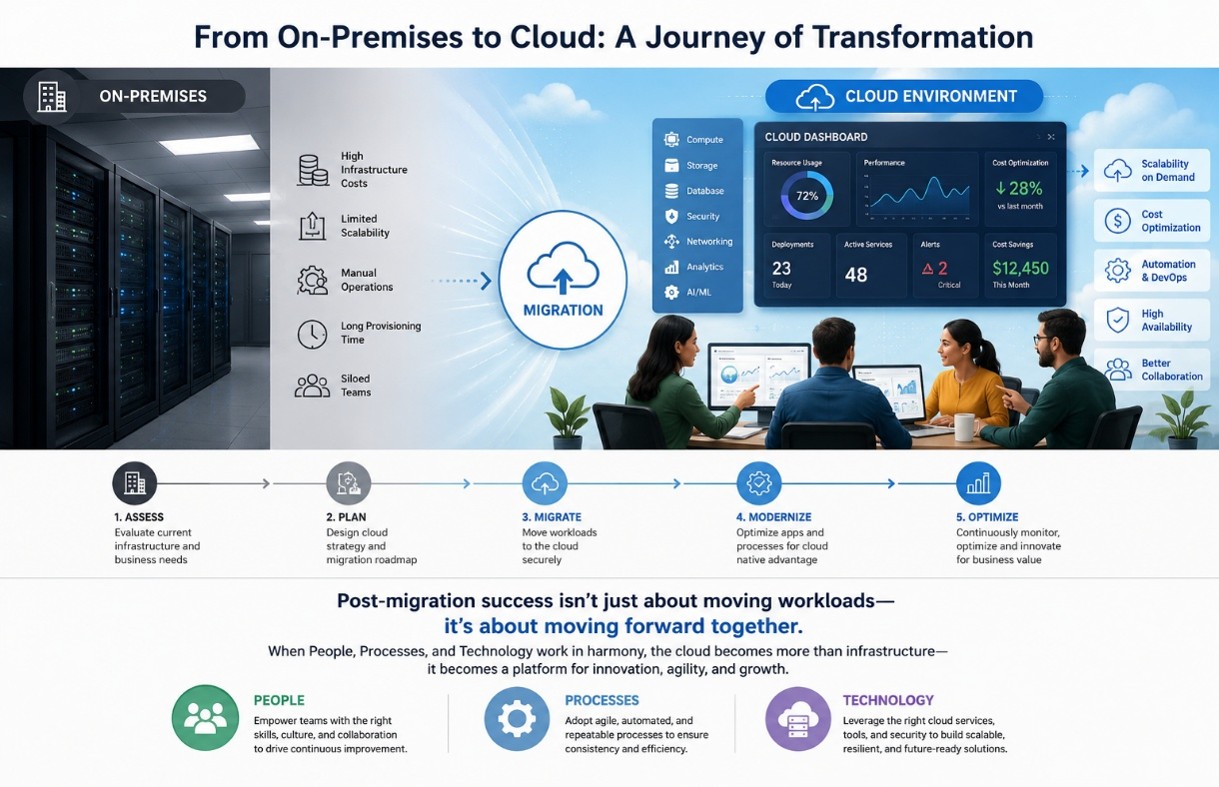
Fig 1: On-premises infrastructure to a cloud environment, with teams collaborating around cloud dashboards.
Start Learning In-Demand Tech Skills with Expert-Led Training
- Industry-Authorized Curriculum
- Expert-led Training
Post-Migration Success Depends on More Than Technology
Migrating workloads to the cloud is only the first step in a successful cloud transformation. The real value of cloud adoption is realized when people, processes, and technology work together seamlessly.
- People: Equip teams with the right cloud skills, encourage collaboration, and foster a culture of continuous learning and innovation.
- Processes: Establish standardized governance, security practices, automation, monitoring, and operational procedures to ensure consistency and efficiency.
- Technology: Leverage cloud-native services, automation tools, security controls, and monitoring platforms to build scalable, resilient, and high-performing solutions.
When these three pillars are aligned, organizations can accelerate innovation, improve operational efficiency, enhance security, and maximize the return on their cloud investment. Cloud migration is not just about moving infrastructure; it’s about transforming the way people work and deliver business value.
Establishing Strong Cloud Operations Practices
- After migration, teams need to understand how daily operations change in a cloud environment. Traditional infrastructure management often focuses on physical servers and fixed capacity, while cloud platforms require continuous monitoring, automation, and resource optimization.
During the first 100 days, teams should focus on:
- Monitoring application performance and availability.
- Understanding cloud resource usage and dependencies.
- Creating incident response processes.
- Automating repetitive operational tasks.
Cloud monitoring tools should become part of everyday workflows. Teams must know how to analyze alerts, identify performance issues, and maintain service reliability without depending only on manual intervention. Operational maturity also comes from documenting processes. Creating clear guidelines for deployments, backups, troubleshooting, and resource management helps teams respond faster to challenges. Developing a Strong Cloud Security Mindset. Security responsibilities often change after moving to the cloud. While cloud providers manage infrastructure security, organizations remain responsible for protecting their applications, identities, configurations, and data.
The first 100 days should include training on:
- Identity and access management.
- Secure configuration practices.
- Data protection methods.
- Compliance requirements.
- Regular security reviews.
Teams should understand the principle of least privilege and ensure users receive only the access required for their roles. Security should become part of everyday cloud operations rather than a separate activity handled occasionally.
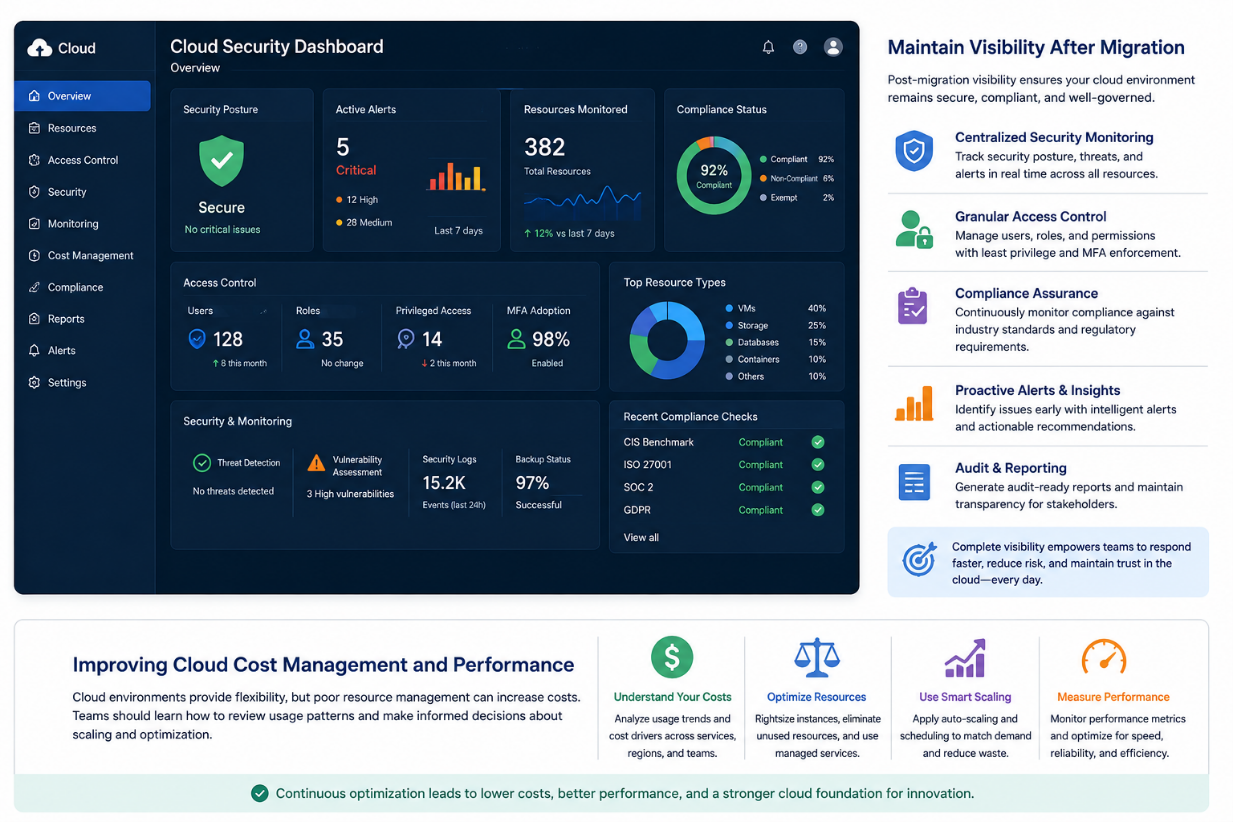
Fig 2: A cloud security dashboard with access controls, monitoring indicators, and compliance checks.
Maintaining Visibility After Cloud Migration
Moving applications and data to the cloud is only the beginning of the cloud journey. To ensure long-term success, organizations must maintain continuous visibility into their cloud environment. Visibility enables IT and operations teams to monitor resource health, detect security threats, track user activity, and verify compliance with organizational and regulatory requirements.
A centralized cloud monitoring dashboard provides real-time insights into infrastructure performance, access controls, security alerts, and compliance status. By regularly reviewing these metrics, teams can identify potential issues early, respond quickly to incidents, and ensure that cloud resources remain secure, reliable, and well-governed.
Improving Cloud Cost Management and Performance
One of the greatest advantages of cloud computing is its flexibility and scalability. However, without proper governance and monitoring, organizations can experience unnecessary spending due to overprovisioned resources, idle virtual machines, unused storage, or inefficient workloads.
Teams should learn how to analyze cloud usage patterns, monitor resource consumption, and use cloud cost management tools to identify optimization opportunities. Reviewing performance metrics alongside cost data helps determine whether resources are appropriately sized and whether workloads can benefit from auto-scaling or scheduling to reduce waste.
Cloud-native monitoring and cost management solutions provide recommendations that help organizations optimize infrastructure while maintaining application performance and reliability. By regularly evaluating usage trends and implementing best practices, businesses can control costs without compromising service quality.
Key practices include:
- Monitor resource utilization and identify underused or idle resources.
- Configure auto-scaling to match resources with workload demand.
- Right-size virtual machines, databases, and storage services.
- Use budgeting, cost alerts, and spending reports to prevent unexpected expenses.
- Continuously review performance metrics to balance cost, availability, and user experience.
Key areas to understand include:
- Identifying unused resources.
- Selecting suitable resource sizes.
- Reviewing storage and database usage.
- Applying automation for cost control.
Performance optimization should happen alongside cost management. A well-designed cloud environment balances speed, reliability, and financial efficiency. Teams should regularly review application behavior after migration, as workloads may perform differently in the cloud than in previous environments.
Building Skills Through Cloud Training
Technology adoption depends heavily on team capability. Employees who understand cloud platforms can troubleshoot issues faster, improve solutions, and contribute more effectively to business objectives.
A structured learning plan during the first 100 days can include foundational cloud concepts, platform-specific services, security practices, and hands-on exercises. Organizations can explore structured learning paths such as CloudThat AWS Training and Courses or specialized programs like Migrating to AWS Training by CloudThat to help teams build practical knowledge around cloud environments. The most effective learning approach combines theory with real-world practice. Teams should work with actual cloud workloads, review architecture decisions, and learn from operational scenarios.
Creating a Long-Term Learning Roadmap
The first 100 days should create momentum, not mark the end of learning. Cloud technologies continue to evolve, and teams need ongoing development plans.
A practical roadmap may include:
- Regular knowledge-sharing sessions.
- Internal cloud communities.
- Advanced certifications.
- Continuous improvement reviews.
- Hands-on experimentation with new services.
Role-based learning is also important. Developers, administrators, architects, and security teams may require different skill sets based on their responsibilities. For professionals looking to strengthen cloud expertise, certification-focused programs such as Cloud Computing Certifications and Training can support structured skill development.
Driving Long-Term Cloud Success
The first 100 days after Cloud Migration determine how effectively an organization can use its new cloud environment. Teams that invest in Cloud Operations, Cloud Security, cost management, and continuous Cloud Training are better prepared to maintain reliable and efficient systems. Migration is only the beginning of the cloud journey. Building skilled teams and improving processes ensures that cloud investments deliver lasting business value.
Upskill Your Teams with Enterprise-Ready Tech Training Programs
- Team-wide Customizable Programs
- Measurable Business Outcomes
About CloudThat
FAQs
1. What should teams focus on immediately after Cloud Migration?
ANS: – Teams should focus on understanding the new environment, monitoring performance, improving security practices, managing costs, and establishing operational processes.
2. Why is Cloud Operations knowledge important after migration?
ANS: – Cloud Operations skills help teams maintain availability, resolve issues quickly, automate processes, and manage resources efficiently.
3. How can organizations improve Cloud Security after migration?
ANS: – Organizations should train teams on identity management, secure configurations, access controls, monitoring, and compliance practices.
4. Is Cloud Training necessary after completing a migration?
ANS: – Yes. Cloud platforms introduce new tools and operating models. Continuous training helps teams use cloud capabilities effectively and avoid common management challenges.
5. How long does it take for teams to become comfortable with cloud environments?
ANS: – The timeline varies depending on existing skills and workload complexity. A structured learning plan during the first 100 days can significantly improve confidence and adoption.


WRITTEN BY Madhuri Abhijeet Joshi
Dr. Madhuri Joshi is a Microsoft Certified Trainer (MCT) and a renowned Subject Matter Expert with a Doctorate in Computer Science and Engineering. With over 23 years of experience in training and consulting, she has established herself as a trusted expert in DevOps and Cloud Computing technologies. She has worked extensively on a wide range of industry projects and has played a key role in designing custom training programs and project-based course outlines for enterprise technologies such as SAP and Red Hat OpenShift. As a technical coach for the Government of Maharashtra's Women Empowerment Program, Dr. Joshi has contributed significantly to upskilling and mentoring women in technology. Having trained over 7,000 professionals across the globe, she is highly respected for her clear, simple, and example-driven teaching style, especially when explaining complex technical concepts.


 PREV
PREV












Comments