

 Login
Login


 July 29, 2026
|
Voiced by Amazon Polly |
Introduction
A cloud engineer learning path is a structured progression from foundational Linux and networking skills through AWS and other cloud platforms to DevOps practices, culminating in real projects. Most paths follow this sequence: Linux basics (2-3 months), networking fundamentals (2 months), cloud platform essentials like AWS (3-4 months), DevOps tools and CI/CD (3 months), then hands-on projects that prove you can actually build. The entire progression typically takes 12-18 months from zero to hireable. The most common failure point is skipping fundamentals and jumping straight to AWS. This blog breaks down the exact path, what to learn at each stage, and how to avoid wasting time.
You’re excited. You just decided to become a cloud engineer. So you download the AWS certification exam prep materials and start studying EC2 instances and VPCs on day one.
Three weeks later, you’re stuck. You’re staring at network diagrams, and you don’t understand how IP addresses work. You’re reading about security groups, and you don’t know what a port is. You’re following tutorials, but they use Linux commands you’ve never seen before.
You’re frustrated. You feel stupid. You quit. This is what happens when you skip the foundation.
A cloud engineer doesn’t just need knowledge of AWS. They need to understand the Linux operating system that runs on every cloud instance. They need to understand networking to design systems that communicate securely. They need DevOps practices to automate everything. They need to build real projects, so employers believe they can actually do this.
Most learning paths skip one or more of these. Then people get stuck.
Let’s build the right one.
No Job After Graduation? Cloud Engineering is Your Answer
- Beginner Friendly
- 92% Placement Rate
- Live Instructor-Led
What Does a Cloud Engineer Actually Do?
Before we talk about learning, let’s talk about the job.
A cloud engineer designs, builds, and maintains systems that run on cloud platforms like AWS, Azure, or GCP. They don’t just click buttons in a console. They architect infrastructure, automate deployments, handle security, monitor systems, and troubleshoot failures.
On a daily basis, a cloud engineer might: write infrastructure-as-code scripts that define servers, databases, and networks in configuration files instead of clicking. Deploy applications to cloud environments. Set up monitoring and alerts so the team knows when something breaks. Automate testing and deployment pipelines so that code reaches production safely. Manage security and access controls. Optimize costs so the cloud bill doesn’t explode. Handle incidents when systems fail.
The common thread through all of this? Understanding the underlying technologies. You can’t architect cloud infrastructure if you don’t understand networking. You can’t troubleshoot deployment failures if you don’t understand Linux. You can’t automate effectively if you don’t know how to script.
This is why the learning path matters. It’s not arbitrary. It follows the job’s dependencies.
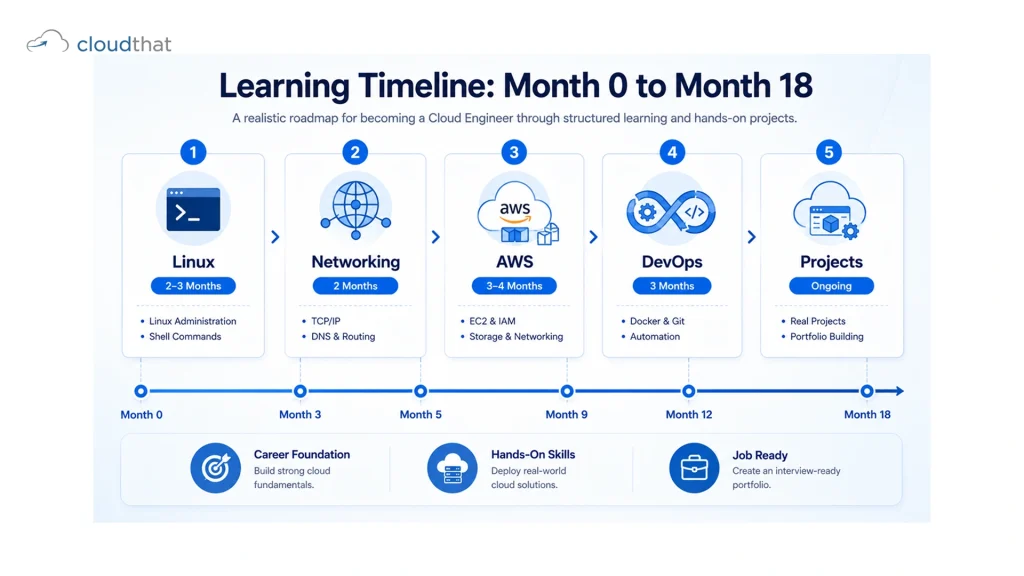
The Real Learning Path (In Order)
Here’s the path that actually works.
Linux (operating system basics)
→ Networking (how systems communicate)
→ AWS or cloud platform (where you run things)
→ DevOps (how you automate and manage things)
→ Real projects (proof you can do this).
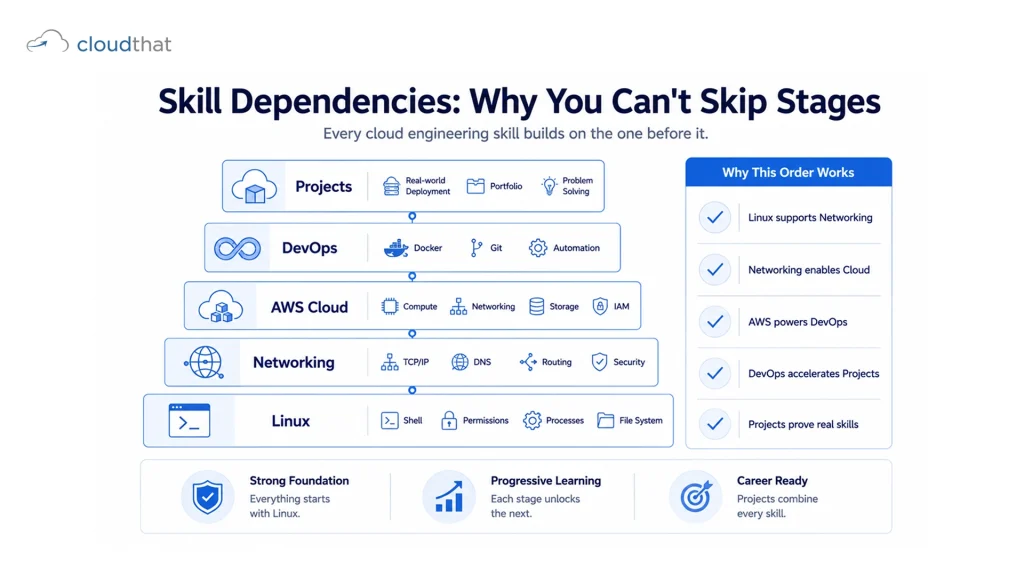
This progression isn’t optional. You can’t skip to step three without understanding steps one and two. Well, you can try. But you’ll get confused and quit.
Let’s go through each stage.
Stage 1: Linux Foundations (2-3 Months)
Linux is the operating system running inside most cloud servers. If you can’t use Linux, you can’t work with cloud infrastructure.
You’re learning:
- How to navigate the terminal and understand directory structure
- File permissions and user management
- Installing software and managing packages
- Running services and daemons
- Basic shell scripting
- Process management and system monitoring
- User and group administration
Don’t try to become a Linux expert. You need enough knowledge to understand what’s happening on a server, navigate the filesystem, run commands, and write basic scripts. That’s 2-3 months if you’re working through it seriously.
The mistake people make: They watch YouTube videos about Linux for two weeks, think they know it, then move on. Then they hit AWS Labs and get confused because they don’t understand chmod, sudo, or what’s running in the background.
Spend the full time. Do the labs. Actually run the commands. Write a few shell scripts. Make it stick.
Stage 2: Networking Essentials (2 Months)
Now you need to understand how systems communicate.
You’re learning:
- IP addresses, subnetting, and CIDR notation
- OSI model (conceptually, not memorizing all seven layers)
- TCP and UDP protocols
- DNS and how domain names resolve to IP addresses
- Firewalls and port-based filtering
- Load balancing basics
- VPNs and secure communication
This stage trips people up because it feels abstract. You’re not building something visible. You’re learning concepts. But cloud infrastructure is all about networking. VPCs, security groups, network ACLs, route tables- all of this makes no sense if you don’t understand networking fundamentals.
When you finish this stage, you should be able to look at a network diagram and explain how traffic flows, what ports are involved, and where security should be enforced.
Stage 3: Cloud Platform Mastery (3-4 Months)
Now you’re learning AWS (or Azure or GCP, but AWS is the most in-demand).
You’re learning:
- Core services: EC2 (virtual machines), S3 (storage), RDS (databases), VPC (networking on AWS)
- IAM (identity and access management, controlling who can do what)
- Load balancers and auto-scaling
- CloudFormation or Terraform (infrastructure-as-code)
- Cost optimization and monitoring
- Specific certifications: AWS Solutions Architect Associate is the foundation
This is where most people start their cloud journey. By the time you get here, you have enough Linux and networking knowledge that AWS makes sense and doesn’t feel like just a bunch of random buttons.
The goal isn’t to learn every AWS service. It’s to understand the mental model of how AWS works, how services interact, and how to architect solutions using core services.
Stage 4: DevOps and Automation (3 Months)
Now you add the automation layer.
You’re learning:
- CI/CD concepts and tools (Jenkins, GitLab CI, GitHub Actions)
- Infrastructure-as-code tools (Terraform, CloudFormation, Ansible)
- Container orchestration (Docker, Kubernetes basics)
- Monitoring and logging (CloudWatch, ELK, Prometheus)
- Incident response and on-call practices
- Configuration management
This is where a cloud engineer becomes dangerous. Instead of manually deploying things, you automate. Instead of clicking, you code. This stage often gets abbreviated or skipped, and it’s a huge mistake. Companies would rather hire someone with solid DevOps skills than someone who knows AWS but can’t automate.
Stage 5: Real Projects That Matter
After these four stages, you build projects.
Not tutorial projects. Real projects that look like actual cloud infrastructure: Deploy an application with auto-scaling. Set up a database backup strategy. Implement a CI/CD pipeline. Build a monitoring and alerting system. Deploy and manage a containerized application.
These projects are your portfolio. Employers don’t care about certificates. They care about your GitHub showing actual infrastructure code, proper deployment pipelines, and evidence that you’ve solved real problems.
Why Most People Fail This Path
Here’s the harsh reality.
Impatience. People want to be cloud engineers in three months. It takes 12-18 months of consistent effort. They get to month three and feel behind, so they quit.
Skipping foundations. Someone skips Linux basics, jumps to AWS, gets confused about what’s happening on a server, and blames AWS. The real problem is they didn’t learn the foundation.
No projects. They take courses, pass exams, but never build anything real. Then they interview, and the hiring manager asks, “Show me something you built.” They have nothing.
Passive learning. They watch videos, take quizzes, but never actually learn hands-on. Watching someone else code isn’t the same as coding yourself. Watching someone else troubleshoot isn’t the same as being stuck at 2 AM trying to figure out why your deployment failed.
Inconsistency. They learn intensely for two weeks, then disappear for a month, then come back. The momentum is gone. The knowledge fades.
How CloudThat Accelerates Your Cloud Engineer Learning
Here’s where the path becomes actionable.
CloudThat is an AWS Premier Tier Training Partner with 14+ years in cloud training and consulting. That’s not marketing. It means the trainers are people who run cloud infrastructure for enterprises. They know what companies actually hire for, because they work with those companies.
CloudThat’s cloud engineer learning path is structured exactly as outlined in this blog: Linux and networking fundamentals, core AWS services, and DevOps practices. But it’s not just lectures. It’s hands-on labs in live AWS environments where you actually build infrastructure, not simulations.
The AWS Mastery Pass gives you access to all the certifications you need: Solutions Architect Associate, SysOps Administrator, and DevOps Engineer Professional. More importantly, you’re working in live environments. You’re launching real instances, configuring real networks, deploying real applications. When something breaks, you’re troubleshooting actual systems, not clicking through demo scenarios.
The Capability Development Framework ensures you’re not just learning. You’re learning in a structured way, with progress measured. Pre-training assessments show what you already know so you don’t waste time. Hands-on labs are tied to real problems, not textbook exercises. Post-training support extends beyond course completion, as learning doesn’t stop when the course ends.
For teams and enterprises, CloudThat’s corporate cloud training programs build entire teams from fundamentals through advanced deployments. The Job Ready Cloud Operations Engineer Program is specifically designed for organizations that need engineers job-ready across the entire cloud stack.
Conclusion
You don’t become a cloud engineer by learning AWS. You become a cloud engineer by learning how cloud infrastructure actually works, from the operating system level through the deployment pipeline to the production environment.
The learning path takes time. It requires discipline. It requires hands-on work, not just watching. But it works. Thousands of people have followed this progression and landed cloud engineering roles. You can too.
The question isn’t whether you can do this. The question is whether you’re willing to commit 12-18 months to getting really good at something that’s actually in demand and pays well. If the answer is yes, start with Linux fundamentals, work through the path systematically, build real projects, and your cloud engineer job is waiting.
Key Takeaways
- A cloud engineer learning path should follow the job’s dependencies: Linux, Networking, Cloud Platform, DevOps, and Projects.
- Linux fundamentals are non-negotiable because most cloud servers run Linux.
- Networking knowledge is essential because cloud infrastructure is fundamentally about systems communicating securely.
- You can’t skip to AWS without understanding what’s happening at the OS and network layer.
- DevOps and automation skills separate junior cloud engineers from senior ones.
- Real portfolio projects prove you can actually build, not just pass exams.
- The entire path from zero to hireable takes 12-18 months of consistent effort.
- Passive learning (watching videos) fails. Hands-on lab work succeeds.
- Most people fail because they skip foundations or don’t build real projects.
- Certifications help, but demonstration of actual skills matters more to employers.
- Consistency matters more than intensity. 20 hours per week for 18 months beats 40 hours per week for three months.
Already in IT? Switch to Cloud & Earn 55% More
- Weekend Batches
- Dedicated Career Support
- Official AWS Labs
About CloudThat
FAQs
1. Do I need a background in IT to start this path?
ANS: – Not necessarily. You need to be comfortable with technology and willing to learn. If you can navigate your computer and understand basic programming concepts, you can learn this path.
2. How much time per week do I need to commit?
ANS: – Realistically, 20-25 hours per week for 12-18 months. If you can do more, great. Less than that and you’ll take longer to see results.
3. Should I learn AWS, Azure, or GCP?
ANS: – AWS is the market leader by a huge margin. Learn AWS first. Once you understand one cloud platform deeply, learning others is faster because the concepts are similar.
4. Do I need to be a programmer?
ANS: – Not initially. Linux and networking don’t require programming. DevOps requires scripting (Bash, Python). As you advance, programming skills help, but you can learn them as needed.
5. Should I get certified at each stage?
ANS: – Certifications are useful but not essential. AWS Solutions Architect Associate is valuable. AWS Certified Cloud Operations Engineer is newer and increasingly in demand. But portfolio projects matter more than certificates.
6. What's the biggest time-waster on this path?
ANS: – Taking courses without building projects. You can watch hundreds of hours of content and still not be hireable. Build something real at each stage.
7. How do I stay motivated over 12-18 months?
ANS: – Set milestone goals. “I’ll pass Solutions Architect exam.” “I’ll deploy a three-tier application.” “I’ll set up a CI/CD pipeline.” Celebrate when you hit them. Join communities. See what others are building.
8. Is this path different if I want to be a DevOps Engineer vs a Cloud Solutions Architect?
ANS: – The foundation is the same. If you want to specialize in DevOps, you’ll spend more time on automation tools and CI/CD. If you want to architect solutions, you’ll focus more on design patterns and service selection. But the base learning path is identical.

WRITTEN BY Himisha Raval
Himisha Raval is a Digital Marketing Manager at CloudThat with a strong command of search engine optimization, web analytics, link building, and content strategy. She brings a data-driven approach to digital marketing, helping IT companies strengthen their online presence, improve search rankings, and generate consistent leads across channels. Beyond execution, she plays an active role in ideation, campaign strategy, and website performance optimization. Outside of work, she balances her analytical side with a love for travel, nature painting, and dancing.


 PREV
PREV












Comments