

 Login
Login


 June 18, 2026
|
Voiced by Amazon Polly |
Conversational AI has moved well beyond simple FAQ bots. Today, enterprises expect virtual agents that can reason, access live data, integrate with backend systems, and adapt to user intent, all without months of custom development. Microsoft Copilot Studio is Microsoft’s answer to that demand: a low-code platform for designing, building, and deploying AI-powered copilots across Microsoft 365, Teams, websites, and third-party channels.
Whether you are an IT professional looking to automate service desk interactions, a developer extending enterprise workflows, or a business analyst wanting to surface insights through chat, Copilot Studio offers a structured yet flexible canvas. This blog explores what the platform is, what makes it architecturally significant, and how organizations can put it to work strategically.
Start Learning In-Demand Tech Skills with Expert-Led Training
- Industry-Authorized Curriculum
- Expert-led Training
What Is Microsoft Copilot Studio?
Copilot Studio (formerly Power Virtual Agents) is part of the Microsoft Power Platform family. It provides a graphical, topic-based authoring environment backed by Azure OpenAI Service, enabling teams to build generative AI agents that go far beyond pre-scripted decision trees.
At its core, the platform lets builders define topics (the conversational units), connect actions (API calls, Power Automate flows, custom connectors), and configure generative answers that draw from internal knowledge bases, SharePoint, public websites, or uploaded documents, using retrieval-augmented generation (RAG).
Key Capabilities That Set Copilot Studio Apart
Several platform capabilities make Copilot Studio architecturally different from earlier-generation bot-building tools:
Generative Answers and Knowledge Grounding
Instead of requiring an author to anticipate every user question, Copilot Studio can point the agent at a knowledge source and let the underlying large language model synthesize answers dynamically. This generative-answers capability dramatically reduces topic-authoring overhead while keeping responses grounded in vetted organizational content, thereby curbing hallucination risk.
Actions: Connecting to Real-World Systems
Actions bridge conversation and execution. A Copilot Studio agent can call a Power Automate cloud flow to raise a support ticket in ServiceNow, query a custom API for live inventory data, or run an Azure Logic App to kick off an approval workflow.
Multi-Channel Deployment
A single agent definition can be published simultaneously to Microsoft Teams, a web chat widget, a mobile app (via the Direct Line API), or third-party messaging platforms such as Slack and Facebook Messenger. This multi-channel deployment model means organizations maintain one canonical agent rather than fragmented per-channel bot clones.
Enterprise Security and Authentication
Copilot Studio integrates natively with Azure Active Directory (Microsoft Entra ID) for user authentication. Agents can respect role-based access, ensuring that a Finance team bot does not surface sensitive data to someone outside that security group, a critical consideration for enterprise adoption.
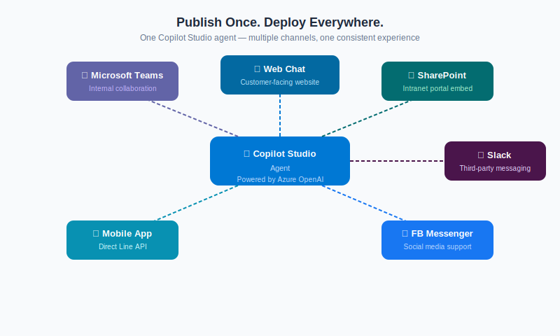
Fig 1: Copilot Studio multi-channel deployment, one agent definition published across six channels | Source: Microsoft Power Platform Blog.
Practical Use Cases Across Industries
Understanding the platform’s architecture is one thing; knowing where to apply it is another. The following use cases reflect common patterns organizations are deploying today:
- IT Service Desk Automation: Agents handle password resets, software provisioning requests, and incident triage, freeing Level-1 support staff for complex cases.
- HR Self-Service: Employees ask about leave policies, payroll queries, and onboarding steps. The agent retrieves answers from HR knowledge bases without directly involving the HR team.
- Sales Enablement: Inside sales teams use a Copilot Studio agent connected to Dynamics 365 CRM to pull deal status, update pipeline records, and draft follow-up emails, all from within Teams.
- Customer-Facing Support: Retail and banking organizations embed agents on their websites to handle FAQs, order tracking, and appointment scheduling, escalating seamlessly to human agents when needed.
Professionals looking to build and govern enterprise-grade copilots can deepen their skills through Microsoft Azure training programs, which cover the Power Platform ecosystem in depth.
Building Your First Agent: What the Process Looks Like
The authoring experience in Copilot Studio is designed for speed. A builder starts by defining the agent’s purpose, then adds topics to handle specific intents. Each topic contains a trigger (what the user might say), nodes (conditions, messages, questions, and actions), and an endpoint (resolution or escalation).
When the built-in topic authoring is insufficient, say, a question falls outside authored topics, the generative answers fallback engages automatically, querying the configured knowledge sources and returning a grounded response. Builders can tune the aggressiveness of this fallback and set content moderation thresholds per deployment context.
Testing happens inline within the authoring canvas using the built-in chat simulator. Once validated, publishing to channels takes minutes, not days. Analytics dashboards, surfaced natively in the platform, show conversation volume, topic coverage, escalation rates, and satisfaction signals, helping teams iterate quickly.
For a deeper technical walkthrough, Microsoft’s official Copilot Studio documentation is a comprehensive reference covering all authoring constructs, connector types, and governance settings.
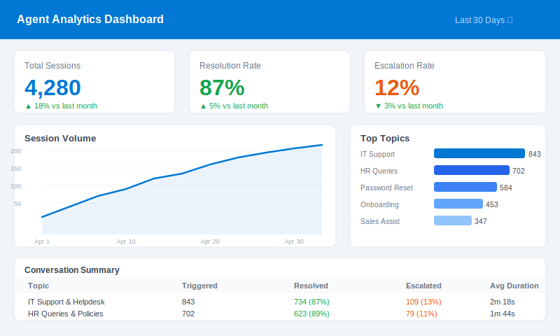
Fig 2: Built-in analytics dashboard in Copilot Studio, session volume, resolution rates, and top topics | Source: Microsoft Learn
Governance and Responsible AI Considerations
Deploying AI agents at enterprise scale demands governance that aligns with the deployment’s risk profile. Copilot Studio addresses this through several mechanisms. Data loss prevention (DLP) policies from Power Platform apply at the environment level, controlling which connectors and data sources an agent can reach. Content moderation settings allow administrators to flag or block responses based on sensitivity categories defined in Azure AI Content Safety.
Audit logs track agent activity, conversation metadata (not content by default), and configuration changes, providing compliance teams with the visibility needed in regulated industries. Organizations operating under GDPR, HIPAA, or sector-specific frameworks should review these controls carefully before moving agents into production.
Building Intelligent AI Agents
Microsoft Copilot Studio represents a significant maturation in the low-code AI space. By combining visual topic authoring with generative AI grounding, deep Power Platform integration, and native Microsoft 365 embedding, organizations can deploy intelligent agents that are genuinely useful, not just novelties.
The key takeaways are clear: Copilot Studio reduces development cycle time compared to custom bot frameworks, keeps AI responses grounded in enterprise knowledge sources, and integrates governance controls that enterprise risk teams require. For teams already invested in the Microsoft ecosystem, it is the most direct path to production-ready conversational AI.
Upskill Your Teams with Enterprise-Ready Tech Training Programs
- Team-wide Customizable Programs
- Measurable Business Outcomes
About CloudThat


WRITTEN BY Akshay K S
Akshay is a Tech Lead at CloudThat, specializing in Azure Integrations and DevOps. With 10+ years of experience in consulting and training, He have trained over 10000+ professionals/students to upskill in Azure, AWS, GCP, GitHub, DevOps and Copilot technologies. Known for simplifying complex concepts, hands-on teaching, industry insights, he brings deep technical knowledge and practical application into every learning experience. His areas of expertise include Cloud, DevOps, DevSecOps, GitHub etc. Akshay's passion for teaching and learning reflects in his unique approach to learning and development.


 PREV
PREV












Comments