

 Login
Login


 March 24, 2026
|
Voiced by Amazon Polly |
Managing modern virtualization environments requires a scalable, centralized, and efficient approach, especially as IT infrastructures grow more complex. Microsoft’s Windows Admin Center (WAC) Virtualization Mode is designed to meet these exact needs. It represents a specialized management experience focused purely on virtualization fabric management, offering IT professionals a powerful interface to administer Hyper-V hosts, clusters, storage, and networking more effectively.
Start Learning In-Demand Tech Skills with Expert-Led Training
- Industry-Authorized Curriculum
- Expert-led Training
Understanding Virtualization Mode
Virtualization Mode is a purpose-built management experience optimized for large-scale, cluster-based Hyper‑V environments, supporting parallel operations, contextual navigation, and end-to-end lifecycle management of virtualization workloads.
In this blog, we explore what Virtualization Mode is, how it works, the operational differences from Administration Mode, and why it matters for modern data centers.
Unlike the traditional WAC Administration Mode, which focuses on general server management, Virtualization Mode zeroes in on managing the infrastructure that hosts virtual machines. This includes managing:
- Hyper‑V hosts and clusters
- Storage infrastructure such as SAN, NAS, and Scale‑Out File Servers
- Networking resources and SDN components
- VM lifecycle operations, templates, and disaster recovery workflows (including Hyper‑V Replica)
This mode is optimized for environments at scale, offering support for parallel operations and persistent, stateful connections across clusters, which is not possible in the stateless, per-session model of Administration Mode.
It is designed to provide a high-level, unified fabric view like enterprise tools such as SCVMM, but in a lighter, more modern, web-native package.
How Virtualization Mode Differs from Administration Mode
Windows Admin Center now includes two independent operational modes:
- Administration Mode (aMode)
- Used for general system administration
- Compatibility with tools like Device Manager, Registry Editor, Roles & Features, and Remote Desktop
- Focused on per‑server, direct management via WinRM/PowerShell connections
- Virtualization Mode (vMode)
- Dedicated to virtualization fabric management
- Supports advanced features like VM lifecycle management, storage topology, SDN (future integration), and cluster-level views
- Uses a stateful architecture, incorporating a built‑in database and agents running on each host to enable fast, parallel, persistent operations
Virtualization Mode is meant for large-scale, multi-host, distributed virtualized environments rather than simple server management scenarios. Where Administration Mode is tool-centric, Virtualization Mode is infrastructure-centric.
Architectural Enhancements: What Makes Virtualization Mode Different?
The introduction of Virtualization Mode required significant architectural changes to Windows Admin Center.
Key architectural improvements include:
- Stateful Connection Model
Virtualization Mode uses:
- A PostgreSQL database to store state
- Lightweight agents installed on each Hyper‑V host
- Persistent TLS 1.3 connections
This enables faster, more responsive interactions—unlike the slower, stateless WinRM calls used in Administration Mode.
- Improved Scalability
Virtualization Mode is optimized for large-scale operations, allowing management of:
- Hundreds to thousands of Hyper‑V hosts
- Tens of thousands of virtual machines
This scale is essential for modern organizations with distributed data centers or hybrid cloud deployments.
- Unified Fabric View
Administrators get one unified place to view and manage:
- Compute
- Storage
- Networking
- VM lifecycle
This resembles enterprise virtualization management solutions, but without requiring System Center Virtual Machine Manager (SCVMM).
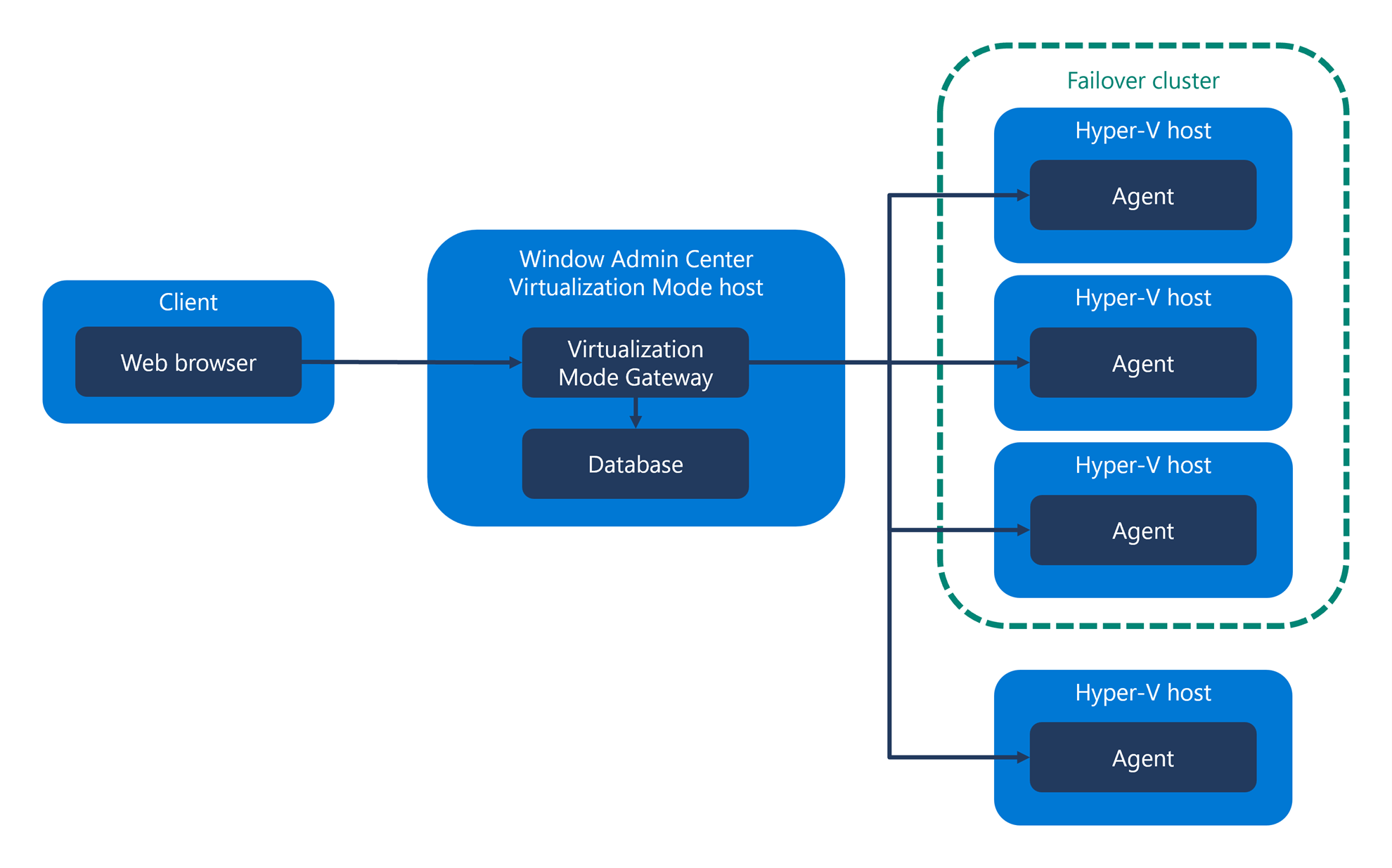
Fig 1: Architecture of Windows Admin Center Virtualization Mode (Image Credit- Microsoft)
Key Capabilities of Virtualization Mode
- Contextual Global Search
Searches automatically filter by object type, VMs, hosts, or clusters, reducing navigation complexity.
- Support for Multiple Storage Architectures
Including:
- SAN and NAS appliances
- Hyperconverged systems
- Scale-Out File Server clusters
This makes Virtualization Mode suitable for diverse enterprise architectures.
- VM Templates and Future Arc Integration
Virtualization Mode supports VM templates and outlines future support for Azure Arc–enabled resources to bring hybrid functionality.
- Parallel Operations
The stateful architecture allows multiple actions (such as VM creations or migrations) to run simultaneously.
- Integrated Disaster Recovery
Hyper V Replica integration enables VM-level disaster recovery capabilities.
Installing and Getting Started with Virtualization Mode
Microsoft’s onboarding guidance highlights the goal of minimizing deployment friction. The installation process is designed to be simple, requiring only the Visual C++ Redistributable as a prerequisite. You can install it in one command:
winget install “Microsoft.VCRedist.2015+.x64” –silent
Additional setup highlights include:
- Virtualization Mode must be installed on a separate server, not directly on a Hyper‑V host being managed.
- The WAC‑vMode server and managed hosts must be in the same Active Directory domain.
- At least 8 GB RAM is recommended for the WAC server.
This lightweight and streamlined setup experience significantly lowers the barrier to implementing enterprise-grade virtualization management.
Why Virtualization Mode Matters for Modern Data Centers
With virtualization central to IT infrastructure, organizations need scalable, centralized, and secure management tools. Virtualization Mode delivers:
- A Modern, Web‑Based Alternative to Hyper‑V Manager
Instead of managing each host individually, administrators can manage everything from a unified web dashboard.
- Improved Performance and Responsiveness
Stateful operations and lightweight agents create a smoother, faster management experience.
- Better Fit for Large and Growing Environments
As businesses scale, managing clusters and virtual workloads becomes increasingly complex. Virtualization Mode addresses this by enabling large-scale, parallel operations.
- Alignment with Microsoft’s Hybrid Cloud Vision
Future Arc support will help integrate on‑premises virtualization with Azure governance and automation.
Modern Virtualization Management
Windows Admin Center Virtualization Mode represents a significant leap forward for managing Hyper‑V virtualization environments. By shifting from server-centric management to fabric-centric management, Microsoft offers a modern, scalable, and highly performant toolset for IT teams operating at any scale.
With its streamlined setup, advanced lifecycle management capabilities, and architecture built for large environments, Virtualization Mode is rapidly positioning itself as the future of Hyper‑V management.
As it continues to evolve, administrators can expect deeper hybrid integrations, more automation, and expanded SDN and storage features—making now the perfect time to explore this powerful new management experience.
Upskill Your Teams with Enterprise-Ready Tech Training Programs
- Team-wide Customizable Programs
- Measurable Business Outcomes
About CloudThat


WRITTEN BY Mariyam Thomas
Mariyam Thomas is a Subject Matter Expert and Microsoft Certified Trainer at CloudThat, with a strong focus on Microsoft Azure and Hybrid Infrastructure. With over 10 years of experience in training and academics, she has empowered more than 5,000 professionals and learners through her engaging and hands-on training sessions. She was recognised as Top 100 MCT Quality Awards Winner for 2024-25. Mariyam is known for her ability to demystify complex cloud concepts using real-world scenarios, interactive labs, and a learner-first approach. Her deep technical expertise, combined with a passion for teaching, makes her sessions both insightful and impactful. Her dedication to continuous learning and cloud innovation reflects in her dynamic training style, making her a trusted mentor for aspiring cloud professionals.


 PREV
PREV











Comments