

 Login
Login


 March 5, 2026
|
Voiced by Amazon Polly |
In today’s hybrid work era, employees expect seamless access to business applications- whether they’re sitting in the office, working from home, or traveling across the globe. For IT teams, however, enabling secure access to on-premises applications without opening dangerous inbound firewall ports can feel like walking a tightrope.
This is where Application Proxy in Azure Entra ID (formerly Azure Active Directory) shines. It offers a modern, cloud-based approach to securely publishing internal applications, without the complexity of traditional VPNs.
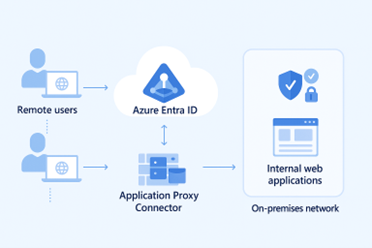
Fig 1: Azure Entra ID Application Proxy securely connects remote users to internal apps without VPNs.
Let’s explore what Application Proxy is, how it works, and why it’s a game-changer for modern organizations.
Start Learning In-Demand Tech Skills with Expert-Led Training
- Industry-Authorized Curriculum
- Expert-led Training
What Is Application Proxy in Azure Entra ID?
Application Proxy is a feature of Azure Entra ID that enables secure remote access to on-premises web applications. Instead of exposing your internal apps directly to the internet, Application Proxy acts as a secure bridge between users and applications.
Users authenticate using Azure Entra ID, and access is granted based on identity, policies, and conditions—not network location.
In simple terms, Application Proxy lets users securely access internal web apps from anywhere using their Entra ID identity.
The Problem It Solves
Traditionally, organizations relied on:
- VPNs
- Reverse proxies
- Firewall port forwarding
While these methods work, they come with drawbacks:
- Complex setup and maintenance
- Poor user experience
- Limited security controls
- Increased attack surface
Application Proxy replaces these approaches with identity-centric security, aligning perfectly with Zero Trust principles.
How Application Proxy Works
The magic of Application Proxy lies in its outbound-only connectivity.
Here’s a simplified flow:
- On-Premises Connector
- A lightweight Application Proxy Connector is installed inside your corporate network.
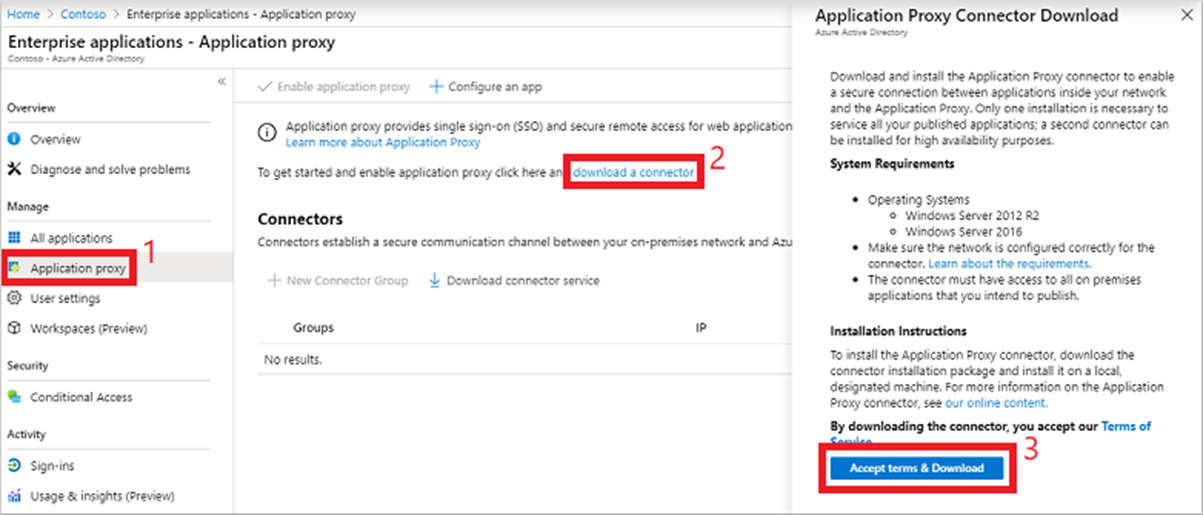
Fig 2: Downloading the Azure Entra ID Application Proxy Connector for secure outbound-only access.
-
- It establishes an outbound connection to Azure—no inbound firewall rules required.
- User Authentication
- A user accesses the application URL via a browser.
- Azure Entra ID authenticates the user.
- Conditional Access Enforcement
- Policies such as MFA, device compliance, and location-based access are evaluated.
- Secure Traffic Flow
- Once authorized, Azure routes the request through the connector to the on-premises app.
- The response travels back through the same secure channel.
At no point is your internal application directly exposed to the internet.
Key Features
- Strong Identity-Based Security
Application Proxy integrates deeply with Azure Entra ID, enabling:
- Single Sign-On (SSO)
- Multi-Factor Authentication (MFA)
- Conditional Access policies
Security is enforced before the application is ever reached.
- Zero Trust Friendly
Instead of trusting network boundaries, Application Proxy verifies:
- Who the user is
- What device are they using
- Whether access conditions are met
This makes it an ideal solution for Zero Trust architectures.
- No Inbound Firewall Changes
Because connectors initiate outbound connections, you avoid:
- Opening inbound ports
- Public IP exposure
- Complex reverse proxy setups
This significantly reduces the attack surface and administrative overhead.
- Support for Legacy and Modern Apps
Application Proxy works with:
- Legacy line-of-business apps
- IIS-hosted web apps
- Applications using header-based or Kerberos authentication
You don’t need to rewrite applications to modernize access.
- Seamless User Experience
Users enjoy:
- Browser-based access
- SSO using corporate credentials
- Consistent login experience across cloud and on-prem apps
No VPN client. No extra passwords.
Common Use Cases
Application Proxy is incredibly versatile. Some popular scenarios include:
- Remote access to HR, finance, or ERP applications
- Secure partner or vendor access
- Publishing internal admin portals
- Replacing VPN access for web apps
- Modernizing access to legacy systems
For organizations embracing hybrid or remote work, these use cases are increasingly common.
Security and Best Practices
From a security standpoint, Application Proxy delivers impressive advantages:
- Identity-based access control
- Built-in MFA and Conditional Access
- Reduced lateral movement risk
- Centralized logging and monitoring
- Integration with Microsoft Defender and Entra ID logs
Instead of securing the network, you secure the user and the application.
Application Proxy vs VPN: A Quick Comparison
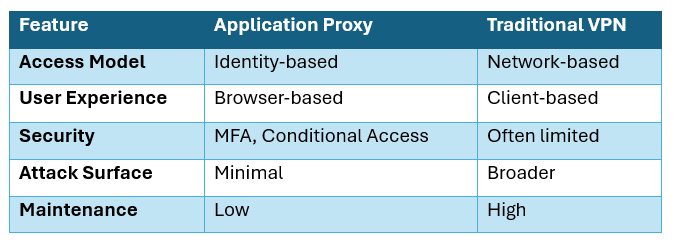
While VPNs still have their place, Application Proxy is a superior option for web-based applications.
Things to Keep in Mind
Although powerful, Application Proxy has a few considerations:
- It supports web applications only (HTTP/HTTPS)
- Performance depends on connector placement and sizing
- Requires Azure Entra ID licensing (P1/P2 for advanced features)
Planning connector deployment and access policies is key to success.
Secure Access Simplified
Application Proxy in Azure Entra ID is a perfect example of modern security done right. It eliminates the trade-off between security and user experience, offering a clean, scalable, and identity-driven solution for accessing on-premises applications.
As organizations continue moving toward Zero Trust and hybrid work, Application Proxy isn’t just a nice-to-have; it’s a strategic enabler.
If your goal is to secure access without complexity, modernize legacy applications, and delight users, Application Proxy deserves a top spot in your Azure Entra ID toolkit.
Upskill Your Teams with Enterprise-Ready Tech Training Programs
- Team-wide Customizable Programs
- Measurable Business Outcomes
About CloudThat


WRITTEN BY Vivek Kumar
Vivek Kumar is a Senior Subject Matter Expert at CloudThat, specializing in Cloud and Data Platforms. With 11+ years of experience in IT industry, he has trained over 2000 professionals to upskill in various technologies including Cloud and Full Stack Development. Known for simplifying complex concepts and hands-on teaching, he brings deep technical knowledge and practical application into every learning experience. Vivek's passion for technology reflects in his unique approach to learning and development.


 PREV
PREV












Comments