

 Login
Login


 December 19, 2025
|
Voiced by Amazon Polly |
In today’s digital landscape, identity has become the new security perimeter. As organizations increasingly adopt cloud services, remote work and hybrid environments, traditional network-based security models are no longer sufficient. This is where Zero Trust Architecture (ZTA) comes into the picture. And Microsoft Entra is at the forefront of enabling it with ZTA.
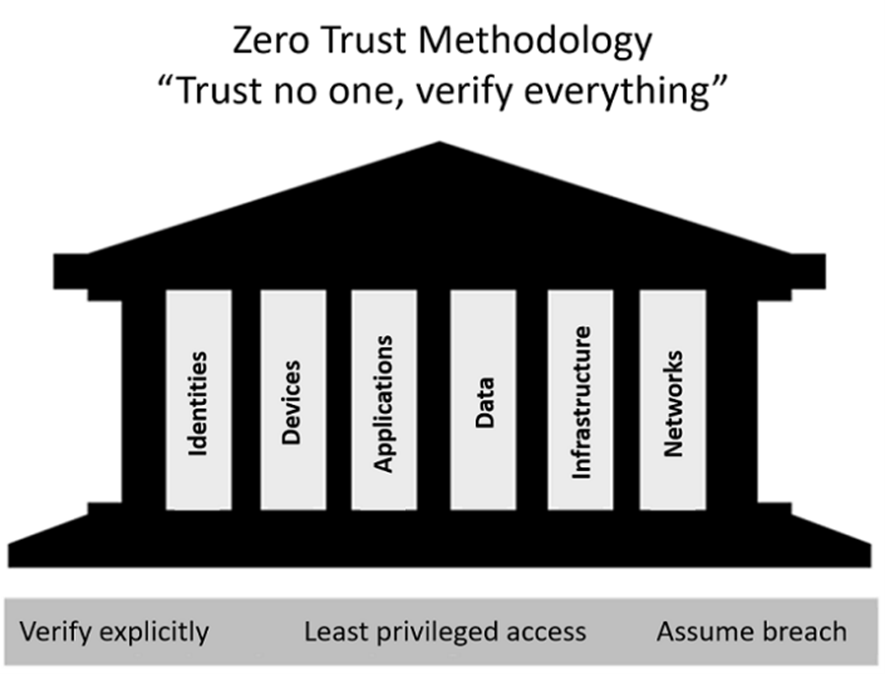
Source: Microsoft Learn
Start Learning In-Demand Tech Skills with Expert-Led Training
- Industry-Authorized Curriculum
- Expert-led Training
What is Zero Trust?
Zero Trust is a security framework built on the principle of “Trust no one, verify everything.” Rather than assuming that users or devices within the corporate network are trustworthy, Zero Trust continuously validates every access request based on identity, device health and other contextual factors.
Core principles of Zero Trust include:
- Verify explicitly: Authenticate and authorize based on all available data points. Whether it is a C-Suite Executive or a junior employee, verification is necessary to access the resource.
- Use least privilege access: Limit permissions to only what is necessary by providing Just Enough Access (JEA).
- Assume breach: Design systems as if attackers are already inside.
Microsoft Entra: The Identity Backbone of Zero Trust
Microsoft Entra is a suite of identity and access solutions that helps organizations implement Zero Trust effectively.
It includes:
- Entra ID (formerly Azure AD): Centralized identity management for users, apps and devices.
- Verified ID: Decentralized identity for secure and privacy-focused interactions.
How Entra Enables Zero Trust
Conditional Access Policies
As the heart of Zero Trust in Entra, allow organizations to enforce granular access controls based on:
- User risk level
- Device compliance
- Location and network conditions
- Real-time signals from Microsoft Defender and other security tools
For instance, if a user logs in from an unfamiliar location, Entra can require Multi-Factor Authentication (MFA) or block access entirely.
Identity Protection
Microsoft Entra enables Zero Trust for identity protection by continuously verifying every access request using strong authentication methods like MFA and passwordless sign-ins, applying conditional access policies based on real-time risk signals, and leveraging Identity Protection to detect and respond to suspicious activities. It enforces least privilege through role-based and just-in-time access, automates identity governance to prevent privilege creep, and integrates seamlessly with other security solutions to deliver end-to-end Zero Trust across users, devices and applications. It utilizes machine learning (ML) to identify risky sign-ins and compromised accounts, automatically blocking suspicious activities or enforcing additional verification steps, thereby reducing the likelihood of credential-based attacks.
Least Privilege with Permissions Management
Over-permissioning is a silent threat in cloud environments. Entra Permissions Management provides visibility into unused or excessive permissions across Azure, AWS and GCP, enabling organizations to enforce least privilege and reduce their attack surfaces.
Password-less Authentication
Zero Trust is built on solid authentication. Microsoft Entra reinforces this foundation by offering passwordless options, such as FIDO2 security keys, Windows Hello and Microsoft Authenticator, delivering authentication that is both highly secure and resistant to phishing attacks.
Benefits for Organizations
- Enhanced Security: Continuous verification reduces the attack surface.
- Compliance: Meets regulatory requirements for identity governance.
- Improved User Experience: Adaptive access ensures security without unnecessary friction.
- Multi-Cloud Visibility: Unified control across diverse environments.
Best Practices for Implementing Entra in Zero Trust
- Start with enabling MFA everywhere– it is the foundation of Zero Trust.
- Deploy Conditional Access policies for high-risk scenarios.
- Regularly review and clean up permissions across all cloud platforms.
- Adopt passwordless authentication for stronger security.
- Monitor and Respond – Leverage Entra’s reporting and analytics for continuous improvement.
Real-World Use Case
A global enterprise with thousands of employees implemented Microsoft Entra to secure its hybrid workforce. By enforcing Conditional Access and passwordless authentication, the company reduced account compromise incidents by over 90% within six months. Additionally, Permissions Management helped them identify and remove thousands of unused permissions across their multi-cloud environment.
Identity-First Zero Trust
Zero Trust is no longer optional; it is a necessity in today’s threat landscape. Microsoft Entra provides the tools and intelligence to make Zero Trust practical and scalable for organizations of all sizes. By focusing on identity as the core of security, businesses can protect their data, users and reputation in an increasingly complex digital world.
Upskill Your Teams with Enterprise-Ready Tech Training Programs
- Team-wide Customizable Programs
- Measurable Business Outcomes
About CloudThat


WRITTEN BY Ashwin B V
Ashwin is a Certified Technical Trainer and M365 Specialist at CloudThat, with 8 years in IT infrastructure, system administration and Microsoft 365. He delivers hands-on training in Teams, SharePoint, OneDrive, Intune and cloud technologies. Skilled in content design, partner enablement and sales readiness, Ashwin has trained professionals from top firms. He holds an MBA in Operations and focuses on empowering users through tailored, productivity-driven training programs.


 PREV
PREV












Comments