

 Login
Login

 September 21, 2026
|
Voiced by Amazon Polly |
Artificial intelligence (AI) assistants are transforming the way people work. Whether you’re writing content, developing software, managing projects, or analyzing data, these tools help improve productivity. Among the most popular are ChatGPT, GitHub Copilot, and Microsoft Copilot. While all three use advanced AI, each serves a different purpose. In this blog, we’ll compare their features, use cases, and ideal audience to help you choose the right AI assistant for your workflow.
Start Learning In-Demand Tech Skills with Expert-Led Training
- Industry-Authorized Curriculum
- Expert-led Training
Why Do These AI Tools Matter?
Professionals today spend a significant amount of time on repetitive tasks such as writing emails, summarizing meetings, searching documentation, generating reports, writing code, fixing syntax errors, or preparing the first draft of a document.
Modern AI assistants reduce this effort by working within the applications people already use, allowing them to focus on higher-value work.
At a high level:
- ChatGPT is a versatile, general-purpose AI assistant.
- GitHub Copilot is designed specifically for software development.
- Microsoft Copilot enhances productivity within Microsoft 365 applications.
Understanding these differences makes it easier to choose the right tool for your needs.
What is ChatGPT?
ChatGPT is a conversational AI assistant developed to help users with a wide variety of personal, educational, and professional tasks. It excels at explaining concepts, brainstorming ideas, generating content, summarizing information, and assisting with research through natural conversations.
Unlike task-specific AI tools, ChatGPT allows users to ask follow-up questions, refine responses, and explore topics in greater depth within a single conversation.
Best Use Cases for ChatGPT
- Writing blogs, reports, and emails
- Learning technical concepts
- Summarizing lengthy documents
- Brainstorming ideas
- Creating study plans
- Explaining code logic
When Should You Choose ChatGPT?
Choose ChatGPT if your work involves multiple tasks, such as writing, learning, planning, researching, or generating creative ideas. It is an excellent choice for users looking for one AI assistant that can support a wide range of activities.
What is GitHub Copilot?
GitHub Copilot is an AI coding assistant that helps developers write code more efficiently. It integrates directly into popular Integrated Development Environments (IDEs) such as Visual Studio Code, Visual Studio, and JetBrains IDEs.
Instead of searching online for examples or documentation, developers receive intelligent code suggestions as they write, helping them stay focused within their development environment.
Best Use Cases for GitHub Copilot
- Auto-completing code
- Generating functions from comments
- Writing unit tests
- Refactoring existing code
- Creating automation scripts
- Debugging repetitive coding tasks
- Learning new programming frameworks
Developers often use GitHub Copilot to accelerate routine coding tasks while maintaining their existing workflow.

Fig 1: Visual Studio and GitHub Copilot streamline AI-powered software development.
When Should You Choose GitHub Copilot?
If you spend most of your day writing, reviewing, or maintaining software applications, GitHub Copilot can significantly improve development speed and reduce repetitive coding effort.
To build practical AI-assisted development skills, you can explore GitHub Copilot learning.
What is Microsoft Copilot?
Microsoft Copilot is Microsoft’s AI assistant integrated across Microsoft 365 applications, including Word, Excel, PowerPoint, Outlook, and Teams.
Its biggest advantage is helping users complete everyday business tasks without leaving the Microsoft applications they already use.
Whether it’s drafting emails, summarizing meetings, creating presentations, or analyzing spreadsheets, Microsoft Copilot helps improve workplace productivity.
Best Use Cases for Microsoft Copilot
- Drafting emails in Outlook
- Summarizing Microsoft Teams meetings
- Creating PowerPoint presentations
- Rewriting Word documents
- Analyzing Excel data
- Creating meeting action items
- Finding business information across Microsoft 365

Fig 2: Microsoft Copilot enhances document creation and editing in Word.
When Should You Choose Microsoft Copilot?
Choose Microsoft Copilot if your daily work revolves around Microsoft 365 applications. It is especially valuable for business users who regularly work with documents, spreadsheets, presentations, and collaboration tools.
You can also explore Microsoft Copilot training programs to learn how to use AI effectively across Microsoft 365.
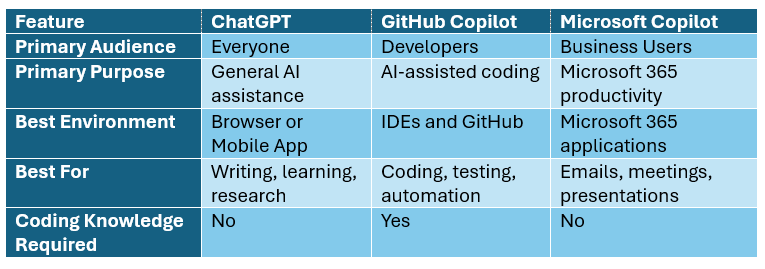
Quick Comparison
Which AI Assistant Should You Choose?
The right AI assistant depends on the type of work you perform most frequently.
Choose ChatGPT if you:
- Need help with writing, research, learning, and planning
- Want an AI assistant for a wide variety of everyday tasks
- Frequently brainstorm ideas or create content
Choose GitHub Copilot if you:
- Spend most of your day developing software
- Want intelligent code suggestions inside your IDE
- Need help writing tests, scripts, and boilerplate code
Choose Microsoft Copilot if you:
- Work extensively with Word, Excel, Outlook, Teams, and PowerPoint
- Want AI assistance directly within Microsoft 365
- Need to improve productivity in business workflows
Can You Use All Three Together?
Absolutely.
These AI assistants complement one another rather than compete.
For example, a software developer might:
- Use ChatGPT to brainstorm an application idea or understand a technical concept.
- Use GitHub Copilot to write and optimize the application code.
- Use Microsoft Copilot to prepare project documentation, summarize meetings, and create presentation slides.
Using each tool for its strengths often provides the best overall productivity.
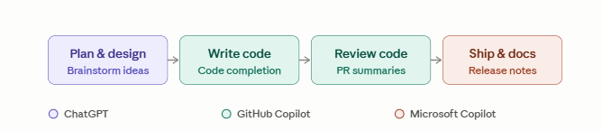
Fig 3: Using ChatGPT, GitHub Copilot, and Microsoft Copilot together for end-to-end productivity.
Skills matter more than the tool. The quality of AI results depends on how well you use it. Key skills include writing clear prompts, verifying responses, protecting privacy, and applying human judgment. Building these skills helps you get the most value from any AI assistant.
Choosing the Right AI
ChatGPT, GitHub Copilot, and Microsoft Copilot each serve different needs. ChatGPT is best for writing, learning, and problem-solving, GitHub Copilot supports software development, and Microsoft Copilot boosts productivity in Microsoft 365. The best choice depends on your work, and many professionals use them together for greater efficiency.
Upskill Your Teams with Enterprise-Ready Tech Training Programs
- Team-wide Customizable Programs
- Measurable Business Outcomes
About CloudThat


WRITTEN BY Shyla J
Shyla is an MCT and works on cloud platforms like AWS and Azure. She is certified as an Azure Administrator and works on DevOps tools like Ansible, and Terraform, to create and deploy highly available infrastructure on AWS and Azure.


 PREV
PREV












Comments