

 Login
Login


 September 24, 2026
|
Voiced by Amazon Polly |
Introduction
Organizations often need to process large volumes of data for machine learning inference, such as document classification, sentiment analysis, recommendation generation, content moderation, or generative AI workloads. Running predictions one request at a time can be inefficient and costly when dealing with thousands or millions of records.
Google Cloud’s Vertex AI Batch Prediction enables organizations to submit large datasets for asynchronous processing without managing infrastructure. When combined with Cloud Storage and Cloud Run, it becomes possible to build a fully automated, serverless inference pipeline that scales with demand.
Pioneers in Cloud Consulting & Migration Services
- Reduced infrastructural costs
- Accelerated application deployment
What is Vertex AI Batch Prediction?
Vertex AI Batch Prediction allows users to submit datasets stored in Cloud Storage or BigQuery and receive prediction results asynchronously.
Unlike online prediction endpoints, batch prediction:
- Does not require a continuously running endpoint
- Is optimized for large-scale processing
- Supports asynchronous execution
- Reduces operational overhead
- Is well-suited for scheduled and event-driven workloads
Common use cases include:
- Document classification
- Customer feedback analysis
- Product categorization
- Recommendation generation
- Forecasting
- Generative AI batch inference
- Data enrichment pipelines
High-Level Architecture
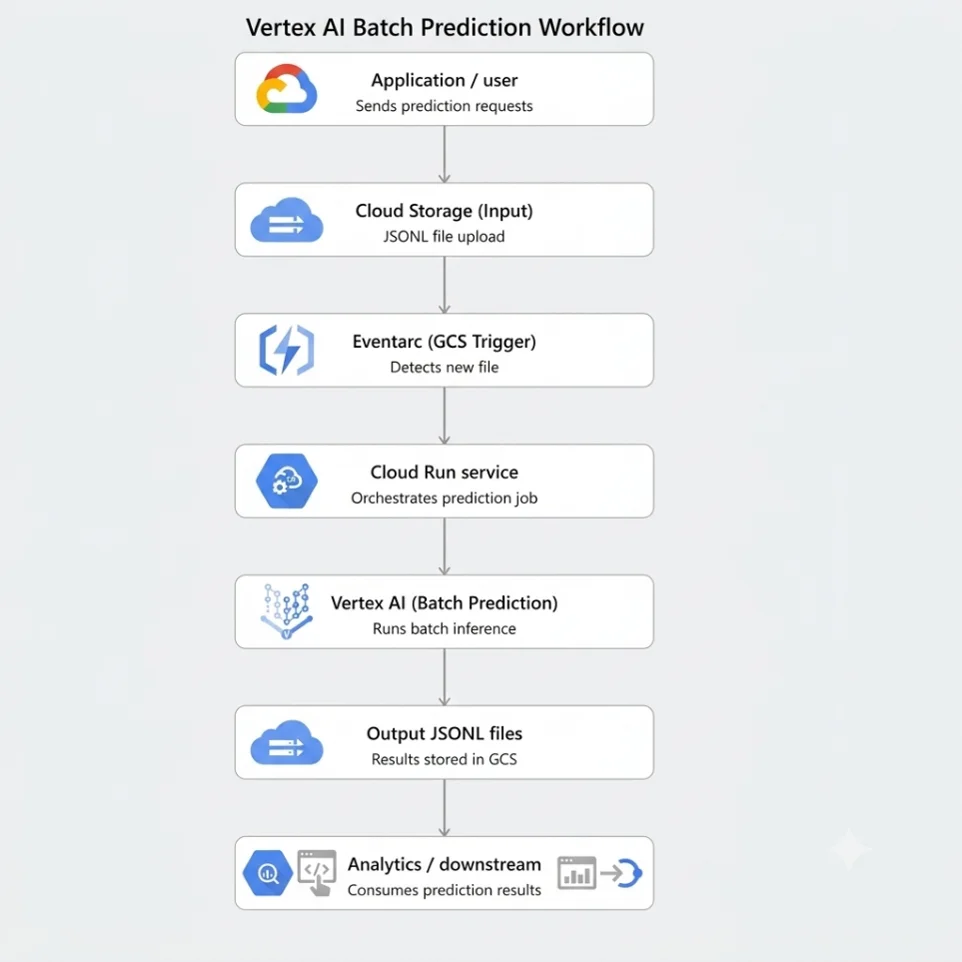
Workflow
- A JSONL file is uploaded to a GCS bucket.
- An Eventarc trigger invokes a Cloud Run service.
- Cloud Run extracts the file path from the event.
- Cloud Run calls the Vertex AI API and creates a Batch Prediction Job.
- Vertex AI processes the file asynchronously.
- Results are written to an output bucket.
- Monitoring and alerts can track job status and failures.
Prerequisites
Before proceeding, ensure you have:
- Google Cloud Project
- Billing enabled
- Vertex AI API enabled
- Cloud Run API enabled
- Eventarc API enabled
- Cloud Storage bucket
- Appropriate IAM permissions
- Python 3.10 or later
Install the Vertex AI SDK:
|
1 |
pip install google-cloud-aiplatform flask |
Authenticate locally:
|
1 |
gcloud auth application-default login |
Step 1: Create an Input File
Vertex AI Batch Prediction commonly accepts JSONL files.
Example:
input.jsonl
|
1 2 3 |
{"text":"Vertex AI simplifies machine learning workflows"} {"text":"Cloud Run enables serverless execution"} {"text":"Batch prediction is useful for large datasets"} |
Upload the file:
|
1 |
gsutil cp input.jsonl gs://vertex-ai-input-bucket/ |
Step 2: Create the Cloud Run Service
The Cloud Run service receives Cloud Storage events and creates a Vertex AI Batch Prediction Job.
Create a file named main.py.
|
1 2 3 4 5 6 7 8 9 10 11 12 13 14 15 16 17 18 19 20 21 22 23 24 25 26 27 28 29 30 31 32 33 34 35 36 37 38 39 40 41 42 43 |
from flask import Flask, request from google.cloud import aiplatform app = Flask(__name__) PROJECT_ID = "my-project" REGION = "us-central1" MODEL_ID = "123456789" @app.route("/", methods=["POST"]) def create_batch_job(): event = request.get_json() bucket = event["bucket"] file_name = event["name"] input_uri = f"gs://{bucket}/{file_name}" aiplatform.init( project=PROJECT_ID, location=REGION ) model = aiplatform.Model( f"projects/{PROJECT_ID}/locations/{REGION}/models/{MODEL_ID}" ) batch_job = model.batch_predict( job_display_name=f"batch-job-{file_name}", instances_format="jsonl", gcs_source=[input_uri], gcs_destination_prefix="gs://vertex-ai-output-bucket/results/", sync=False ) return { "job_name": batch_job.resource_name, "status": "submitted" }, 200 if __name__ == "__main__": app.run(host="0.0.0.0", port=8080) |
Step 3: Create a Requirements File
Create a file named requirements.txt.
|
1 2 3 |
flask google-cloud-aiplatform gunicorn |
Step 4: Create a Dockerfile
Cloud Run requires a container image.
|
1 2 3 4 5 6 7 8 9 10 |
FROM python:3.11-slim WORKDIR /app COPY requirements.txt . RUN pip install --no-cache-dir -r requirements.txt COPY . . CMD exec gunicorn \ --bind :8080 \ --workers 1 \ --threads 8 \ main:app |
Step 5: Deploy Cloud Run
Deploy the service:
|
1 2 3 4 |
gcloud run deploy vertex-batch-trigger \ --source . \ --region us-central1 \ --allow-unauthenticated |
After deployment, note the generated service URL.
Step 6: Configure Eventarc Trigger
Create an Eventarc trigger that listens for file uploads.
|
1 2 3 4 5 6 |
gcloud eventarc triggers create vertex-batch-trigger \ --location=us-central1 \ --destination-run-service=vertex-batch-trigger \ --destination-run-region=us-central1 \ --event-filters="type=google.cloud.storage.object.v1.finalized" \ --event-filters="bucket=vertex-ai-input-bucket" |
Now every time a file is uploaded to the bucket, Eventarc automatically invokes Cloud Run.
Step 7: Upload a Test File
Upload a sample JSONL file.
|
1 |
gsutil cp input.jsonl gs://vertex-ai-input-bucket/ |
Cloud Run receives the event and submits a Vertex AI Batch Prediction Job.
Step 8: Monitor the Batch Job
List jobs:
|
1 2 |
gcloud ai batch-prediction-jobs list \ --region=us-central1 |
Describe a specific job:
|
1 2 |
gcloud ai batch-prediction-jobs describe JOB_ID \ --region=us-central1 |
Possible job states:
| State | Description |
| PENDING | Job created |
| RUNNING | Processing started |
| SUCCEEDED | Completed successfully |
| FAILED | Job failed |
| CANCELLED | Job cancelled |
Step 9: Review Prediction Output
Once the job completes, Vertex AI stores the output files in the configured destination bucket.
Example output:
|
1 2 3 4 5 6 |
{ "instance": { "text": "Vertex AI simplifies machine learning workflows" }, "prediction": "Technology" } |
Analytics systems, dashboards, databases, or downstream applications can consume these prediction files.
IAM Permissions Required
The Cloud Run service account should have the following permissions:
Vertex AI Access: roles/aiplatform.user
Read Input Files: roles/storage.objectViewer
Write Output Files: roles/storage.objectAdmin
Eventarc Invocation: roles/eventarc.eventReceiver
Following the principle of least privilege is recommended for production environments.
Benefits of This Architecture
This serverless design offers several advantages:
Fully Automated
No manual intervention is required after the file is uploaded.
Scalable
Cloud Run automatically scales based on incoming events.
Cost Efficient
Cloud Run runs only when needed, and Vertex AI Batch Prediction processes workloads asynchronously.
Easy to Maintain
No VM management or infrastructure provisioning is required.
Enterprise Ready
Supports monitoring, logging, IAM controls, and CI/CD integration.
Conclusion
Vertex AI Batch Prediction provides a simple and scalable way to process large datasets using machine learning models without maintaining dedicated inference infrastructure. By integrating Cloud Storage, Eventarc, and Cloud Run, organisations can build a fully automated event-driven pipeline that automatically submits batch prediction jobs whenever new data arrives.
This architecture is particularly useful for document processing, recommendation engines, content analysis, customer feedback classification, and generative AI workloads. The combination of serverless automation and managed AI services enables teams to focus on business outcomes rather than infrastructure management.
As machine learning workloads continue to grow, automated batch prediction pipelines provide a reliable, scalable, and cost-effective foundation for enterprise AI solutions.
Upskill Your Teams with Enterprise-Ready Tech Training Programs
- Team-wide Customizable Programs
- Measurable Business Outcomes
About CloudThat
FAQs
1. When should I use Batch Prediction instead of Online Prediction?
ANS: – Use Batch Prediction when processing large datasets asynchronously and when low-latency responses are not required. Online Prediction is better suited for real-time applications such as chatbots, recommendation APIs, and interactive applications.
2. Can Vertex AI Batch Prediction process files automatically when they are uploaded?
ANS: – Yes. By combining Cloud Storage, Eventarc, and Cloud Run, you can automatically trigger the creation of Batch Prediction Jobs whenever new files are uploaded to a bucket, creating a fully serverless workflow.
3. What file formats are supported by Vertex AI Batch Prediction?
ANS: – Vertex AI supports multiple input formats depending on the model type, including JSONL, CSV, BigQuery tables, and Cloud Storage-based datasets. JSONL is commonly used for machine learning and generative AI batch inference workloads.


WRITTEN BY Aishwarya M
Aishwarya M works as a Cloud Solutions Architect – DevOps & Kubernetes at CloudThat. She is a proficient DevOps professional with expertise in designing scalable, secure, and automated infrastructure solutions across multi-cloud environments. Aishwarya specializes in leveraging tools like Kubernetes, Terraform, CI/CD pipelines, and monitoring stacks to streamline software delivery and ensure high system availability. She has a deep understanding of cloud-native architectures and focuses on delivering efficient, reliable, and maintainable solutions. Outside of work, Aishwarya enjoys traveling and cooking, exploring new places and cuisines while staying updated with the latest trends in cloud and DevOps technologies.


 PREV
PREV












Comments