

 Login
Login

 September 23, 2026
|
Voiced by Amazon Polly |
Building your first AI agent is easier when you begin with a single, focused task rather than a broad transformation goal. You do not need a large development team or years of experience to create a useful first version.
This guide explains what an AI agent is, how it works, and how beginners can move from a clear use case to a tested AI automation workflow. It also shows where low-code platforms, enterprise data, instructions, tools, memory, and real-world testing fit into AI agent development.
Start Learning In-Demand Tech Skills with Expert-Led Training
- Industry-Authorized Curriculum
- Expert-led Training
What Is an AI Agent?
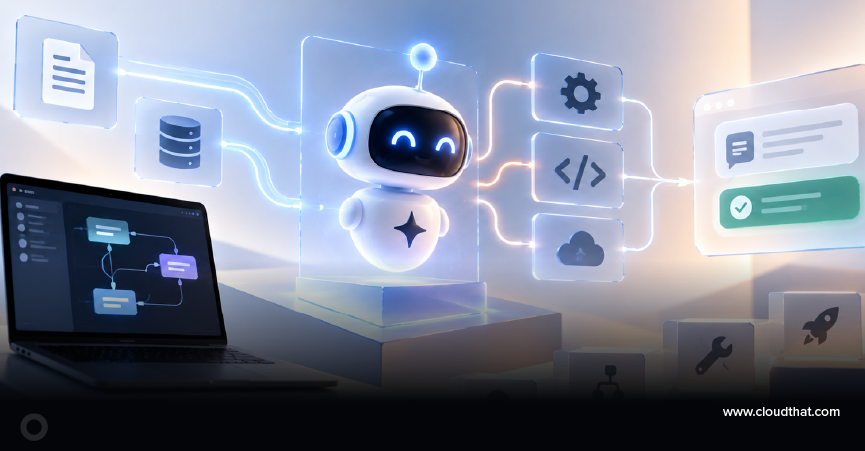
An AI agent is a software system that receives a goal, interprets information, chooses an action, and uses approved tools or data to complete a task. Unlike a basic chatbot that mainly returns text, an agent can follow a multi-step process and act on the result.
- Answer customer support questions
- Summarize documents
- Schedule meetings
- Analyze business data
- Create reports
- Trigger approved workflows in external systems
At its core, an AI agent combines a large language model (LLM), instructions, tools, and, when useful, memory. These components help the agent understand the objective, decide what to do next, and produce a result within defined boundaries.
How Does an AI Agent Work?
An AI agent works through a repeatable loop: understand the objective, review context, select a permitted action, use a tool or data source, and evaluate the result. The loop continues until the task is complete, a limit is reached, or human input is required.
- Receive an objective or prompt
- Understand the context and constraints
- Decide which action is required
- Use available tools or approved data sources
- Evaluate the result
- Return the outcome or continue with the next step
A simple way to think about the process is as follows: goal, context, decision, action, observation, and response. This action loop is the practical foundation of an AI automation workflow.
What Do You Need Before Building Your First AI Agent?
Before you build your first AI agent, define the business goal and prepare four core components: an AI model, clear instructions, relevant tools, and trusted information. Memory is optional and should be added only when the use case needs context across interactions.
- An AI model
The AI model acts as the reasoning and language layer. Choose a model that fits the task, expected response quality, security requirements, and platform constraints.
- Tools and actions
Tools allow the agent to interact with the outside world. Examples include email systems, calendars, databases, APIs, knowledge bases, search, ticketing systems, and approved business applications.
- Instructions
Instructions define the agent’s role, objective, boundaries, response format, and escalation behavior. Example: “Act as a customer support assistant. Use only approved company documentation and escalate unresolved issues.”
- Trusted knowledge and data
The agent needs accurate, current, and approved information. Organize the relevant documents, FAQs, policies, or records before connecting them to an enterprise AI agent.
- Memory, when required
Memory helps the agent retain context across turns or sessions. Use only the minimum memory required for the task and comply with the organization’s privacy, retention, and access requirements.
How Do You Build Your First AI Agent Step by Step?
To build your first AI agent, start with one measurable use case, connect only the information and tools that it needs, write precise instructions, and test the complete workflow. Improve the agent using documented failures, user feedback, and task results before expanding the scope.
Step 1: Define a specific goal
Avoid broad goals such as “automate all support operations.” Choose a narrow outcome such as summarizing support tickets, generating meeting notes, or answering FAQs from approved documentation. Define what a successful result looks like.
Step 2: Identify the information the agent needs
List the documents, records, policies, or systems required to complete the goal. Remove outdated or duplicate information and confirm that the agent has permission to use each source.
Step 3: Select an AI agent framework or platform
Choose an AI agent framework that matches the team’s skills, governance needs, integration requirements, and delivery model. Beginners can start with a no-code AI agent or low-code platform, then move to code-based frameworks when the use case needs deeper customization.
Step 4: Give the agent clear instructions
Define the role, permitted actions, prohibited actions, source rules, output format, and escalation path. Include what the agent should do when information is missing, rather than letting it guess.
Step 5: Connect tools and actions
Connect only the tools needed for the first use case, such as document search, email, a calendar, reporting, or ticket creation. Apply least-privilege access and require human approval for sensitive or high-impact actions.
Step 6: Test real-world and edge-case scenarios
Test common requests, incomplete inputs, conflicting information, tool failures, access restrictions, and unexpected questions. Record the input, expected result, actual result, source used, action taken, and any corrections required.
Step 7: Monitor and improve
Review accuracy, user feedback, completion quality, exceptions, and repeated errors. Update instructions, data sources, tools, and approval steps based on evidence, then retest before wider rollout.
Platform examples
For low-code development, explore Microsoft Copilot Studio. For Azure-based generative AI development, explore Azure AI Foundry. Code-first options may include LangChain, CrewAI, or AutoGen, depending on project requirements.
What Are Common Mistakes When Building an AI Agent?
The most common mistakes are starting with an oversized scope, using weak or outdated data, writing vague instructions, connecting unnecessary tools, and skipping realistic testing. These problems make the agent harder to control, evaluate, and improve.
- Making the scope too broad
Start with one use case and one measurable outcome rather than attempting to solve every problem at once.
- Using poor-quality data
Review the source information for accuracy, ownership, currency, and permission before the agent uses it.
- Giving unclear instructions
Specify objectives, constraints, source rules, response format, and escalation behavior.
- Connecting too many tools
Add only the actions required for the initial workflow and protect sensitive actions with approvals.
- Skipping testing and monitoring
Test expected and unexpected situations before rollout, then continue reviewing results after launch.
Where Can Businesses Use an AI Agent First?
Businesses should begin with a repetitive, well-documented task that has clear inputs, outputs, owners, and review criteria. Good starting areas include customer service, IT support, employee onboarding, meeting management, knowledge retrieval, reporting, and sales assistance.
- Customer service: answer repetitive questions using approved knowledge
- IT support: classify requests and guide users to standard resolutions
- Employee onboarding: surface policies, checklists, and learning resources
- Meeting management: prepare agendas, summarize notes, and track agreed actions
- Knowledge management: retrieve and summarize trusted internal content
- Sales assistance: draft account briefs and organize approved product information
What Is the Best Way to Start AI Agent Development?
The best way to start AI agent development is to prove one useful workflow before adding more capabilities. A small, controlled pilot creates clearer learning, safer testing, simpler measurement, and a stronger foundation for an enterprise AI agent.
Select a process with an identifiable owner, trusted source content, limited actions, and frequent enough use to generate feedback. Once the first version performs reliably, expand the knowledge, integrations, or audience in manageable stages.
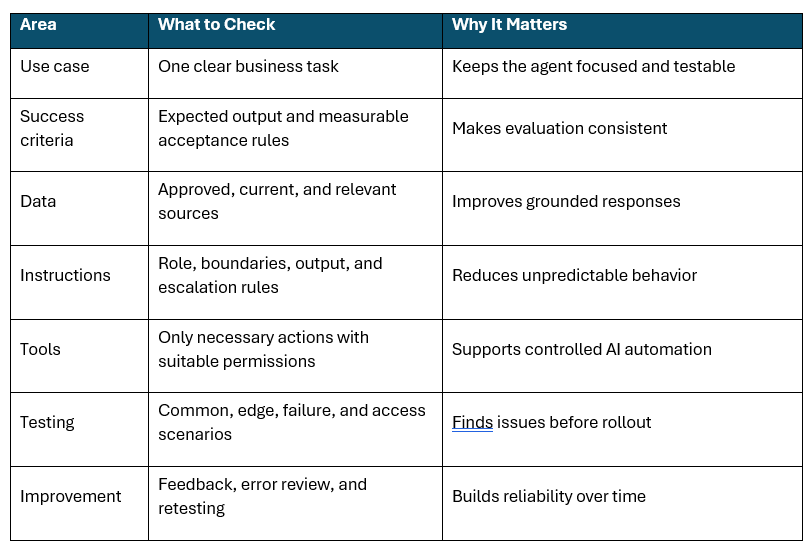
Quick AI Agent Build Checklist
Use this checklist to confirm that the first AI agent has a focused task, trusted data, limited tools, clear controls, and realistic tests. Review every item before a pilot, demonstration, or production rollout.
Build Your First AI Agent
You can build your first AI agent without a massive budget or a complex technology stack by starting with one focused objective. Combine trusted data, clear instructions, necessary tools, realistic testing, and continuous improvement to create a reliable AI automation workflow.
The strongest first agent is not the one with the most features. It is the one that consistently solves a specific problem, stays within defined boundaries, and provides evidence that the workflow is ready to expand.
Upskill Your Teams with Enterprise-Ready Tech Training Programs
- Team-wide Customizable Programs
- Measurable Business Outcomes
About CloudThat
FAQs
1. What is the easiest AI agent to build first?
ANS: – A document summarization or FAQ agent is often a practical starting point because the scope can be limited and the outputs are easy to review. Use a small set of approved documents and define how the agent should respond when the answer is unavailable.
2. How can beginners create an AI agent without coding?
ANS: – Beginners can use a no-code or low-code platform that provides a visual interface for instructions, knowledge sources, topics, and actions. Microsoft Copilot Studio is one option for building and managing agents with minimal traditional programming.
3. How is an AI agent different from a chatbot?
ANS: – A basic chatbot mainly answers a message with text. An AI agent can also choose tools, use data, perform approved actions, observe results, and continue working toward a goal.
4. Can AI agents work with company data?
ANS: – AI agents can use approved enterprise systems, databases, and knowledge repositories when access controls and organizational policies are applied. Connect only the sources required for the use case and validate permissions before testing.
5. What tools do you need to build an AI agent?
ANS: – The exact tools depend on the goal. A first agent may need document search, a knowledge base, email, a calendar, an API, or a business application, but unnecessary tools should not be connected.
6. What is the most important factor for AI agent success?
ANS: – A clearly defined use case is the strongest starting point because it makes implementation, testing, ownership, and adoption easier to manage. Reliable source information and clear instructions are also essential.


WRITTEN BY Reshu Goyal
Reshu Goyal is a Microsoft Certified Trainer and Subject Matter Expert at CloudThat with over 10 years of experience in data analytics and visualization. She has trained 1,000+ professionals across Power BI, Microsoft Fabric, Advanced Excel and Tableau, delivering sessions for top clients like Microsoft, Deloitte and TCS. Reshu is known for her hands-on, learner-focused approach and her ability to turn complex data into actionable insights.


 PREV
PREV








Comments