

 Login
Login


 September 23, 2026
|
Voiced by Amazon Polly |
Not every business problem is an AI problem. Some are solved faster, cheaper, and more reliably with plain rule-based automation – and picking the wrong one wastes budget and trust. Yet “add AI” has become the default line item on nearly every project brief, even when the underlying task hasn’t changed in ten years. This post walks through how to read a business requirement correctly, when automation beats AI, and when AI is genuinely worth the investment – and closes with a practical path for building this judgment on your own team.
Start Learning In-Demand Tech Skills with Expert-Led Training
- Industry-Authorized Curriculum
- Expert-led Training
Why do businesses default to AI when automation would work?
Most teams reach for AI because it’s the visible, funded option – not because the problem needs reasoning, prediction, or language understanding. Leadership hears “AI transformation” in every boardroom conversation, budgets get allocated toward AI initiatives before a single requirement is written, and teams follow the money rather than the problem. A task that follows the same fixed steps every time – move data from a form into a system, send a reminder email, reconcile two spreadsheets – doesn’t need a model. It needs a script or a rule-based workflow, which is cheaper to build, easier to audit, and doesn’t fail unpredictably.
The cost of this mismatch isn’t just wasted spend. An AI model applied to a fixed-rule problem introduces variability where none existed before, makes the output harder to explain to auditors or regulators, and requires ongoing monitoring that a simple script never would. Choosing the wrong tool early tends to compound teams end up maintaining a probabilistic system for a problem that a five-line rule would have solved outright.
What’s the actual difference between AI and automation?
Automation executes a fixed set of rules the same way every time; AI makes a judgment call based on patterns in data, and that judgment can vary. Automation is the right fit for predictable, repetitive, rule-based work – invoice matching, data entry, and scheduled reports. AI earns its place when the task involves ambiguity: understanding free-text customer messages, forecasting demand, or flagging anomalies that a fixed rule can’t define in advance.
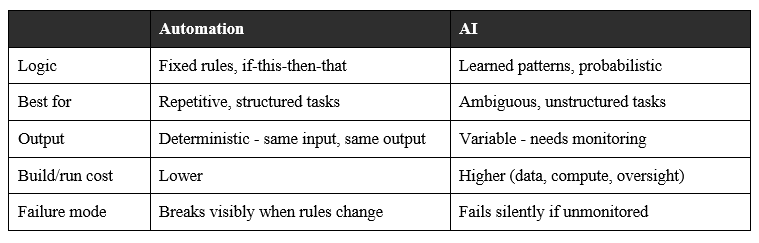
Robotic Process Automation, or RPA, is the clearest example of the automation side of this table: it uses software bots to mimic a person’s clicks and keystrokes across existing systems, following a fixed sequence with no learning involved. As IBM’s overview of the technology explains, RPA and AI solve fundamentally different problems, and confusing the two is one of the most common reasons automation projects stall.
How do you match a business requirement to the right tool?
Start with the requirement, not the technology – write down what decision or output is needed, then check whether the logic behind it is fixed or judgment-based. If you can write the rule on a whiteboard in five steps and it won’t change often, automate it. If the “rule” depends on interpreting language, images, or shifting context, that’s where AI adds real value.
A simple filter that works for most teams:
- Is the input structured? Structured data (fields, forms, fixed formats) leans automation. Unstructured input (emails, chat, documents, images) leans AI.
- Does the logic change often? Frequent rule changes favor automation; you can edit quickly – a model needs retraining and validation, which is slower.
- Is the cost of a wrong answer high? High-stakes decisions need a human in the loop regardless of which tool you pick – AI doesn’t remove that requirement; it just changes what’s being reviewed.
- Would a script solve 80% of it? If yes, automate the 80% and reserve AI for the genuinely ambiguous remainder, rather than routing everything through a model.
Take a customer support queue as a worked example. Categorizing a ticket by the product code the customer already entered in a form is structured, low-ambiguity, and cheap to get wrong – automate it. Reading a free-text complaint to determine sentiment and route it to the right specialist is unstructured and judgment-based – that’s where a language model earns its cost. Most real workflows, like this one, are a blend of both stages rather than a single tool end-to-end.
When does AI earn its cost?
AI earns its cost when the task involves language, prediction, or pattern recognition that fixed rules can’t capture – and when the organization is set up to monitor it, not just deploy it. AI adoption is now mainstream but shallow: McKinsey’s most recent global AI survey found that nearly nine out of ten respondents said their organizations were regularly using AI in at least one business function, yet only about a third reported having scaled it across the enterprise, with most pilots staying pilots rather than turning into enterprise-wide capability. On the automation side, traditional rule-based automation still leads adoption over AI-driven automation, and both are growing rather than one replacing the other.
The practical takeaway: AI and automation aren’t competitors – most real workflows need both, split along the line in the framework above. The organizations McKinsey’s research identifies as getting real value tend to share one habit: they redesign the workflow around the new tool instead of bolting AI onto an unchanged process and hoping the model absorbs the inefficiency.
How do you build this skill on your team?
The most useful skill right now isn’t “using AI” – it’s diagnosing which parts of a workflow need AI and which don’t, then having the platform skills to build both. Microsoft’s newer AB-series certifications are built around exactly this business-first framing rather than pure tool usage:
- AB-900 (Copilot and Agent Administration Fundamentals) – foundational governance for teams rolling out AI tools safely.
- AB-730 (AI Business Professional) – a non-technical certification for business analysts and PMs on spotting high-value AI use cases versus automation-first ones. Microsoft’s own certification page lays out the exam scope and prerequisites in detail for anyone weighing whether it fits their role.
- AB-731 (AI Transformation Leader) – for leads who need to justify AI investment against simpler alternatives and measure ROI.
- AB-100 (Agentic AI Business Solutions Architect) – for architects designing multi-agent systems, once you’ve confirmed AI, not automation, is the right call.
Picking between these four often trips people up more than the exam content itself, since they overlap in places – a side-by-side breakdown of the AB-series path is worth a skim before committing study time to one over another.
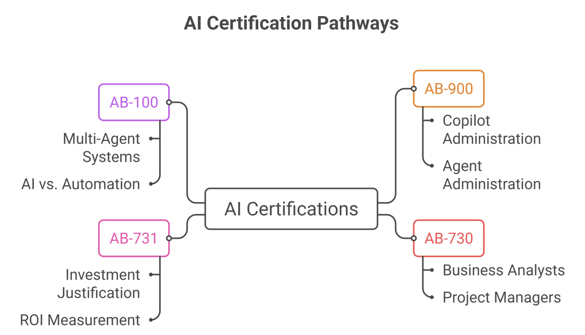
Fig 1: Microsoft AI certification pathways for governance, business strategy, and agentic AI solutions.
For teams that want a structured way to work through these certifications rather than self-navigating Microsoft’s documentation, training providers run instructor-led cohorts aimed specifically at the business-requirement stage – deciding what to build, not just how to build it. The AB-730 course is one example if you’d rather not build your own study plan.
Choosing the Right Technology
The AI-versus-automation decision isn’t a technology question – it’s a requirements question that gets answered before any tool gets picked. Fixed, rule-based, structured work belongs in automation, where it’s cheaper to build, easier to audit, and it fails loudly rather than quietly. Ambiguous, language-heavy, or judgment-based work is where AI genuinely pays for itself, provided the organization commits to monitoring it rather than treating deployment as the finish line. Most real workflows split cleanly along this line once someone maps them out, which is exactly why the diagnostic skill matters more than familiarity with any single tool. Whether your team builds that skill through hands-on practice, a structured certification path, or both, the discipline is the same: write down the requirement first and let the requirement choose the technology – not the other way around.
Upskill Your Teams with Enterprise-Ready Tech Training Programs
- Team-wide Customizable Programs
- Measurable Business Outcomes
About CloudThat
FAQs
1. Should every automation project start with AI by default?
ANS: – No. Start by writing down whether the task follows fixed rules or requires judgment on unstructured input. Fixed-rule tasks should be automated first; AI is for the genuinely ambiguous remainder.
2. Is RPA the same as AI?
ANS: – No. RPA (Robotic Process Automation) executes fixed, rule-based steps and doesn’t learn or adapt. AI makes probabilistic judgments from patterns in data. Many workflows combine both – RPA for the structured steps, AI for the judgment calls.
3. Why do so many AI pilots never scale?
ANS: – Research points to two recurring causes: applying AI to processes without redesigning the workflow around it and treating AI as a bolt-on automation tool rather than rethinking the process from scratch – which limits the value it can realistically deliver.
4. Do I need a certification to make this call, or just experience?
ANS: – Experience helps, but a structured framework – like the one in Microsoft’s AB-series – gives less experienced team members a repeatable way to make the same call consistently, instead of relying on one person’s judgment.


WRITTEN BY Shatrughan Singh Gusain
Shatrughan Singh Gusain is a Senior Research Associate at CloudThat, specializing in AI. With 3 years of experience in AI, He have trained over 2000+ professionals/students to upskill in AI, ML, DL, Gen AI and Agentic AI. Known for simplifying complex concepts, hands-on teaching, industry insights, he brings deep technical knowledge and practical application into every learning experience. Shatrughan's passion for hobby reflects in his unique approach to learning and development.


 PREV
PREV









Comments