

 Login
Login


 September 4, 2026
|
Voiced by Amazon Polly |
Overview
Adding an LLM to an application is easy. You choose a model, connect its API, send a prompt, and process the response. For a small application, this direct approach is usually the best place to start.
The challenge comes when AI becomes a core part of the product. You may need different models for different tasks, support multiple providers, handle provider failures, control costs, and understand what is happening with AI requests in production.
This is where an AI Gateway becomes useful.
An AI Gateway sits between your application and the AI providers behind it. Instead of integrating every provider directly into different services, the application communicates through a single interface, while the gateway manages provider-specific logic.
Pioneers in Cloud Consulting & Migration Services
- Reduced infrastructural costs
- Accelerated application deployment
Why Put a Gateway Between the Application and LLMs?
A single-provider integration is simple, but it can become difficult to manage as the application grows.
One feature may use OpenAI, another may perform better with Gemini, and another may use models available through Amazon Bedrock. Each provider has different APIs, authentication methods, request formats, and error handling.
If every service manages these differences independently, AI-related logic starts spreading across the codebase.
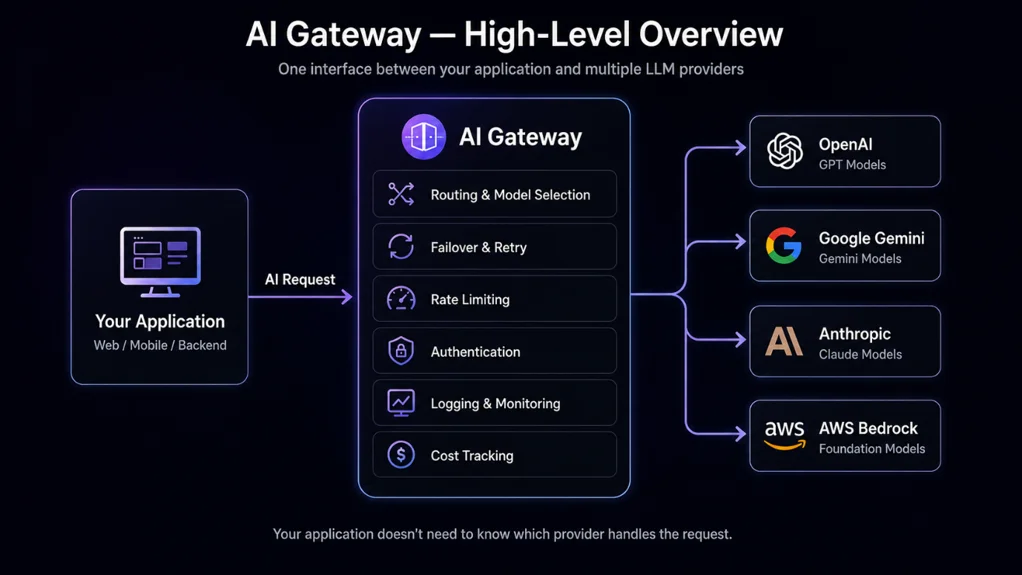
The gateway creates a common interface between the application and the providers. The application can request a capability such as code analysis or summarization without knowing which provider will handle it.
This also makes future changes easier. If you decide to use a different model or provider, the change can be handled within the gateway rather than modifying multiple application services.
Handling Provider Failures
Reliability is another reason to consider a gateway.
AI providers are external dependencies. They can experience outages, rate limits, timeouts, or temporary model availability issues. If your application depends directly on one provider, these problems can immediately affect users.
A gateway provides a central place for fallback logic.
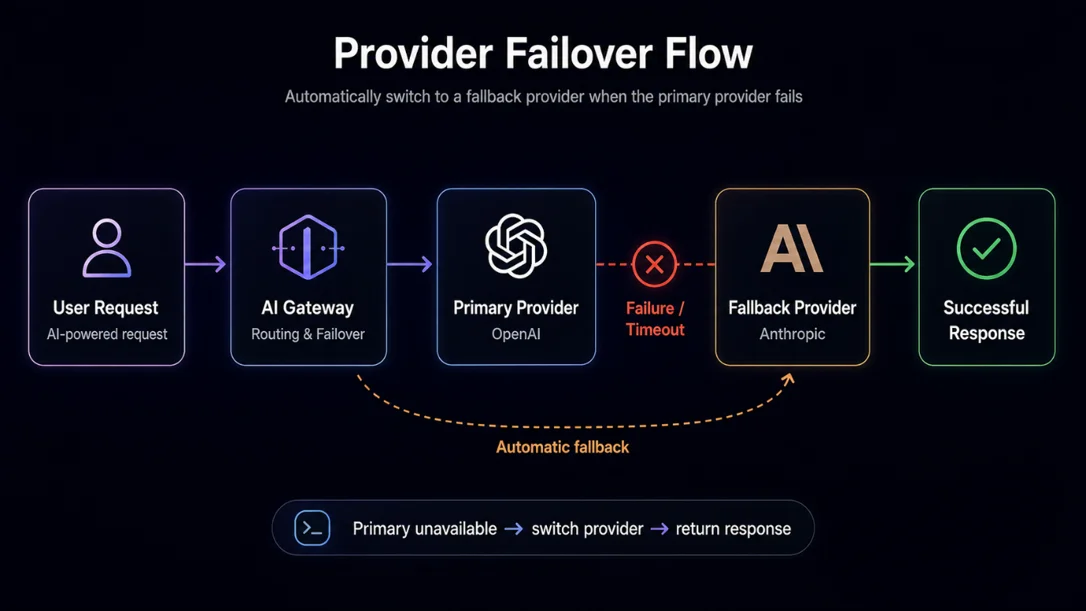
For example, the gateway can use one provider as the primary option and route a request to another provider when a suitable temporary failure occurs.
This should not mean retrying every failed request. An invalid request will not become valid when sent to another provider, and unnecessary retries can increase both latency and cost.
The gateway should determine which errors are retryable and when a fallback is appropriate.
Routing Requests to the Right Model
Not every AI request requires the same model.
A simple classification task may work well with a smaller model, while complex code analysis may require a more capable one. Sending every request to the most expensive model can increase costs without necessarily improving the result.
An AI Gateway can centralize this model-selection logic.
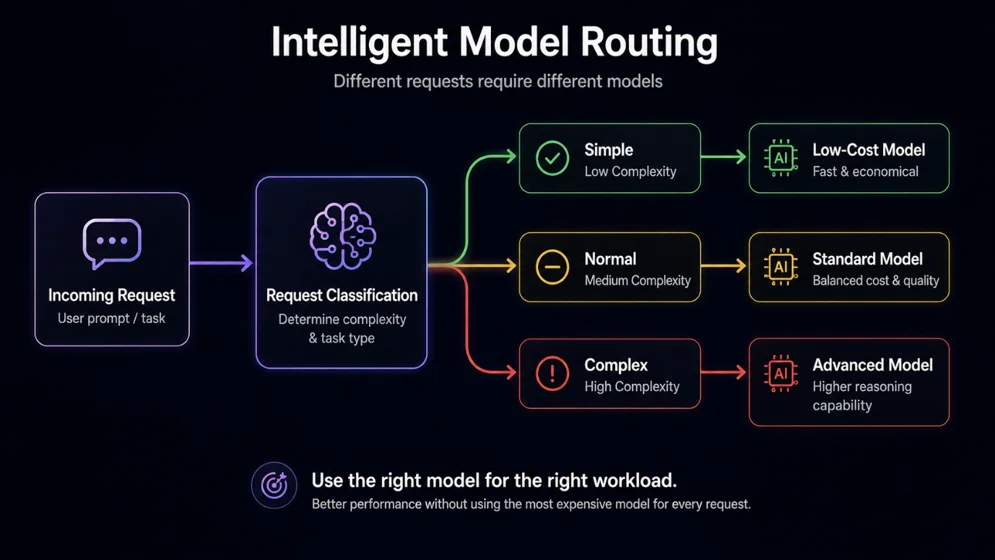
The gateway can choose a model based on the type of task, request complexity, required quality, latency requirements, customer plan, provider availability, or estimated cost.
The routing rules can start simple and become more sophisticated as the application grows. Because the logic lives in one place, changing the model for a particular workload does not require changes throughout the application.
Building an AI Gateway on AWS
For applications running on AWS, the gateway can be built using managed and serverless services.
A common setup can use Amazon API Gateway as the entry point, AWS Lambda for the gateway logic, and Amazon Bedrock as one of the available AI providers. External providers can also be integrated when needed.
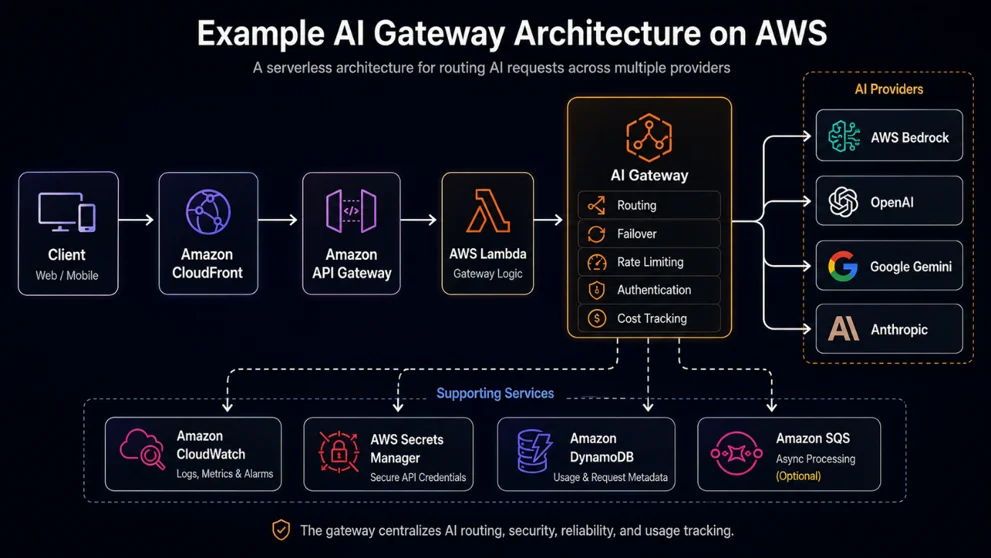
Additional AWS services can support specific requirements. AWS Secrets Manager can protect provider credentials, CloudWatch can provide logs and metrics, and Amazon DynamoDB can store request or usage information.
There is no need to introduce all of these services from the beginning. Start with the smallest architecture that solves the current problem and add components as the requirements grow.
Observability and Cost
Once an AI application reaches production, knowing that a request failed is not enough. You also need to understand why it failed, how long it took, which model handled it, and what it cost.
An AI Gateway provides a natural place to collect this information.
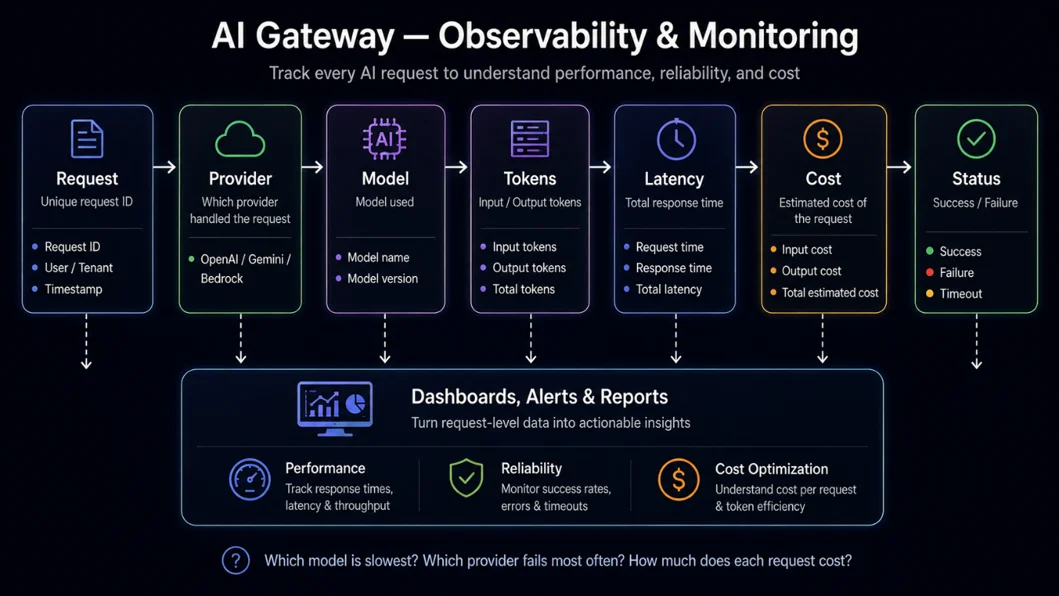
Request-level data can include the provider, model, token usage, latency, status, and estimated cost. This makes it easier to troubleshoot slow requests and identify providers or models that are producing unexpected results.
The same information is useful for cost management. AI usage can grow quickly when an application starts receiving real traffic. Larger prompts, longer responses, and expensive models can all increase spending.
A gateway does not automatically reduce the bill, but it gives you the visibility needed to manage it. You can route simple workloads to cheaper models, monitor customer usage, and enforce limits when necessary.
When Should You Build an AI Gateway?
An AI Gateway is not required for every AI application.
If you are building a small application with one provider and limited traffic, direct integration is usually simpler and easier to maintain.
The decision changes when you have multiple providers, several models, reliability requirements, rising AI costs, or a need for centralized monitoring and usage controls.
At that point, the gateway is solving a real problem rather than adding another architectural layer without a clear purpose.
Conclusion
An AI Gateway is ultimately about keeping AI infrastructure separate from application logic.
You may start with one provider, but your requirements can change as the product grows. A different model may become better for a workload, another provider may offer better pricing, or you may need a fallback when a provider becomes unavailable.
With a gateway, those decisions can change without forcing provider-specific logic into every part of the application.
You do not need to build an AI Gateway from day one. Start simple, understand where the complexity appears, and introduce the gateway when it provides real value.
The goal is not to add another service. The goal is to give your application enough flexibility to evolve with the rapidly changing AI ecosystem.
Drop a query if you have any questions regarding AI Gateway, and we will get back to you quickly.
Empowering organizations to become ‘data driven’ enterprises with our Cloud experts.
- Reduced infrastructure costs
- Timely data-driven decisions
About CloudThat
FAQs
1. What is an AI Gateway?
ANS: – An AI Gateway is a layer between an application and AI providers. It provides a common interface while managing concerns such as provider routing, model selection, fallback, monitoring, security, and usage tracking.
2. Do I need an AI Gateway if I use one LLM provider?
ANS: – Not necessarily. For a small application, direct integration is usually simpler. A gateway becomes useful when you need multiple providers, model routing, failover, monitoring, or centralized usage controls.
3. Can an AI Gateway reduce LLM costs?
ANS: – It can help control costs by providing centralized usage visibility and model routing. For example, simple workloads can be routed to lower-cost models, while more complex requests use more capable models.

WRITTEN BY Mayur Patel
Mayur Patel works as a Lead Full Stack Developer at CloudThat. With solid experience in frontend, backend, database management, and AWS Cloud, he is a versatile and reliable developer. Having hands-on expertise across the entire technology stack, Mayur focuses on building applications that are robust, scalable, and efficient. Passionate about continuous learning, he enjoys exploring new technologies daily and actively shares his knowledge to foster growth within his team and the broader community. Mayur’s practical approach, strong teamwork, and drive for innovation make him an invaluable member of every project he undertakes.


 PREV
PREV












Comments