

 Login
Login


 September 2, 2026
|
Voiced by Amazon Polly |
If you’ve used GitHub Copilot regularly, you know the frustration: every new session feels like meeting a stranger. You spend the first few minutes re-explaining your project structure, naming conventions, and rules that your team follows. Over and over again.
GitHub’s engineering team understood this deeply. Their vision is to evolve Copilot into a full ecosystem of agents that collaborate across the entire development lifecycle, from coding and code review to security, debugging, deployment, and maintenance. But to do that, Copilot needed memory.
“Cross-agent memory allows agents to remember and learn from experiences across your development workflow, without relying on explicit user instructions.”
Start Learning In-Demand Tech Skills with Expert-Led Training
- Industry-Authorized Curriculum
- Expert-led Training
How Copilot Memory Works
The system is elegantly simple in concept, but technically sophisticated under the hood.
- Discovery: As Copilot works on your repository, reviewing a pull request, implementing a task, or running a CLI command, it notices patterns worth remembering, logging conventions, file synchronization rules, API versioning requirements, and more.
- Storage with citations: Each memory is saved with specific code locations as citations, not just abstract facts, but facts anchored to real lines in your codebase.
- Just-in-time verification: Before using any memory, Copilot checks those cited locations against the current branch. If the code has changed or the memory is stale, it’s updated or discarded, never blindly applied.
- Auto-expiry: Memories automatically expire after 28 days to prevent outdated context from creeping into your workflow.
Where Memory Works Today
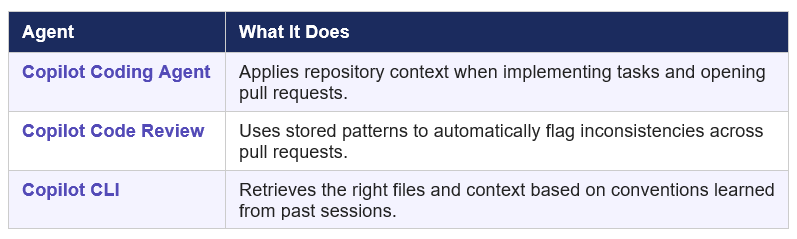
Currently in public preview, Copilot Memory is active across three key agents:
The Numbers Speak for Themselves
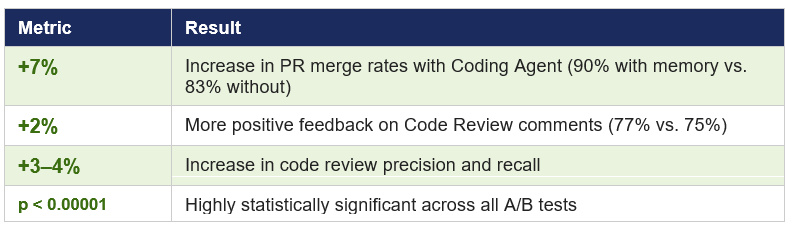
GitHub ran A/B tests to measure real-world impact. Results published on the official GitHub Blog are striking:
Cross-Agent Memory Sharing: The Real Superpower
Memories aren’t locked to a single agent; they’re shared across all of Copilot’s agents working on the same repository. A real example from GitHub’s official documentation:
- Code Review notices a logging convention while reviewing a PR: log files must follow the pattern app-YYYYMMDD.log using Winston.
- Coding Agent is later assigned to build a new microservice. It automatically applies the same logging format, without being told.
- Copilot CLI helps debug an issue by efficiently retrieving the correct log file based on the format it already knows.
GitHub describes this as knowledge transfer from experienced developers to newer ones, automatically, through Copilot.
Privacy & Security
Memories are tightly scoped. They can only be created by contributors with write permissions to a repository and can only be used in tasks on that same repository. Memories never cross repository boundaries.
Repository owners can review and delete stored memories at any time via Repository Settings → Copilot → Memory. For enterprises, the feature is off by default and requires explicit enabling. Individual Copilot Pro and Pro+ users have it on by default, but can opt out anytime.
How to Enable Copilot Memory
- Go to your GitHub profile → Settings
- Click Copilot in the sidebar
- Scroll to Features → Copilot Memory
- Toggle it on, that’s it!
Why This Matters for Developers
The shift from a stateless tool to a stateful collaborator is significant. You no longer need to maintain detailed custom instruction files or repeat yourself every session. The more you use Copilot on a repository, the better it gets, because it’s genuinely learning from your team’s patterns.
For large teams, this is even more powerful: a seasoned engineer’s conventions get encoded into memory and automatically apply to every junior developer’s pull request, reviewed by the same Copilot that already knows what “good” looks like in your codebase.
If you want to build the skills behind these workflows, an expert-led GH-300: GitHub Copilot course and GH-900: GitHub Foundations training will give you hands-on, certification-ready paths to master AI-assisted development on GitHub.
The Future of AI Coding
GitHub Copilot Memory marks a significant step toward more intelligent, context-aware AI-assisted development. By retaining repository-specific coding conventions, architectural patterns, and workflow insights, Copilot can deliver more consistent and relevant assistance across coding, reviews, and CLI tasks. Its citation-based verification, automatic expiry, repository-level boundaries, and administrative controls also help balance productivity, security, and maintainability. While still in public preview, the measurable improvements in merge rates, review quality, and precision demonstrate its practical potential. As GitHub expands memory across more agents and organizational contexts, Copilot is positioned to become a more capable, collaborative AI pair programmer for modern development teams.
Upskill Your Teams with Enterprise-Ready Tech Training Programs
- Team-wide Customizable Programs
- Measurable Business Outcomes
About CloudThat


WRITTEN BY Sirin Kausar Isak Ali
Sirin Ali is a seasoned corporate trainer and Subject Matter Expert with 11+ years of experience in cloud infrastructure, DevOps automation and Kubernetes. She has extensive real-time project experience in designing enterprise-grade CI/CD pipelines, automating containerized microservices deployments and implementing GitOps practices with advanced observability solutions. Skilled across diverse Kubernetes distributions, she brings hands-on expertise in transforming infrastructure and applications using industry best practices. Sirin has trained over 1500+ professionals worldwide and holds multiple certifications including CKA, Terraform Associate, Azure AI Engineer, GCP ACE, MCP, CCNA and MCT. Her practical, real-world approach simplifies complex DevOps concepts, empowering learners to confidently build production-ready solutions.


 PREV
PREV












Comments