

 Login
Login


 August 19, 2026
|
Voiced by Amazon Polly |
As organizations continue their digital transformation journey, cloud-based infrastructure has become the preferred choice for hosting applications, databases, and enterprise workloads. Microsoft Azure offers a comprehensive range of Windows Server solutions that combine the familiarity of Windows Server with the scalability, security, and flexibility of the cloud.
Whether you’re migrating legacy applications, hosting enterprise software like SQL Server or Active Directory, or building modern hybrid environments, Azure Windows Servers provide a reliable platform for businesses of all sizes.
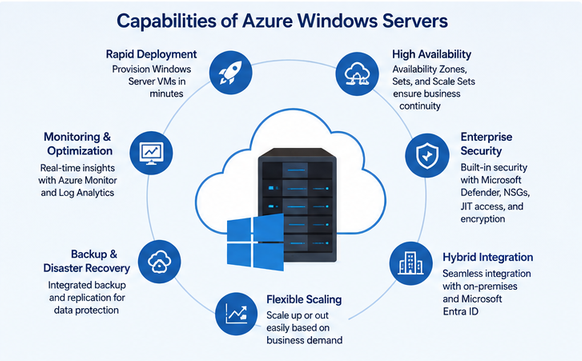
Fig 1: Key capabilities of Azure Windows Servers.
Start Learning In-Demand Tech Skills with Expert-Led Training
- Industry-Authorized Curriculum
- Expert-led Training
What Are Azure Windows Servers?
Azure Windows Servers are virtual machines (VMs) running Microsoft Windows Server operating systems hosted on Microsoft Azure. They allow organizations to deploy Windows-based workloads without investing in expensive on-premises hardware.
Azure supports multiple Windows Server versions, including:
- Windows Server 2025
- Windows Server 2022
- Windows Server 2019
- Windows Server 2016
These virtual machines can be deployed in minutes and managed using familiar tools such as Remote Desktop Protocol (RDP), Windows Admin Center, PowerShell, Azure Portal, and Azure CLI.
Key Capabilities of Azure Windows Servers
- Rapid Deployment
Azure enables administrators to provision Windows Server virtual machines within minutes. Organizations can select predefined images or create custom images that include their preferred applications and configurations.
- Built-in High Availability
Azure provides multiple options to ensure business continuity, including:
- Availability Zones
- Availability Sets
- Virtual Machine Scale Sets
- Azure Backup
- Azure Site Recovery
These services help minimize downtime during planned maintenance or unexpected failures.
- Enterprise-Grade Security
Security remains one of Azure’s strongest advantages. Windows Servers hosted on Azure benefit from features such as:
- Microsoft Defender for Cloud
- Microsoft Defender for Endpoint
- Just-In-Time (JIT) VM Access
- Disk Encryption
- Azure Firewall
- Network Security Groups (NSGs)
- Microsoft Entra ID integration for identity management
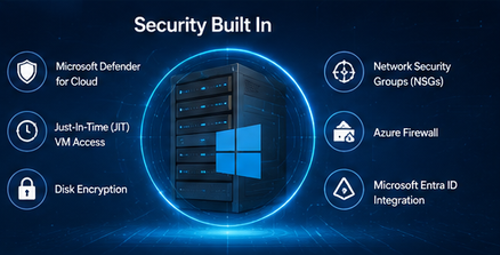
Fig 2: Built-in security features for Azure Windows Servers.
Organizations can also enforce compliance policies using Azure Policy and Microsoft Defender recommendations.
- Hybrid Cloud Integration
Many businesses continue to operate in both on-premises and cloud environments. Azure Windows Servers integrate seamlessly with:
- Active Directory Domain Services
- Microsoft Entra ID
- Azure Arc
- Azure VPN Gateway
- ExpressRoute
This hybrid capability allows organizations to migrate workloads gradually instead of moving everything at once.
- Flexible Scaling
Unlike physical servers, Azure virtual machines can scale vertically by increasing CPU and memory or horizontally by adding more VM instances using Virtual Machine Scale Sets.
Organizations pay only for the resources they consume, helping optimize infrastructure costs.
- Backup and Disaster Recovery
Azure offers integrated backup and disaster recovery solutions without requiring third-party software.
Azure Backup provides automated backups, while Azure Site Recovery replicates workloads across regions to support disaster recovery planning and reduce recovery times.
- Monitoring and Performance Optimization
Azure Monitor, Log Analytics, and Application Insights provide real-time monitoring of server health, application performance, and resource utilization.
Administrators can configure alerts and automate responses using Azure Automation and Logic Apps.
Common Use Cases
Azure Windows Servers support a wide variety of enterprise workloads, including:
- Hosting ASP.NET applications
- Running Microsoft SQL Server databases
- Active Directory Domain Controllers
- File and Print Servers
- Remote Desktop Services (RDS)
- Enterprise ERP and CRM applications
- Development and testing environments
- Legacy Windows applications requiring Windows Server
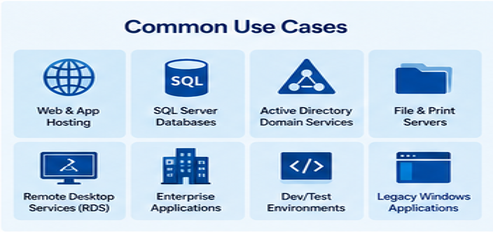
Fig 3: Common enterprise workloads supported by Azure Windows Servers.
Their compatibility with existing Microsoft technologies makes migration straightforward for many organizations.
Benefits of Choosing Azure Windows Servers
Businesses adopting Azure Windows Servers gain several advantages:
- Reduced capital expenditure on hardware
- Faster deployment of infrastructure
- Global availability across multiple Azure regions
- Pay-as-you-go pricing model
- Automatic infrastructure updates
- Enterprise-grade security and compliance
- Easy integration with Microsoft 365 and Azure services
- Support for hybrid and multi-cloud strategies
Organizations also benefit from Microsoft’s continuous investment in cloud innovation and security.
Alternatives to Azure Windows Servers
Although Azure is an excellent choice for Microsoft-centric environments, several alternatives may better suit specific business requirements.
Amazon EC2 Windows Instances provide Windows Server virtual machines with deep integration into the AWS ecosystem. They are suitable for organizations already invested in Amazon Web Services.
Google Cloud Compute Engine supports Windows Server workloads with flexible machine types and competitive pricing. It integrates well with Google Cloud’s analytics and AI services.
VMware Cloud allows businesses to extend existing VMware environments into the cloud while maintaining familiar management tools.
On-Premises Windows Server remains a viable option for organizations with strict regulatory requirements, specialized hardware dependencies, or limited internet connectivity. However, it requires higher upfront investment and ongoing maintenance.
Linux-Based Servers running distributions such as Ubuntu, Red Hat Enterprise Linux, or Debian offer a cost-effective alternative for web hosting, containerized applications, and open-source workloads. While they may not support Windows-specific software, they provide excellent performance and flexibility for many modern applications.
Azure Cloud Infrastructure Benefits
Azure Windows Servers provide a powerful, secure, and scalable platform for organizations seeking to modernize their IT infrastructure. With features such as high availability, enterprise-grade security, hybrid cloud integration, automated backup, and flexible scaling, Azure enables businesses to deploy Windows workloads efficiently while reducing operational complexity.
Choosing the right platform ultimately depends on your organization’s existing infrastructure, budget, compliance requirements, and long-term cloud strategy. For businesses heavily invested in Microsoft technologies, Azure Windows Servers offer one of the most seamless and feature-rich cloud solutions available today. As cloud adoption continues to accelerate, leveraging Azure’s capabilities can help organizations improve agility, enhance security, and confidently support future growth.
Upskill Your Teams with Enterprise-Ready Tech Training Programs
- Team-wide Customizable Programs
- Measurable Business Outcomes
About CloudThat


WRITTEN BY Naved Ahmed Khan
Naved Ahmed Khan is a Research Associate with over 5+ years of experience in Cloud. He is an MCT and also the winner of Top 100 MCT Quality Awards Winner for 2024-25. Naved is known for adding humor into his training making it engaging and fun. He has a passion for IoT services because of his roots in Electrical & Electronics Engineering and his habit of reading fictional novels add an imaginative punch into his training method. With 12 certifications in Azure, he has trained over 1000+ individuals across different verticals like Infra & Architect, Security, Data and AI. His core skillset lies in Networking, Security, Python and Powershell.


 PREV
PREV












Comments