

 Login
Login


 August 10, 2026
|
Voiced by Amazon Polly |
Introduction
Managing compute infrastructure has always been one of the less glamorous parts of running data and AI workloads at scale. Choosing the right cluster type, wiring up permissions correctly, and keeping cloud credentials secure can eat up hours that teams would rather spend building pipelines and models. Databricks has been steadily chipping away at this friction, and its latest round of updates to Unity Catalog Compute is a meaningful step forward.
The improvements center on three themes: making cluster creation genuinely simple rather than just simpler, extending fine-grained access control to additional compute types, and replacing legacy credential management with a cleaner, identity-based approach. Together, these changes are designed to help data teams spend less time configuring infrastructure and more time actually working with data, without sacrificing the governance and security that enterprises depend on.
Pioneers in Cloud Consulting & Migration Services
- Reduced infrastructural costs
- Accelerated application deployment
Overview
Simplified Cluster Creation with Auto Mode
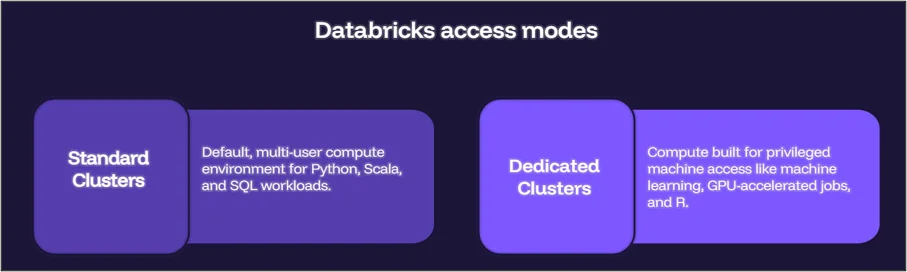
Historically, choosing between compute access modes required understanding a fair amount of internal Databricks terminology before you could even spin up a cluster. That’s changing. Databricks now organizes classic compute, secured by Unity Catalog Lakeguard, into two clearly named access modes:
- Standard Clusters — the default, multi-user compute environment for Python, Scala, and SQL workloads. These clusters (previously called “Shared” clusters) are already the foundation for Databricks’ serverless products and are used by thousands of customers in production today.
- Dedicated Clusters — compute built for workloads that need privileged machine access, such as machine learning, GPU-accelerated jobs, and R. These were formerly known as “Single-User” clusters and are assigned exclusively to one user or, now, one group.
In addition to the renaming, Databricks has introduced Auto mode, a new default selector in the cluster creation UI that automatically recommends the appropriate access mode based on your cluster configuration. Instead of guessing which mode fits a given workload, users get a Databricks-recommended default baked directly into the setup flow. This is a small change on the surface, but it removes a real source of confusion for teams onboarding new users or standardizing cluster creation practices across an organization.
Dedicated Clusters: Fine-Grained Access Control and Group Sharing
Dedicated clusters have traditionally been more restrictive because of the privileged access they grant. Two updates now loosen that restriction without compromising security.
First, fine-grained access control (FGAC) on dedicated clusters is generally available, starting with Databricks Runtime 15.4. This means dedicated clusters can now securely support read operations on tables protected by row- and column-level masking, as well as on views, dynamic views, materialized views, and streaming tables. Support for write operations using MERGE INTO on masked tables is also rolling out through private preview. Under the hood, because Spark tends to overfetch data when processing queries against protected tables, these queries are transparently routed to serverless background compute so that only properly filtered data ever reaches the cluster—billed at standard serverless job rates.
Second, dedicated clusters can now be shared with a group rather than a single user. This is particularly useful for teams like data science groups that want to share one GPU-enabled cluster running a machine learning runtime rather than spinning up a separate cluster per person. When a cluster is assigned to a group, members can automatically attach to it, and their permissions align with the group’s permissions while they work. For auditability, Databricks has added an identity_metadata column to the audit system table that captures both the group whose permissions were used (run_as) and the individual user who executed the command (run_by). So shared access doesn’t come at the cost of traceability.
Introducing Unity Catalog Service Credentials
Perhaps the most structurally significant update is the general availability of Unity Catalog Service Credentials. Previously, connecting to external cloud services like AWS Secrets Manager, Azure Functions, or GCP Secrets Manager typically meant configuring instance profiles on a per-compute basis, a model that’s both hard to scale and prone to misconfiguration, since permissions were tied to machines rather than people.
Service credentials flip that model. Access to external services is now managed per user rather than per machine, and credentials can be created and managed through the UI, API, or Terraform. They work across the full range of Unity Catalog compute, including Standard and Dedicated clusters, SQL warehouses, Delta Live Tables, and serverless compute. Once a service credential is configured, users can access the relevant cloud service without touching their existing code, which simplifies both integration work and ongoing governance.
Conclusion
Simplified cluster creation with Auto mode means fewer misconfigured clusters. Group sharing on dedicated clusters means less redundant infrastructure. And service credentials mean cloud access is tied to identity rather than machines, which is a meaningfully safer default for most organizations.
None of these changes require a dramatic rethink of how your team works today, most are additive and available on Databricks Runtime 15.4 or later. If your organization is already running workloads on Unity Catalog compute, this is a good time to revisit your cluster configurations, review whether dedicated clusters could be consolidated through group sharing, and start migrating from instance profiles to service credentials before they become a bottleneck.
Drop a query if you have any questions regarding Databricks, and we will get back to you quickly.
Empowering organizations to become ‘data driven’ enterprises with our Cloud experts.
- Reduced infrastructure costs
- Timely data-driven decisions
About CloudThat
FAQs
1. What is the difference between Standard and Dedicated clusters?
ANS: – Standard clusters (formerly “Shared”) are Databricks’ default multi-user compute for Python, Scala, and SQL workloads. Dedicated clusters (formerly “Single-User”) are designed for workloads needing privileged machine access, such as ML, GPU, and R workloads, and are assigned to a single user or group.
2. What does Auto mode do during cluster creation?
ANS: – Auto mode automatically selects the recommended compute access mode based on your cluster’s configuration, removing the guesswork of manually choosing between Standard and Dedicated modes.
3. Can multiple users now share a Dedicated cluster?
ANS: – Yes. Dedicated clusters can now be assigned to a group rather than an individual user, allowing team members to share machine learning or GPU resources. At the same time, permissions and audit logs remain properly scoped.


WRITTEN BY Sridhar Andavarapu
Sridhar Andavarapu is a Senior Research Associate at CloudThat, specializing in AWS, Python, SQL, data analytics, and Generative AI. He has extensive experience in building scalable data pipelines, interactive dashboards, and AI-driven analytics solutions that help businesses transform complex datasets into actionable insights. Passionate about emerging technologies, Sridhar actively researches and shares knowledge on AI, cloud analytics, and business intelligence. Through his work, he strives to bridge the gap between data and strategy, enabling enterprises to unlock the full potential of their analytics infrastructure.


 PREV
PREV










Comments