

 Login
Login


 August 10, 2026
|
Voiced by Amazon Polly |
Overview
Serverless computing promises instant resources on demand, but the reality behind that promise is a lot harder than it sounds. Every time a customer runs a query or job on Databricks Serverless, a virtual machine has to boot, pull the right software, and warm itself up before it’s actually useful, and doing that at the scale of millions of VMs a day, across three major cloud providers, is a genuinely hard infrastructure problem.
Databricks recently shared a detailed look at how its engineering teams tackled this exact problem, cutting VM boot times by a factor of seven, from minutes down to seconds. The result isn’t just a nice performance number; it translates into tens of millions of compute minutes saved every day and a noticeably snappier experience for anyone running Apache Spark clusters, SQL warehouses, or LLM serving workloads on the platform.
Pioneers in Cloud Consulting & Migration Services
- Reduced infrastructural costs
- Accelerated application deployment
Introduction
Where VM Boot Time Actually Goes
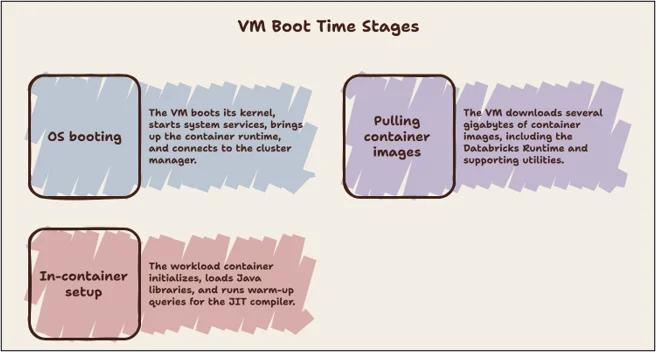
Before optimizing anything, Databricks engineers mapped out the boot sequence for a “Databricks VM”, a virtual machine preloaded with Databricks software, into three stages:
- OS booting — The VM boots its kernel, starts system services, starts the container runtime, and connects to the cluster manager that coordinates the entire fleet.
- Pulling container images — Once connected, the VM downloads several gigabytes of container images, including the Databricks Runtime itself, as well as supporting utilities for logging, health monitoring, and metrics.
- In-container setup — Finally, the workload container initializes. For Databricks Runtime specifically, this means loading thousands of Java libraries and running warm-up queries so the JVM’s just-in-time (JIT) compiler can convert bytecode into optimized native instructions before a customer’s first real query ever runs.
Each of these stages, left unoptimized, adds real minutes to the boot process. Databricks tackled all three independently.
A Purpose-Built Serverless OS
Because Databricks controls the entire software stack for its Serverless offering, engineers built a stripped-down, purpose-specific operating system rather than relying on a generic one. The guiding idea was simple: include only what’s strictly necessary to run containers and reorder the boot sequence so critical services start earlier.
This meant removing components that have no place on an ephemeral cloud VM, such as the USB subsystem, thereby shrinking the OS image and making it easier for cloud providers to cache efficiently. The team also tuned I/O behavior, favoring buffered writes over synchronous ones and reducing blocking during image pulls and container creation. Since these VMs are short-lived and disposable, the usual caution around data durability in the event of crashes or power loss simply doesn’t apply, freeing the team to optimize aggressively for speed.
A Lazy Container Filesystem
The second bottleneck was container image downloads. Pulling several gigabytes of images can take minutes, even on fast connections. Still, prior research cited in the post found that containers typically need only about 6.4% of their image data to start doing useful work. Most of an image’s contents simply aren’t touched right away.
Databricks built a lazy container filesystem to exploit this. Container images are converted at build time into a block device format that supports on-demand loading in 4 MB sectors. When a VM pulls an image, it only fetches the metadata needed to construct the container’s directory structure, filenames, permissions, and layout, and immediately mounts a virtual block device. The container starts running right away, and only when the application first reads a file does the system fetch that specific block of data from the remote registry, caching it locally to avoid repeated network trips.
Checkpointing and Restoring a Pre-Initialized Container
The final, and arguably most involved, optimization tackles the in-container setup, specifically the expensive process of warming up the JVM for Databricks Runtime. Rather than repeating this warm-up procedure from scratch for every single VM, Databricks now takes a full checkpoint of an already-initialized container and uses it as a template for future launches.
During checkpointing, the container runtime freezes the entire process tree. It saves everything needed to reconstruct that exact state later: loaded libraries, open file descriptors, the full JVM heap (including JIT-compiled native code), stack memory, and any files created during setup. This checkpoint is then packaged as a standard OCI/Docker-compatible image and distributed through the same container registry used for regular images. Future VMs can “restore” into this pre-warmed state instead of repeating the setup process.
Conclusion
Cutting VM boot time by 7x is the kind of improvement that customers experience as “Databricks just feels fast,” without ever seeing the layers of engineering underneath, a custom-built OS, a lazy-loading container filesystem, and a checkpoint/restore system for pre-warmed runtimes. Each optimization on its own solves a different bottleneck in the boot sequence, and together they turn a process that used to take minutes into one that takes seconds.
It’s a good reminder that the “serverless” experience customers take for granted is built on genuinely hard, unglamorous systems engineering, and that investing in it pays off across the entire platform.
Drop a query if you have any questions regarding Databricks, and we will get back to you quickly.
Empowering organizations to become ‘data driven’ enterprises with our Cloud experts.
- Reduced infrastructure costs
- Timely data-driven decisions
About CloudThat
FAQs
1. What are the three stages of booting a Databricks VM?
ANS: – OS booting (kernel, system services, container runtime, connecting to the cluster manager), pulling container images (downloading the Databricks Runtime and supporting utilities), and in-container setup (initializing the runtime environment, including JVM warm-up for Databricks Runtime).
2. What is a "lazy container filesystem" and why does it help?
ANS: – It’s a system that converts container images into a block device format, so VMs download only the data they need when they need it, rather than the entire image upfront. Since containers typically use a small fraction of their image data early on, this cuts image pull time from minutes to seconds.
3. Does this optimization affect data durability or reliability?
ANS: – No. These optimizations specifically target short-lived, ephemeral VMs where aggressive I/O tuning and buffered writes are safe because there’s no risk of losing durable customer data — Databricks Serverless still manages persistent data through its standard storage and governance layers.


WRITTEN BY Sridhar Andavarapu
Sridhar Andavarapu is a Senior Research Associate at CloudThat, specializing in AWS, Python, SQL, data analytics, and Generative AI. He has extensive experience in building scalable data pipelines, interactive dashboards, and AI-driven analytics solutions that help businesses transform complex datasets into actionable insights. Passionate about emerging technologies, Sridhar actively researches and shares knowledge on AI, cloud analytics, and business intelligence. Through his work, he strives to bridge the gap between data and strategy, enabling enterprises to unlock the full potential of their analytics infrastructure.


 PREV
PREV











Comments