

 Login
Login


 July 20, 2026
|
Voiced by Amazon Polly |
Introduction
As organizations move beyond simple chatbots and begin building intelligent AI agents, one challenge quickly becomes apparent: connecting large language models (LLMs) with real-world business systems.
An AI assistant doesn’t just need to generate text, it needs to access company data, call APIs, follow business rules, remember context, and perform actions securely. Building all of this from scratch is complex.
This is where Microsoft Semantic Kernel (SK) comes in.
Semantic Kernel is a lightweight, open-source SDK that helps developers integrate AI models into existing applications using C#, Python, or Java. Instead of replacing your application, it serves as an orchestration layer between your business logic and AI models, enabling LLMs to interact with APIs, databases, plugins, and enterprise services in a secure, structured way.
Microsoft and several Fortune 500 companies use Semantic Kernel because it provides a flexible, modular, and production-ready foundation for enterprise AI applications.
Pioneers in Cloud Consulting & Migration Services
- Reduced infrastructural costs
- Accelerated application deployment
Why Semantic Kernel?
Without an orchestration framework, developers typically have to manage manually:
- Prompt engineering
- Function calling
- Context management
- Memory storage
- API integrations
- Security
- Logging
- Multi-agent workflows
Semantic Kernel brings all these capabilities together in a single SDK, significantly reducing development effort while improving reliability and maintainability.
Key Features
- Kernel – The Kernel is the core component of Semantic Kernel that manages AI services, plugins, memory, and workflows, acting as the central controller for AI operations.
- AI Service Connectors – Semantic Kernel provides a unified interface to integrate multiple AI providers, enabling easy model switching without changing the application’s core logic.
- Plugins (Skills) – Plugins allow AI models to interact with external systems by exposing APIs and custom functions as callable tools for executing real-world tasks.
- Memory and Vector Store Integration – Semantic Kernel integrates with vector databases to support RAG, enabling AI agents to retrieve relevant context for more accurate and informed responses.
- Planning and Agent Orchestration – Semantic Kernel supports multi-agent orchestration, enabling AI agents to collaborate and execute complex workflows autonomously
- Enterprise-Ready Features – Semantic Kernel provides built-in support for logging, monitoring, security, and governance, making it suitable for production-ready enterprise AI applications.
- Future-Proof Architecture – Semantic Kernel’s modular architecture enables easy adoption of new AI models while minimizing changes to existing applications.
Common Use Cases
Semantic Kernel is widely used in enterprise applications where AI needs to interact with business systems, automate workflows, and access organizational knowledge. Some of its most common use cases include:
- Conversational Enterprise Assistants – Build intelligent chat assistants that can interact with internal databases, CRM platforms, and ERP systems to answer user queries and perform business tasks.
- Retrieval-Augmented Generation (RAG) – Develop AI assistants that retrieve information from company documents, policies, and knowledge bases to provide accurate and context-aware responses.
- Workflow Automation – Automate routine business processes such as drafting emails, updating records, scheduling meetings, and triggering workflows based on user requests.
- Customer Support Copilots – Create AI-powered support assistants that combine historical customer interactions with real-time business data to deliver faster, more personalized support.
- Multi-Agent Systems – Enable multiple specialized AI agents to collaborate, divide tasks, and work together to solve complex business problems efficiently.
- Cross-Platform Plugin Sharing – Reuse plugins built with OpenAPI standards across different applications and Microsoft AI ecosystems, reducing development effort and improving consistency.
Code Examples
The following examples demonstrate how to use Semantic Kernel with Python, from creating a kernel and registering plugins to executing prompt functions.
- Creating a Kernel
The first step is to create a Kernel and connect it to an AI service such as Azure OpenAI.
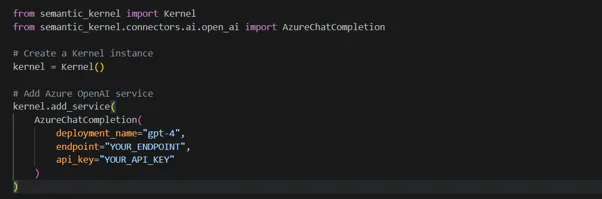
Explanation:
This example creates a Semantic Kernel instance and configures it to use Azure OpenAI for processing AI requests. The kernel acts as the central component that manages all AI interactions.
- Registering a Plugin
Plugins extend the AI model’s capabilities by exposing custom functions it can invoke when needed.
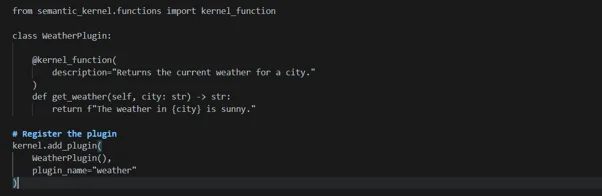
Explanation:
This example creates a custom WeatherPlugin and registers it with the kernel. Once registered, the AI model can automatically call the get_weather() function whenever a user’s request requires weather information.
- Creating a Prompt Function
Semantic Kernel allows prompts to be defined as reusable functions, making prompt management more structured.
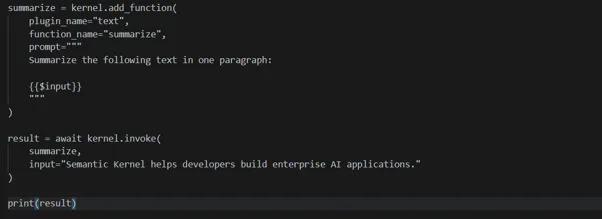
Explanation:
This example creates a reusable summarization function. When invoked, the kernel sends the input to the configured language model and returns a concise summary.
- Using Chat Completion
Once the kernel is configured, you can send prompts directly to the language model.
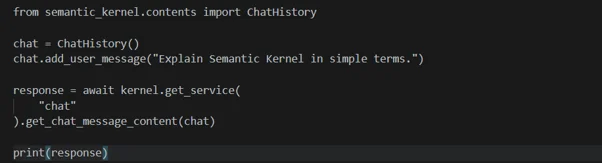
Explanation:
This example sends a user message to the configured chat model and prints the generated response. It demonstrates how Semantic Kernel manages conversations with an LLM.
- Invoking a Plugin Function
After registering a plugin, its functions can be invoked directly through the kernel.

Explanation:
This example calls the get_weather() function from the registered Weather plugin. In real-world applications, such plugins can connect to external APIs, databases, or enterprise services to perform business operations.
Real-World Implementations
Leading enterprises are adopting Semantic Kernel to build intelligent, scalable, and production-ready AI applications. Below are some notable examples of how organizations are using the framework.
- Fujitsu – Kozuchi AI Agent
Fujitsu uses the Semantic Kernel to power its Kozuchi AI Agent, an enterprise assistant that analyzes business scenarios, makes recommendations, and selects the most suitable AI model for different tasks. This enables intelligent task orchestration while leveraging multiple specialized AI models.
- Suntory Global Spirits – Enterprise Chatbots
Suntory Global Spirits built AI-powered chatbots using Semantic Kernel to integrate with enterprise platforms such as SAP and Salesforce. By combining plugins with natural language capabilities, the company developed reliable, multilingual chatbots that can be deployed quickly while maintaining enterprise-grade scalability and governance.
- ServiceNow – Multi-Agent Incident Management
ServiceNow leverages the Semantic Kernel to coordinate multiple AI agents to manage high-priority IT incidents. These agents collaborate to analyze incidents, track ongoing actions, and assist support teams, significantly reducing response times and improving operational efficiency.
Conclusion
Semantic Kernel simplifies the development of enterprise AI applications by providing a structured framework for connecting large language models to business systems, APIs, and external data sources.
Whether you’re creating conversational assistants, automating workflows, or developing multi-agent systems, Semantic Kernel offers the flexibility and enterprise-grade capabilities needed to accelerate AI adoption. As organizations continue to embrace AI, Semantic Kernel provides a powerful foundation for building reliable, future-ready intelligent applications.
Drop a query if you have any questions regarding Semantic Kernel, and we will get back to you quickly.
Empowering organizations to become ‘data driven’ enterprises with our Cloud experts.
- Reduced infrastructure costs
- Timely data-driven decisions
About CloudThat
FAQs
1. What is the difference between Semantic Kernel and LangChain?
ANS: – Semantic Kernel is designed for enterprise AI applications with built-in support for plugins, orchestration, and Microsoft ecosystem integration, while LangChain focuses on rapid AI application development.
2. Do I need Azure OpenAI to use Semantic Kernel?
ANS: – No. Semantic Kernel supports Azure OpenAI, OpenAI, Hugging Face, and other AI providers through its connector framework.
3. When should I use Semantic Kernel instead of calling an LLM API directly?
ANS: – Use Semantic Kernel when your application requires memory, plugin integration, workflow automation, or AI agent orchestration beyond simple text generation.


WRITTEN BY Livi Johari
Livi Johari is a Research Associate at CloudThat with a keen interest in Data Science, Artificial Intelligence (AI), and the Internet of Things (IoT). She is passionate about building intelligent, data-driven solutions that integrate AI with connected devices to enable smarter automation and real-time decision-making. In her free time, she enjoys learning new programming languages and exploring emerging technologies to stay current with the latest innovations in AI, data analytics, and AIoT ecosystems.


 PREV
PREV











Comments