

 Login
Login


 June 23, 2026
|
Voiced by Amazon Polly |
Introduction
Traditional contact centers, which are often built on legacy telephony technologies, fail to meet these changing expectations due to limited scalability, high operational costs, and limited flexibility.
Amazon Connect, an AWS cloud-based contact center solution, enables organizations to create contemporary, scalable, and intelligent customer interaction platforms without the complexities of infrastructure management. It enables organizations to transition from inflexible, hardware-based systems to agile, software-defined contact centers.
Pioneers in Cloud Consulting & Migration Services
- Reduced infrastructural costs
- Accelerated application deployment
Understanding Amazon Connect in the Cloud Ecosystem
Amazon Connect is a fully managed Contact Center as a Service (CCaaS) solution that enables businesses to establish and run customer support centers quickly. Unlike traditional systems, it does not require upfront hardware expenditures and allows for on-demand scalability.
At its core, Amazon Connect integrates seamlessly with other AWS services, such as:
- AWS Lambda for serverless backend logic
- Amazon Lex for conversational AI and chatbots
- Amazon S3 for call recordings and data storage
- Amazon CloudWatch for monitoring and observability
This integration enables organizations to build event-driven, intelligent, and highly customizable contact center solutions.
Why Amazon Connect Matters?
Amazon Connect brings a paradigm shift in how contact centers are designed and operated. Key benefits include:
- Scalability on Demand
Automatically scales to handle thousands of concurrent interactions without manual intervention. - Pay-as-You-Go Pricing
Eliminates capital expenditure and reduces costs by charging only for actual usage. - Omnichannel Support
Supports voice and chat interactions within a unified platform. - Ease of Setup
Contact centers can be deployed in minutes instead of weeks or months. - AI-Powered Automation
Integration with Amazon Lex enables intelligent IVR systems and self-service capabilities. - Global Reach
Supports multiple regions and telephony options for global customer engagement
Core Components of Amazon Connect Architecture
- Contact Flows (IVR Logic)
Contact flows define how customer interactions are handled. These visual workflows allow businesses to:
- Route calls based on user input
- Integrate backend systems
- Implement business logic without complex coding
- Contact Control Panel (CCP)
A web-based interface used by agents to manage customer interactions. It provides:
- Call controls (mute, hold, transfer)
- Customer information
- Integration with CRM systems
- Amazon Lex (Conversational AI)
Enables chatbot capabilities for:
- Automating repetitive queries
- Enhancing self-service options
- Reducing agent workload
- AWS Lambda Integration
AWS Lambda functions allow dynamic interaction with backend systems, such as:
- CRM lookups
- Ticket creation
- Authentication workflows
- Data Storage and Analytics
- Call recordings stored in Amazon S3
- Metrics and logs monitored via Amazon CloudWatch
- Real-time and historical reporting for insights
Step-by-Step Implementation
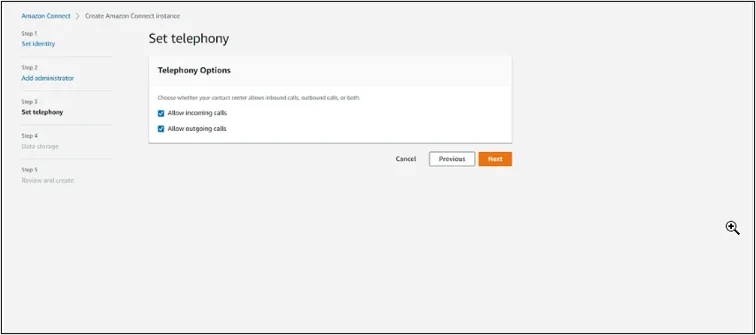
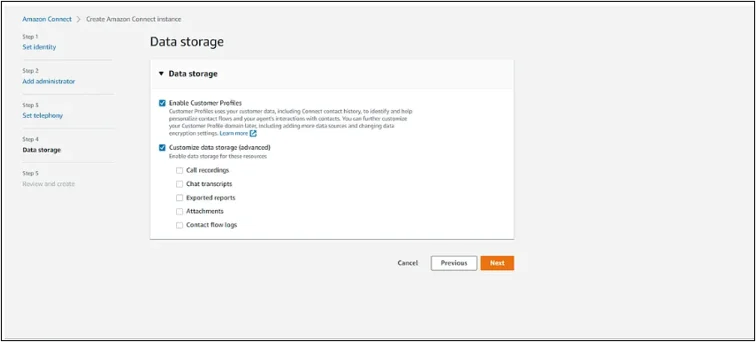
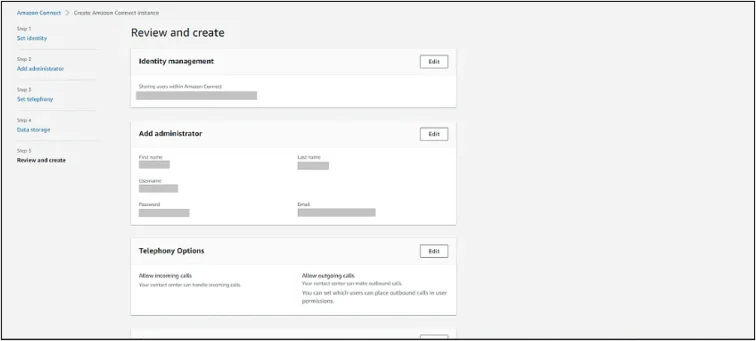
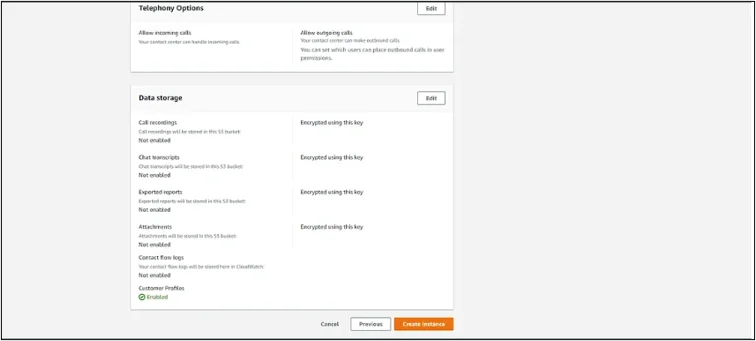
Step 1: Create an Amazon Connect Instance
- Navigate to AWS Console → Amazon Connect
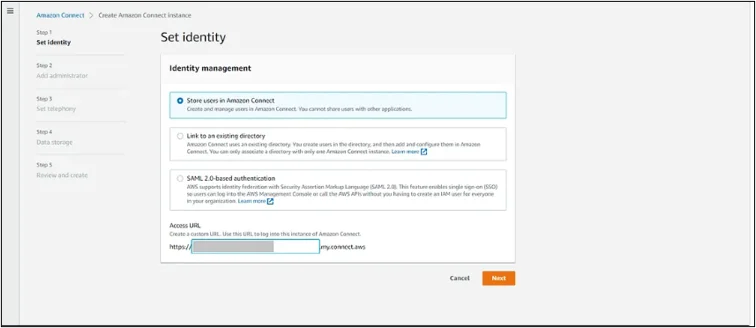
- Create a new instance
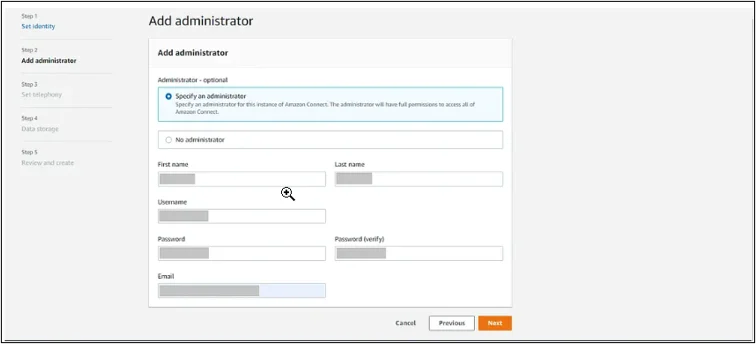
- Configure identity management and telephony options
Step 2: You can log in to your instance using 2 options,
a) Log in for emergency access (Use only when needed in case of emergency, not a best practice to use this option)
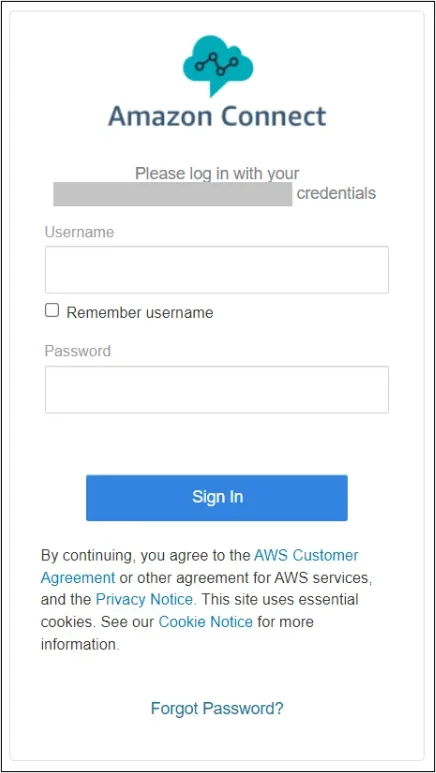
b) Using Access URL
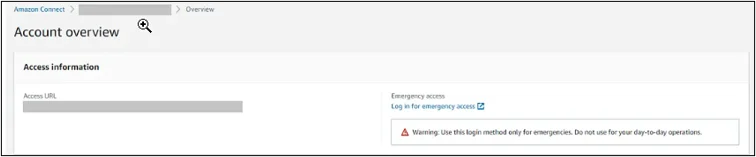
Open the Access URL in a new tab. Enter your Username and Password, then click on Sign In.
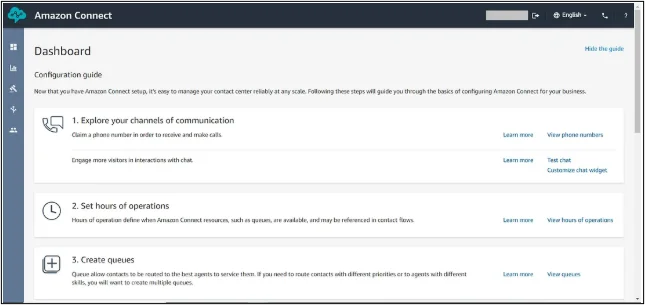
Step 3: Access the Amazon Connect Dashboard
After logging in, you will be redirected to the Amazon Connect dashboard. From here:
- Navigate to Routing → Contact Flows
- This is where you design IVR workflows
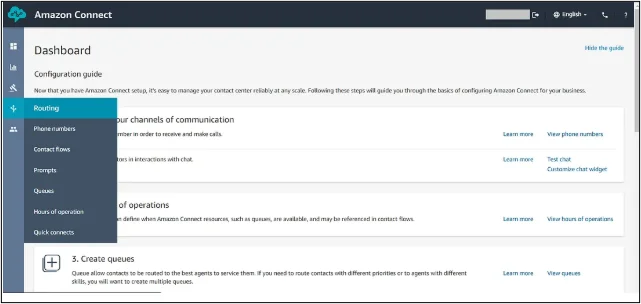
Step 4: Click on “Create contact flow”

You will be taken to a contact flow designer page, which starts with an entry point node.
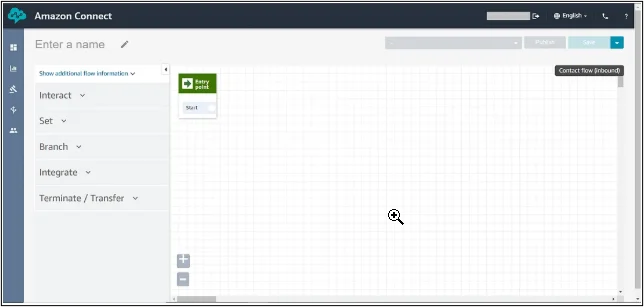
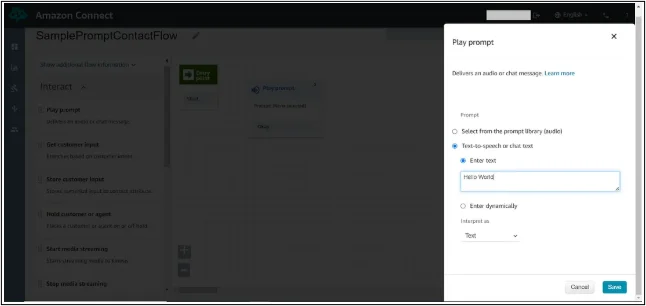
Rename your contact flow by clicking the edit icon in the top-left corner of the page. Now, from the Interact section, Drag and drop the Play Prompt node into the designer window.
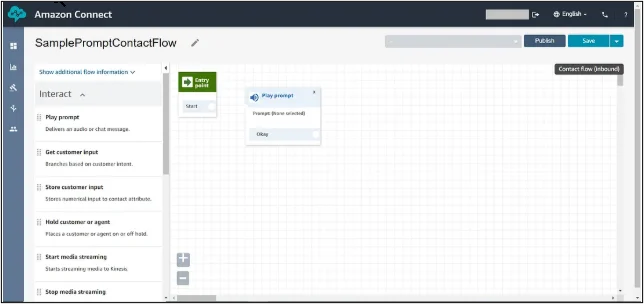
Double-click on the node and select the “Text-to-speech or chat text” option, and under the Enter text box, enter “Hello World” or any message that you want.
Now, from the Terminate/Transfer section, drag and drop the Disconnect node.
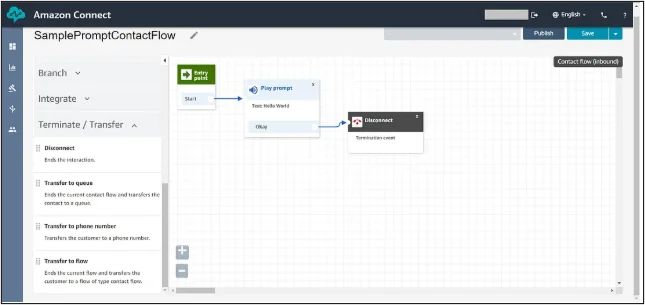
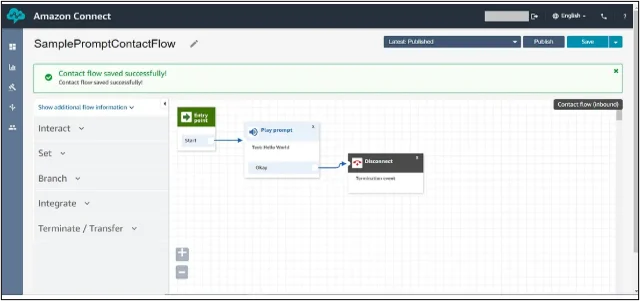
Click on Save followed by the Publish button to publish your contact flow.
Step 5: From the Navigation menu on the left, under Routing, select Phone numbers.
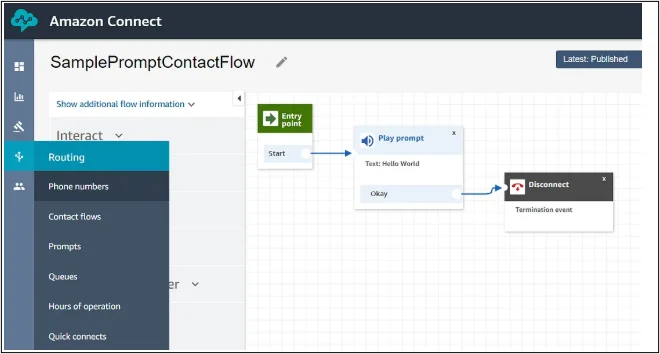
Click on the ” Claim a number button. You can choose either a toll-free number or a DID number. I chose a toll-free number. You can choose any one of them. Choose the Country (USA +1) and select a number from the ones listed by Connect.
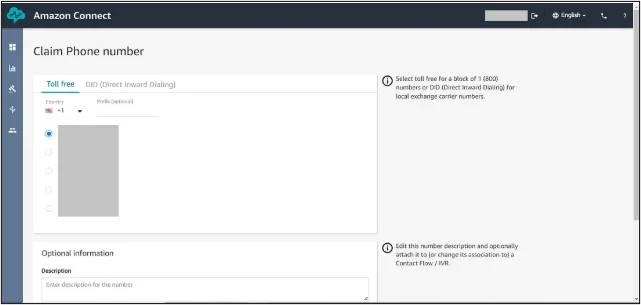
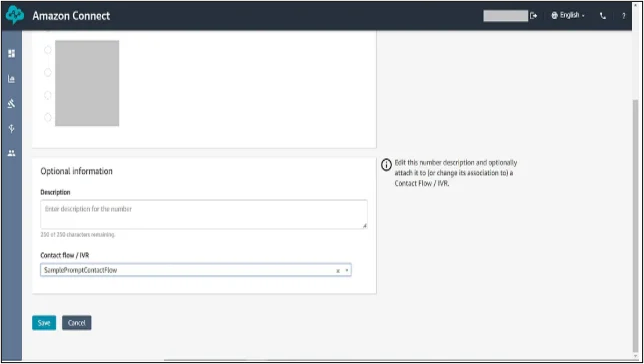
Step 6: Scroll to the bottom of the page and select the Contact flow/IVR you just created by its name in the dropdown menu. After that, Click on Save.
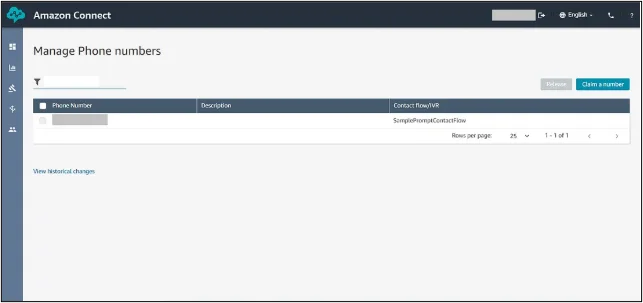
Your claimed phone number will be listed on the Manage phone numbers page, along with the contact flow it is mapped to.
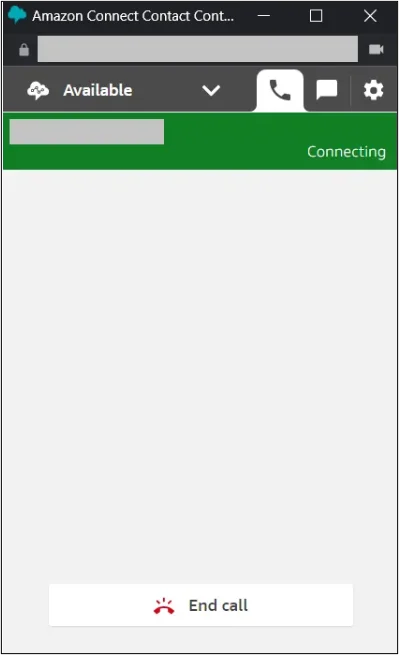
Click on the phone icon in the top right of the screen next to the language setting. It will open a new pop-up window which looks like the one below. This is the softphone Connect provides for testing your Contact flows. Change the status of your agent from Offline to Available, and then click on the Number pad.
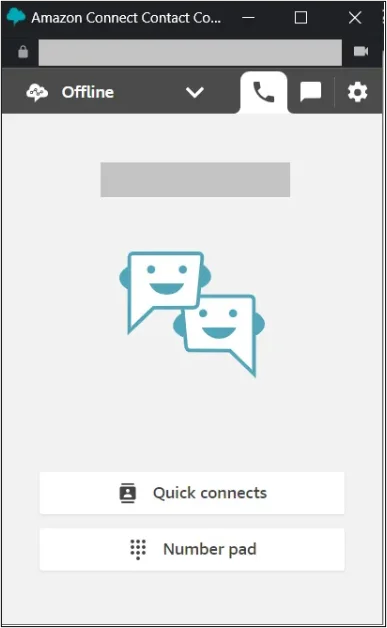
Dial the number you claimed before and click Call. The softphone should connect the call, and you should hear the prompt that you configured in the Contact flow. In my case, “Hello World”.
Once the setup is complete, let’s understand how Amazon Connect processes customer interactions.
A typical workflow in Amazon Connect follows an event-driven model:
- A customer initiates a call or chat session
- Amazon Connect processes the interaction using predefined contact flows
- Inputs are captured and evaluated (DTMF or voice)
- AWS Lambda functions are invoked for backend processing if required
- Calls are routed to appropriate agents or handled via bots
- Interaction data is stored and monitored for analytics
This model ensures high availability, low latency, and intelligent routing.
Key Use Cases
Amazon Connect is widely adopted across industries for:
- Customer Support Centers
Handling inbound and outbound support operations - E-commerce Assistance
Managing order queries, returns, and customer engagement - Healthcare Support Lines
Appointment scheduling and patient assistance - Banking and Financial Services
Secure customer interactions and automated query handling - IT Helpdesk Automation
Internal support systems with chatbot integration
Best Practices for Implementing Amazon Connect
To maximize the value of Amazon Connect, organizations should follow these practices:
- Design Modular Contact Flows
Keep workflows reusable and easy to manage - Leverage Serverless Integrations
Use AWS Lambda for scalable backend logic - Implement Role-Based Access Control
Use IAM policies to enforce least privilege - Enable Monitoring and Logging
Use CloudWatch for real-time insights and alerts - Optimize Customer Experience
Continuously refine IVR flows based on analytics - Adopt AI for Automation
Integrate Amazon Lex to reduce agent dependency
Outcome and Business Impact
Organizations adopting Amazon Connect typically achieve:
- Reduced infrastructure and operational costs
- Improved scalability and performance during peak loads
- Enhanced customer satisfaction with faster response times
- Increased agent productivity through automation
- Better visibility with real-time analytics and reporting
- Faster deployment of new features and workflows
Conclusion
Amazon Connect represents a significant shift from traditional contact centers to cloud-native, intelligent customer engagement platforms. By leveraging AWS services and serverless architecture, businesses can build scalable, flexible, and cost-efficient solutions tailored to modern customer expectations.
Drop a query if you have any questions regarding Amazon Connect, and we will get back to you quickly.
Empowering organizations to become ‘data driven’ enterprises with our Cloud experts.
- Reduced infrastructure costs
- Timely data-driven decisions
About CloudThat
FAQs
1. What is Amazon Connect, and how is it different from traditional contact centers?
ANS: – Amazon Connect is a cloud-based contact center as a service (CCaaS) that eliminates the need for on-premises hardware. Unlike traditional systems, it offers on-demand scalability, pay-as-you-go pricing, and seamless integration with AWS services, enabling faster deployment and greater flexibility.
2. Can Amazon Connect support both voice and chat channels?
ANS: – Yes, Amazon Connect supports omnichannel communication, including voice and chat. It provides a unified platform where agents can handle multiple interaction types, ensuring a consistent customer experience across channels.
3. How does Amazon Connect integrate with backend systems like CRM?
ANS: – Amazon Connect integrates with backend systems using AWS Lambda. AWS Lambda functions can fetch or update data in CRM systems, enabling features like customer identification, ticket creation, and real-time data retrieval during interactions.


WRITTEN BY Ayush Agarwal
Ayush Agarwal works as a Subject Matter Expert at CloudThat. He is a certified AWS Solutions Architect Professional with expertise in designing and implementing scalable cloud infrastructure solutions. Ayush specializes in cloud architecture, infrastructure as code, and multi-cloud deployments, helping organizations optimize their cloud strategies and achieve operational excellence. With a deep understanding of AWS services and best practices, he guides teams in building robust, secure, and cost-effective cloud solutions. Ayush is passionate about emerging cloud technologies and continuously enhances his knowledge to stay at the forefront of cloud innovation. In his free time, he enjoys exploring new AWS services, experimenting with technologies, and trekking to discover new places and connect with nature.


 PREV
PREV












Comments