

 Login
Login

 June 18, 2026
|
Voiced by Amazon Polly |
In today’s data-driven world, organizations no longer rely solely on historical insights; they need decisions to be made in real time. This is where Microsoft Fabric Real-Time Analytics becomes highly relevant. It enables businesses to ingest, process, and analyze streaming data in near real time, helping them respond quickly to events such as fraud detection, IoT monitoring, or live dashboards.
This blog explains how real-time analytics works in Microsoft Fabric and provides a practical implementation approach for data professionals.
Start Learning In-Demand Tech Skills with Expert-Led Training
- Industry-Authorized Curriculum
- Expert-led Training
What is Real-Time Analytics in Microsoft Fabric?
Microsoft Fabric Real-Time Analytics is designed to process continuous streams of data with minimal latency. Unlike traditional batch processing, where data is analyzed after storage, real-time analytics allows insights to be generated instantly.
Key capabilities include:
- Continuous data ingestion from multiple sources
- Stream processing with low latency
- Integration with analytics and visualization tools
- Unified experience across the data lifecycle
This makes it ideal for scenarios like telemetry analysis, financial transactions, and operational monitoring.
Core Components for Real-Time Analytics
To implement Real-Time Data Processing in Fabric, it is important to understand its core components.
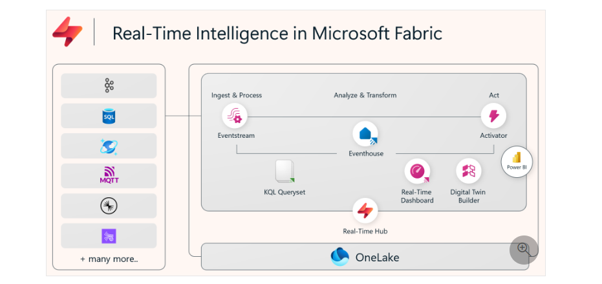
Fig 1: Architecture of Real-Time Intelligence in Microsoft Fabric | Source: Microsoft Learn
This architecture illustrates how Microsoft Fabric Real-Time Intelligence ingests, processes, analyzes, and visualizes streaming data using components such as Eventstream, Eventhouse, KQL Queryset, and Power BI. It enables organizations to derive real-time insights and take faster actions through unified analytics on OneLake.
- Event Streams: Event streams act as the entry point for real-time data. They collect and route streaming data from sources such as IoT devices, applications, and logs.
- Data Activator: Data Activator helps trigger actions based on conditions in streaming data. For example, sending alerts when a threshold is exceeded.
- KQL Database: Fabric uses Kusto Query Language (KQL) databases to store and analyze streaming data efficiently.
- Integration with Power BI: Real-time dashboards can be built to visualize streaming insights instantly, enabling business users to monitor live data.
If you would like to strengthen your expertise in real-time data processing and analytics on Microsoft Fabric, you can consider the DP-700: Implementing Data Engineering Solutions Using Microsoft Fabric certification course from CloudThat. This course focuses on practical real-time intelligence concepts, including event stream processing, real-time dashboards, data ingestion, KQL queries, and analytics using Fabric services, with an emphasis on hands-on implementation and industry-focused scenarios rather than theoretical learning.
Implementation Guide for Real-Time Analytics
Implementing Fabric Streaming Analytics involves a structured approach.
- Identify Data Sources: Start by identifying streaming data sources such as IoT sensors, application logs, clickstream data, and financial transactions. Ensure the data source supports continuous data flow.
- Create an Event stream: Set up an event stream in Fabric to ingest incoming data. This acts as a pipeline connecting data producers to Fabric services. Validate schema before ingestion, ensure proper formatting, and monitor latency.
- Process Data in Real-Time: Once data is ingested, apply transformations such as filtering unwanted data, aggregating metrics, and detecting anomalies. This ensures meaningful insights are generated.
- Store in KQL Database: Store processed data in a KQL database for fast querying, enabling high-performance analytics and time-series analysis.
- Visualize Using Dashboards: Integrate with Power BI to create real-time dashboards like live sales tracking, system monitoring, or fraud detection.
- Set Alerts with Data Activator: Configure rules to trigger alerts or automated actions such as notifications when thresholds are exceeded, or anomalies occur.
To further enhance your understanding of Real-Time Intelligence in Microsoft Fabric, explore components such as Eventstream, Eventhouse, Real-Time Dashboards, and Activator to build scalable event-driven analytics solutions with real-time insights and automated actions.
Use Cases of Real-Time Analytics
Real-time analytics in Microsoft Fabric can be applied across industries.
- Retail: Monitor customer behavior in real time
- Finance: Detect fraudulent transactions instantly
- Healthcare: Track patient vitals continuously
- Manufacturing: Monitor machine performance and failures
These use cases highlight the importance of timely insights in decision-making.
You can also explore DP-603 learning paths, which will explore Microsoft Fabric Real-Time Intelligence training modules to better understand Eventstream, Eventhouse, KQL databases, and streaming analytics implementation in enterprise environments
Real-Time Analytics Dashboard Overview
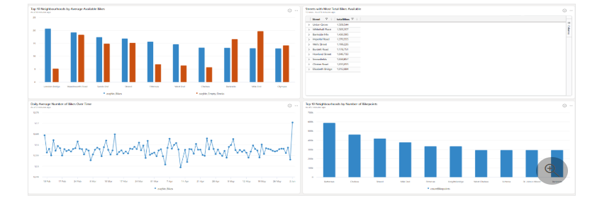
Fig 2: Real-Time Analytics dashboard sample in Microsoft Fabric | Source: Microsoft Learn
This dashboard demonstrates the capabilities of Microsoft Fabric Real-Time Analytics in monitoring live operational data. It provides insights into bike availability, empty docks, and station utilization across different neighborhoods. The visualizations help organizations track trends, identify high-demand locations, and optimize resource allocation in real time. Time-series analytics enables continuous monitoring of changing data patterns throughout the day. Overall, the dashboard highlights how Real-Time Intelligence enables faster, data-driven decision-making.
Best Practices
To successfully implement Microsoft Fabric Real-Time Analytics, consider the following:
- Ensure low-latency data ingestion pipelines
- Design scalable architectures for high-volume data
- Use efficient query patterns in KQL
- Monitor performance and optimize regularly
- Implement proper security and governance controls
Real-Time Data Future
Real-time analytics is becoming a necessity for organizations aiming to stay competitive. With Microsoft Fabric Real-Time Analytics, businesses can efficiently process streaming data, gain instant insights, and act proactively.
By leveraging components such as event streams, KQL databases, and Power BI dashboards, organizations can build a comprehensive real-time analytics solution. Following a structured implementation approach ensures scalability, performance, and meaningful outcomes.
Upskill Your Teams with Enterprise-Ready Tech Training Programs
- Team-wide Customizable Programs
- Measurable Business Outcomes
About CloudThat


WRITTEN BY Sangeetha S
Sangeetha S is a Subject Matter Expert at CloudThat, specializing in Data, and Networking. She is a Microsoft Certified Trainer with over 10+ years of experience in technical training. She has trained more than 3,000 professionals from India, the United States and the United Kingdom to upskill in Azure cloud services, data engineering and AI technologies. Known for simplifying complex concepts and delivering hands-on, impactful sessions, she brings deep technical knowledge and practical insights into every learning experience. Sangeetha's passion for bridging technology with business outcomes reflects in her unique approach to learning and development. "


 PREV
PREV












Comments