

 Login
Login


 June 18, 2026
|
Voiced by Amazon Polly |
Organizations today operate in highly connected digital environments where employees, partners, and contractors require secure access to business applications from anywhere. Managing user identities manually is no longer practical, as enterprises constantly deal with employee onboarding, role changes, temporary access requirements, and offboarding across multiple systems.
To address these challenges, organizations are increasingly adopting intelligent identity lifecycle automation using Microsoft Graph and Microsoft Copilot.
In this blog, we will explore how Microsoft Graph and Copilot can transform enterprise identity lifecycle management through automation and AI-powered assistance.
Start Learning In-Demand Tech Skills with Expert-Led Training
- Industry-Authorized Curriculum
- Expert-led Training
Why Identity Lifecycle Automation Is Important
Identity has become the new security perimeter in modern enterprises. Employees access organizational resources through cloud applications, mobile devices, remote networks, and collaboration platforms. Because of this, controlling user identities and permissions is essential for maintaining both operational efficiency and cybersecurity.
In many organizations, identity-related tasks are still handled manually. When a new employee joins, IT administrators must create Microsoft 365 accounts, assign licenses, configure mailbox access, grant Teams permissions, and add the employee to security groups. Similarly, when employees leave the organization, administrators need to disable accounts, revoke active sessions, remove licenses, and archive data.
Manual operations create several challenges. Delayed onboarding impacts employee productivity because new users cannot access the required tools immediately. Improper offboarding may leave orphaned accounts active, creating security vulnerabilities and compliance risks.
Understanding Microsoft Graph
Microsoft Graph is the unified API platform for Microsoft cloud services. It provides a centralized interface to interact with Microsoft 365, Microsoft Entra ID, Teams, Outlook, SharePoint, OneDrive, and other Microsoft services.
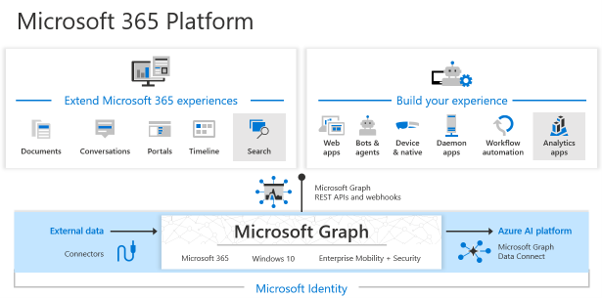
Fig 1: Microsoft 365 platform with Microsoft Graph
Microsoft Graph enables organizations to automate user and access management through APIs. Instead of performing repetitive tasks manually through admin portals, administrators and developers can execute operations programmatically.
Using Microsoft Graph, organizations can:
- Create and manage user accounts
- Assign Microsoft 365 licenses
- Manage group memberships
- Configure authentication settings
- Monitor user activities
- Automate access governance
Automating Employee Onboarding
One of the most common use cases for identity lifecycle automation is employee onboarding. In traditional environments, onboarding often requires coordination between HR teams, IT administrators, and department managers. This process can take hours or even days before employees receive complete access to required systems.
With Microsoft Graph automation, onboarding workflows become faster and more efficient.
When an employee record is created in the HR system, the onboarding workflow can automatically trigger identity provisioning activities. Microsoft Graph APIs can create the user account in Microsoft Entra ID, assign Microsoft 365 licenses, configure mailbox settings, and add the employee to department-specific groups.
Designing identity architectures is a key focus area in advanced Azure architecture training programs. To design architecture and secure identities, Azure certification courses are available.
Managing Role Changes and Dynamic Access
In modern enterprises, employees frequently move between departments, take on temporary projects, or assume new responsibilities.
Microsoft Graph and Microsoft Entra ID support dynamic access management by automating permission updates in response to organizational policies.
For example, if an employee moves from the sales department to finance, their previous access can be removed automatically while finance-related permissions are assigned immediately. Similarly, temporary project access can expire automatically after a specified period.
Strengthening Security Through Automated Offboarding
Offboarding is one of the most critical processes in identity lifecycle management. Delays in removing access after an employee exit can create serious security risks, especially if former employees retain access to sensitive systems or data.
Many organizations struggle with incomplete offboarding because permissions exist across multiple applications and cloud services. Manual processes increase the possibility of missed accounts or forgotten permissions.
Using Microsoft Graph automation, organizations can implement secure and immediate offboarding workflows. Once an employee exit is initiated, the workflow can automatically disable the user account, revoke active sign-in sessions, remove licenses, transfer mailbox ownership, and archive OneDrive data.
The Role of Microsoft Copilot
While Microsoft Graph provides the automation framework, Microsoft Copilot introduces AI-driven assistance into identity management operations.
Traditionally, administrators needed scripting expertise and API knowledge to implement automation solutions. Writing PowerShell scripts, configuring workflows, and troubleshooting API integrations required advanced technical skills.
Microsoft Copilot simplifies this process by enabling administrators to use natural language prompts to generate automation scripts and workflows.
For example, an administrator can ask Copilot to:
- Generate a Graph API script for onboarding users
- Identify inactive accounts older than 90 days
- Create a report of privileged users without MFA enabled
- Suggest Conditional Access policies for contractors
- Explain Graph API responses and permissions
Copilot accelerates automation development by reducing the time and expertise required to build identity management solutions. Microsoft certification helps organizations adopt automation more quickly without extensive scripting experience.
Building a Modern Identity Automation Architecture
A modern identity lifecycle automation architecture typically integrates HR systems, workflow platforms, Microsoft Entra ID, and security monitoring tools into a unified ecosystem.
The HR management system acts as the authoritative source for employee data. When changes occur, workflow tools such as Power Automate trigger automation processes. Microsoft Graph APIs then execute provisioning, license assignment, access updates, and offboarding operations. To implement Microsoft Graph APIs, Azure certifications can be highly beneficial.
This integrated architecture creates a secure, scalable, and policy-driven identity management framework for enterprises.
Business Benefits of Identity Lifecycle Automation
Organizations implementing Microsoft Graph and Copilot-based automation experience several operational and security benefits.
Automated onboarding improves employee productivity by ensuring immediate access to required systems.
Security improves because permissions are consistently managed and stale accounts are automatically removed. Organizations can also enforce Zero Trust principles more effectively through automated policy enforcement.
Future of Identity Automation
As enterprises continue adopting cloud-first strategies and hybrid work environments, identity lifecycle management has become a fundamental part of cybersecurity and IT operations. Manual identity administration cannot meet the demands of modern digital ecosystems.
By combining Microsoft Graph with Microsoft Copilot, organizations can automate onboarding, access governance, role management, and offboarding with greater efficiency and security.
Upskill Your Teams with Enterprise-Ready Tech Training Programs
- Team-wide Customizable Programs
- Measurable Business Outcomes
About CloudThat


WRITTEN BY Kunal Khadke
Kunal Khadke is a Subject Matter Expert and Microsoft Certified Trainer at CloudThat, with a strong focus on Microsoft Azure Infrastructure and security. With 10+ years of experience in cloud, he has trained over 5000 professionals. Kunal has a strong passion for empowering IT professionals and organizations on their cloud journey. He has hands-on experience in cloud architecture, deployment, and security. He delivers practical, real-world training that bridges the gap between certification and implementation. Kunal has trained professionals across industries, helping them master Azure services such as Virtual Networks, Azure Active Directory, Security, Networking, and more. Known for his clear teaching style and deep technical knowledge, Kunal is dedicated to shaping the next generation of cloud experts.


 PREV
PREV












Comments