

 Login
Login


 June 18, 2026
|
Voiced by Amazon Polly |
As organizations modernize their infrastructure, the need to run cloud-native services closer to where data is generated has never been greater. Microsoft addresses this requirement through Azure Local (formerly Azure Stack HCI), enabling customers to run Azure services in their own datacenters, branch offices, and edge locations. A key strength of Azure Local is its flexibility to operate in both connected and disconnected modes, allowing businesses to balance cloud benefits with regulatory, network, and operational constraints.
This blog explores what connected and disconnected modes mean in Azure Local, how they work, and when to choose each.
Start Learning In-Demand Tech Skills with Expert-Led Training
- Industry-Authorized Curriculum
- Expert-led Training
Understanding Azure Local
Azure Local is an extension of Azure that brings cloud-managed infrastructure and services on‑premises. It integrates tightly with Azure for lifecycle management, billing, and monitoring, while running workloads locally on validated hardware. Core components include Windows Server–based infrastructure, software-defined storage, Hyper‑V virtualization, and Azure Arc for centralized governance.
Connected Mode: Full Azure Integration
Connected mode is the default and recommended deployment model for Azure Local. In this mode, the system maintains continuous or periodic connectivity to Azure.
Key Characteristics
- Azure Arc integration for policy, monitoring, and governance
- Centralized management via the Azure portal
- Cloud-based updates for OS, drivers, and firmware
- Usage-based billing and subscription tracking
- Hybrid services such as Azure Monitor, Defender for Cloud, and Backup
Benefits
Connected mode enables organizations to fully leverage Azure’s management plane while keeping workloads local. IT teams gain a consistent operating model across cloud and on‑premises environments. Security policies, role-based access control, and compliance rules can be enforced centrally using Azure Policy.
This mode is ideal for enterprises with reliable internet connectivity and a strong hybrid-cloud strategy. It significantly reduces operational overhead by automating patching, health monitoring, and reporting.
Typical Use Cases
- Enterprise datacenters
- Retail or branch locations with stable connectivity
- Development and testing environments
- Hybrid applications are split between Azure and on‑premises
Disconnected Mode: Operating Without Continuous Cloud Access
In some scenarios, constant internet connectivity to Azure is not feasible or allowed. Disconnected mode enables Azure Local to operate in environments with limited, intermittent, or no connectivity.
Key Characteristics
- No continuous connection to Azure
- Local management using Windows Admin Center or PowerShell
- Manual update and patch management
- Limited or no access to Azure hybrid services
- Connectivity may be restored periodically for reporting or updates
Benefits
Disconnected mode is essential for regulated, remote, or secure environments. Organizations can still benefit from Azure-consistent infrastructure while maintaining strict control over data movement and network exposure.
Examples include defense installations, factory floors, oil rigs, ships, healthcare facilities, and remote research stations. In these environments, data sovereignty and operational continuity outweigh the benefits of real-time cloud management.
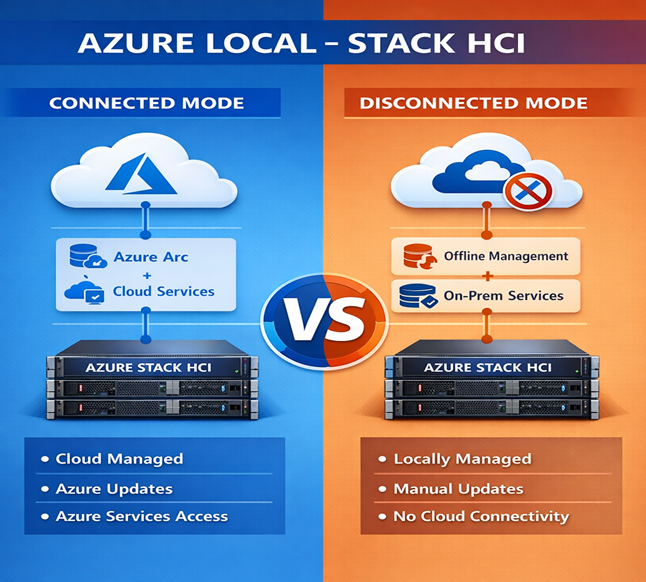
Fig 1: Connected vs disconnected Azure Local deployment modes.
Trade-offs
The primary trade-off is reduced automation and visibility. Without Azure connectivity, features such as Azure Monitor, Azure Update Manager, and Defender for Cloud are unavailable. IT teams must rely on local tooling and processes, increasing administrative effort.
Choosing Between Connected and Disconnected Modes
The choice between connected and disconnected operation depends on several factors:
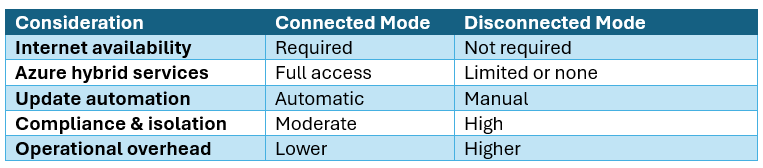
Many organizations adopt a hybrid approach, where core datacentres run in connected mode while edge or secure sites operate in disconnected mode. Azure Local supports transitioning between modes, allowing flexibility as operational requirements evolve.
Best Practices
- Plan connectivity early: Understand regulatory and network requirements before deployment.
- Use Azure Arc where possible: Even intermittent connectivity can unlock significant value.
- Standardize hardware: Use Azure-validated systems for reliability and supportability.
- Define operational runbooks for disconnected environments to handle updates and monitoring.
Flexible Hybrid Infrastructure
Azure Local’s ability to operate in both connected and disconnected modes makes it a versatile platform for modern hybrid and edge computing. Connected mode delivers the full power of Azure’s management ecosystem, while disconnected mode ensures resilience and compliance in constrained environments. By choosing the right model, or combining both, organizations can extend Azure wherever their workloads need to run, without compromising control or consistency.
Upskill Your Teams with Enterprise-Ready Tech Training Programs
- Team-wide Customizable Programs
- Measurable Business Outcomes
About CloudThat


WRITTEN BY Kuino Dalstia
S. Kuino Dalstia is a Subject Matter Expert and MCT at CloudThat, specializing in Microsoft Azure. With 17 years of experience in training and academics, she has trained over 5,000 professionals to upskill in Architect, Administrator and Security. Known for simplifying complex concepts through real-world analogies, she brings deep technical knowledge and practical application into every learning experience. Kuino’s passion for teaching reflects in her unique approach to learning and development.


 PREV
PREV












Comments