

 Login
Login


 March 23, 2026
|
Voiced by Amazon Polly |
Introduction
In modern web applications, authentication is more than just logging users in it is about protecting data, maintaining trust, and designing systems that scale securely.
When building applications using React on the frontend and a microservices architecture on the backend, traditional session-based authentication becomes difficult to manage.
Microservices are distributed by nature:
- They scale independently
- They deploy independently
- They run across multiple containers or servers
Because of this, relying on in-memory sessions or sticky sessions creates tight coupling and scalability issues.
This is where JWT (JSON Web Tokens), combined with HTTP-only secure cookies, provides a powerful solution.
By using JWT:
- Authentication becomes stateless
- Services can verify identity independently
- Scaling becomes easier
By storing JWT inside HTTP-only cookies:
- Tokens are protected from XSS attacks
- JavaScript cannot access sensitive data
- The browser automatically attaches tokens to requests
Together, this creates a secure, scalable, and production-ready authentication system ideal for React and microservices-based applications.
Pioneers in Cloud Consulting & Migration Services
- Reduced infrastructural costs
- Accelerated application deployment
Authentication Architecture (High-Level Overview)
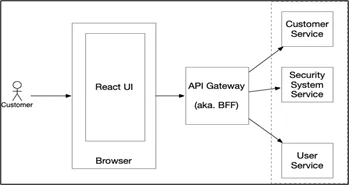
System Flow
|
1 2 3 4 5 6 7 |
React Frontend (Browser) ↓ API Gateway (Optional) ↓ Auth Service (Login / Token Generation) ↓ Business Microservices (Orders, Users, Payments) |
Responsibilities
Auth Service
- Handles login and registration
- Generates JWT tokens
- Manages refresh tokens
Business Microservices
- Do NOT authenticate users
- Only verify tokens
- Authorize based on roles
This separation keeps services independent and scalable.
Deep Technical Explanation — What Actually Happens in Backend
Let’s understand technically what exists in the backend.
In microservices, the backend is not a single server. It usually contains:
- Auth Service (Node.js server)
- User Service
- Order Service
- Payment Service
- Database (PostgreSQL / NeonDB / etc.)
- Optional API Gateway
Each service runs independently.
Backend APIs Structure
Auth Service APIs
- Register
POST /auth/register
- Hash password using bcrypt
- Store user in the database
- Login
POST /auth/login
- Validate email & password
- Generate an access token
- Generate a refresh token
- Store refresh token in DB
- Send tokens in HTTP-only cookies
- Refresh Token
POST /auth/refresh
- Validate refresh token
- Issue a new access token
- Logout
POST /auth/logout
- Clear cookies
- Remove refresh token from DB
Business Service APIs
Example: Order Service
GET /orders
POST /orders
DELETE /orders/:id
These routes:
- Do not handle login
- Only verify JWT
- Process business logic
How JWT Is Generated (Internally)
A JWT has 3 parts:
HEADER.PAYLOAD.SIGNATURE
Header
{
“alg”: “HS256”,
“typ”: “JWT”
}
It defines the signing algorithm.
Payload
{
“userId”: “12345”,
“role”: “admin”,
“iat”: 1700000000,
“exp”: 1700000900
}
- iat = issued at
- exp = expiration time
Important: Never store passwords or sensitive data in the payload.
Signature
Signature is created using:
HMACSHA256(
base64UrlEncode(header) + “.” + base64UrlEncode(payload),
secretKey
)
If someone modifies the payload, the signature becomes invalid.
That’s how JWT ensures integrity.
Complete Login Flow (Backend)
Step 1: User Sends Login Request
POST /auth/login
{
“email”: “test@gmail.com“,
“password”: “123456”
}
Step 2: Password Verification
Backend compares:
bcrypt.compare(password, storedHash)
Passwords are NEVER stored as plain text.
Step 3: Generate Access Token
const accessToken = jwt.sign(
{ userId: user.id, role: user.role },
process.env.JWT_SECRET,
{ expiresIn: “15m” }
);
This automatically:
- Creates header
- Creates payload
- Adds exp time
- Signs with secret
Step 4: Generate Refresh Token
const refreshToken = jwt.sign(
{ userId: user.id },
process.env.REFRESH_SECRET,
{ expiresIn: “7d” }
);
Refresh token is usually:
- Stored in DB
- Rotated after each use
Step 5: Send Tokens as HTTP-Only Cookies
res.cookie(“accessToken”, accessToken, {
httpOnly: true,
secure: true,
sameSite: “Strict”,
maxAge: 15 * 60 * 1000
});
React never sees the token.
The browser automatically sends cookies on future requests.
What Happens On Every Protected Request?
User calls:
GET /orders
The browser automatically sends:
Cookie: accessToken=xxxxx.yyyyy.zzzzz
Middleware Executes
const token = req.cookies.accessToken;
if (!token) return res.sendStatus(401);
try {
const decoded = jwt.verify(token, process.env.JWT_SECRET);
req.user = decoded;
next();
} catch (err) {
return res.sendStatus(401);
}
What does JWT.verify() Do?
Internally:
- Splits the token into 3 parts
- Recreates the signature using a secret
- Compares signature
- Checks expiration
If everything matches → request allowed.
If not → 401 Unauthorized.
This is why JWT is stateless.
No session lookup required.
Access Token + Refresh Token Strategy
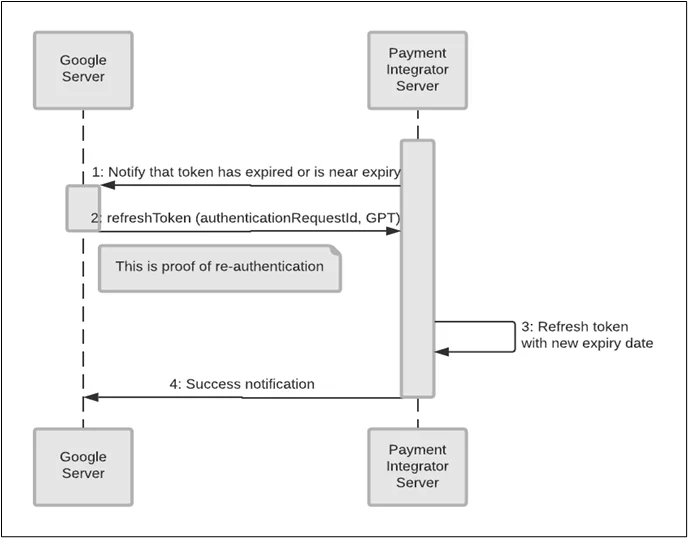
Best Practice:
- Access Token -> 10–15 minutes
- Refresh Token -> 7–30 days
Flow:
- Access token expires
- Client calls /auth/refresh
- Backend validates the refresh token
- New access token issued
If the refresh token expired -> user must log in again.
React Frontend Configuration
React should NOT store tokens.
Instead:
axios.create({
baseURL: “http://localhost:5000“,
withCredentials: true
});
withCredentials: true ensures cookies are sent automatically.
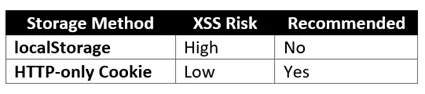
Security Comparison
Production-Level Security Checklist
For enterprise-grade security:
- Always use HTTPS
- Use short-lived access tokens
- Rotate refresh tokens
- Implement CSRF protection
- Configure CORS correctly
- Use RS256 for microservices
- Add rate limiting
- Track failed login attempts
- Use Helmet middleware
Conclusion
JWT authentication with HTTP-only cookies provides a secure, scalable foundation for React and microservice-based applications.
- Stateless authentication
- Independent service validation
- No centralized session storage
- Secure against XSS
- Suitable for distributed systems
When combined with:
- Short-lived access tokens
- Refresh token rotation
- HTTPS enforcement
- Proper CORS configuration
This approach delivers enterprise-grade security.
For production systems, authentication is not just an implementation detail, it is an architectural decision that directly impacts scalability, performance, and security.
Drop a query if you have any questions regarding JWT and we will get back to you quickly.
Empowering organizations to become ‘data driven’ enterprises with our Cloud experts.
- Reduced infrastructure costs
- Timely data-driven decisions
About CloudThat
FAQs
1. Why not localStorage?
ANS: – Because it is vulnerable to XSS, HTTP-only cookies are safer.
2. Is JWT truly stateless?
ANS: – Yes. No session stored in server memory.
3. Do I need CSRF protection?
ANS: – Yes. Use SameSite or CSRF tokens.


WRITTEN BY Shreya Shah
Shreya Shah is a Frontend Developer II at CloudThat, specializing in building scalable, user-focused web applications. She has a strong emphasis on creating clean, responsive interfaces with seamless integration to cloud-based solutions. Passionate about delivering smooth user experiences, Shreya continuously explores innovative ways to enhance efficiency, quality, and overall product performance.


 PREV
PREV












Comments