

 Login
Login


 March 24, 2026
|
Voiced by Amazon Polly |
Security can no longer be an afterthought in the software delivery lifecycle. As organizations accelerate releases through automated pipelines, the attack surface grows in equal measure. DevSecOps is the practice of creating security controls directly into development and operations workflows.
Microsoft Azure provides a rich ecosystem for implementing CI/CD security without slowing down engineering teams. From Azure Pipelines and Microsoft Defender for DevOps to native secret scanning and policy-as-code, the platform offers everything needed to shift security left. This approach helps in catching vulnerabilities early in the pipeline rather than discovering them in production.
This blog explores DevSecOps best practices you can apply in Azure CI/CD pipelines, covering secret management, static analysis, container security, compliance gates, and monitoring.
Start Learning In-Demand Tech Skills with Expert-Led Training
- Industry-Authorized Curriculum
- Expert-led Training
Shifting Security Left: The Core Principle
The phrase “Shift Left” refers to moving security validation earlier in the pipeline – closer to the developer’s commit than the production deployment. In a traditional model, security review happens after code is written, tested, and staged. Vulnerabilities found that late are expensive to fix and often lead to release delays.
In Azure Pipelines, shifting left means running security checks as part of the pull request (PR) validation stage. This includes static application security testing (SAST), dependency scanning, and secret detection. All these are triggered automatically before a single line of code merges into the main branch. The faster a developer receives security feedback, the less context-switching is required to resolve it.
A practical starting point is integrating Microsoft Defender for DevOps, which provides a unified security posture across Azure DevOps and GitHub repositories. It surfaces code scanning results, secret exposure alerts, and infrastructure misconfiguration findings directly within the developer’s familiar tooling.
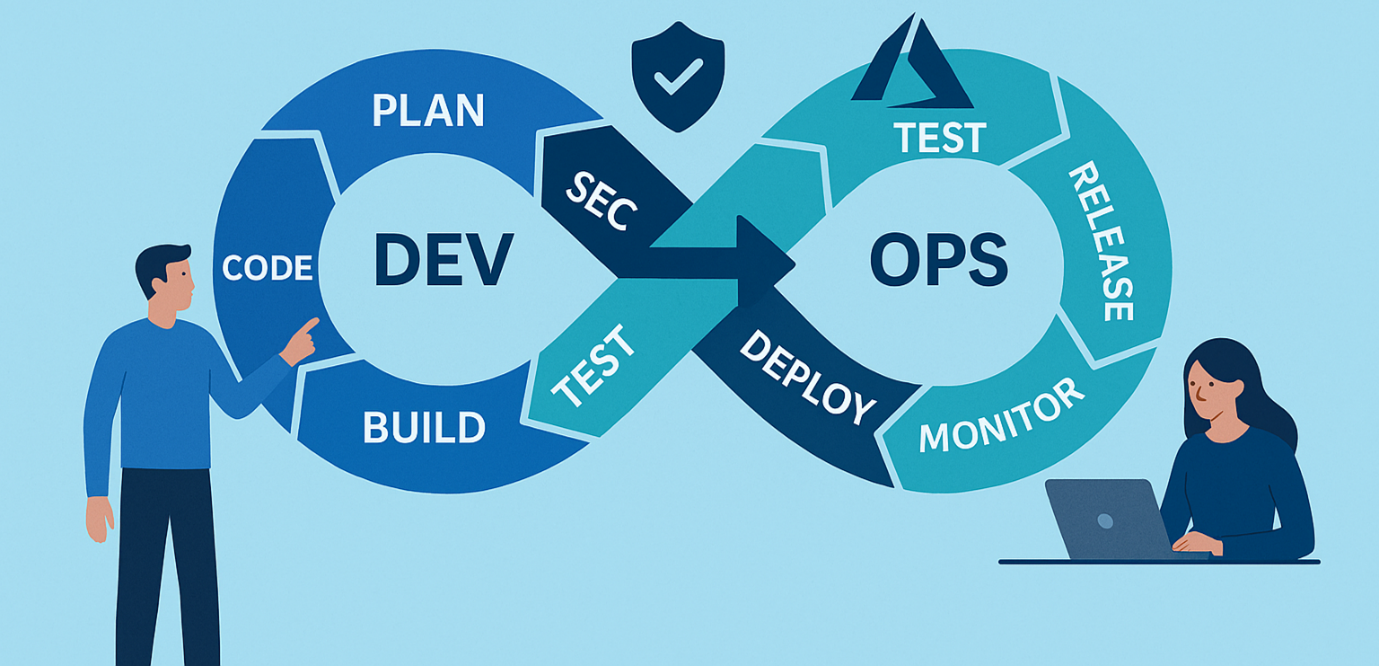
Fig 1: A shift-left security model embeds checks early in the CI/CD flow.
Secret Management and Credential Hygiene
One of the most common and damaging mistakes in CI/CD pipelines is hardcoding secrets such as API keys, database connection strings, or access tokens directly into pipeline YAML or source code. Azure provides two primary mechanisms to eliminate this risk.
Azure Key Vault Integration
Azure Key Vault stores secrets, keys, and certificates centrally and grants access through managed identities. In Azure Pipelines, the AzureKeyVault task fetches secrets at runtime and exposes them as pipeline variables, which are automatically masked in logs. This approach also simplifies secret rotation: update the value in Key Vault once, and all pipelines that reference it benefit immediately without requiring a code change.
Secret Scanning in Repos
Even with Key Vault in use, developers occasionally accidentally commit secrets. Azure DevOps secret scanning and Microsoft Defender for DevOps both detect patterns matching known secret formats including Azure Storage keys, GitHub tokens, and AWS credentials. Then alert repository administrators before the exposure escalates. Teams should enable these scans on all repositories and configure branch policies to block PRs that introduce new secrets.
Static Analysis and Dependency Scanning
Static Application Security Testing (SAST) inspects source code without running it. It detects insecure coding practices like SQL injection, XSS, and unsafe deserialization. In Azure Pipelines, SAST tools (Checkmarx, Veracode, SonarQube, CodeQL) can be added to PR builds. Dependency scanning is equally critical for modern apps using open-source packages. Vulnerabilities in third-party libraries are tracked via CVEs. Tools like OWASP Dependency-Check and Mend integrate with Azure Pipelines. They flag critical/high-severity CVEs in dependencies. Builds can be blocked until issues are fixed or formally accepted with justification.
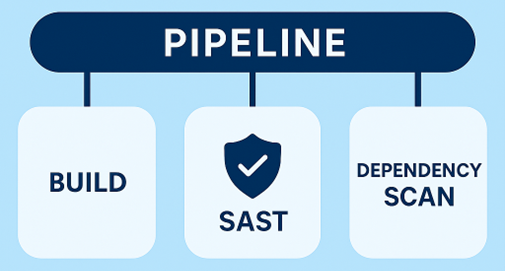
Fig 2: Azure Pipeline Stage with SAST and Dependency Scan.
Container Security and Infrastructure-as-Code Scanning
Most modern Azure workloads run in containers, making image security a critical concern throughout the pipeline. The Azure Container Registry (ACR) integrates with Microsoft Defender for Containers to automatically scan images for OS-level and application-layer vulnerabilities. Teams should configure their pipelines to push images to ACR after build, trigger a scan, and gate promotion to the next environment on the scan result. An image with critical vulnerabilities should never reach production without a documented exception.
Infrastructure-as-Code (IaC) is another growing attack vector. Misconfigured Bicep templates, Terraform modules, or ARM templates can expose storage accounts, leave management ports open, or disable audit logging. Tools like Checkov, KICS, or the Microsoft Security DevOps extension’s IaC scanning task analyze these templates in the pipeline and report misconfigurations before they are deployed.
Azure DevOps training covers the end-to-end pipeline security setup in Azure, including container image scanning, IaC validation, and policy enforcement- a useful resource for teams building these capabilities for the first time.
DevSecOps for Azure
Securing an Azure CI/CD pipeline is a continuous effort, not a one-time setup. The DevSecOps strategy outlined, shifting security left, using Key Vault for secrets, integrating SAST and dependency scans, securing containers, enforcing policy-as-code, and continuous monitoring, creates a strong, layered defence that minimizes both risk and impact of security breaches.
Fortunately, Azure’s built-in tools make these practices accessible without heavy reliance on third-party solutions. Teams can begin with small steps, like enabling a secret scan or Defender for DevOps, and gradually enhance security with each sprint. The aim isn’t perfection from the start, but steady improvement over time.
As threats evolve, organizations that embed security into their development culture rather than adding it as an afterthought will be better equipped to deliver software that’s both fast and secure. Start with one practice, assess its impact, and build from there.
Upskill Your Teams with Enterprise-Ready Tech Training Programs
- Team-wide Customizable Programs
- Measurable Business Outcomes
About CloudThat


WRITTEN BY Pramod Sunagar
Dr. Pramod Sunagar is a Subject Matter Expert and Microsoft Certified Trainer at CloudThat, specializing in Microsoft Azure, DevOps, and GitHub Copilot. With over 12 years of experience in academics and corporate training, he has upskilled more than 2,500 learners through immersive, hands-on sessions. Dr. Sunagar is widely recognized for simplifying complex cloud and DevOps concepts through real-world examples, guided labs and a highly interactive delivery style. His approach blends academic depth with practical application, enabling professionals to confidently apply skills in real-world projects. Backed by a Ph.D. in Text Analytics and multiple Azure certifications, he delivers training across a wide range of roles—from beginners to advanced developers—focusing on certifications such as AZ-400, AZ-204, AZ-900, AI-102, GitHub Copilot, AI-900, DP-900 and SC-900. His passion for teaching, combined with a commitment to learner success, makes him a highly trusted mentor in the cloud and DevOps learning space.


 PREV
PREV










Comments