

 Login
Login


 March 18, 2026
|
Voiced by Amazon Polly |
In today’s fast-paced software development environment, automation is no longer optional; it is essential. From building applications to deploying them in production, every stage of the development lifecycle benefits from streamlined processes.
This is where GitHub Actions plays a crucial role. GitHub’s built-in automation platform enables developers and DevOps engineers to create powerful workflows for continuous integration and continuous deployment.
In this blog, we will explore how GitHub Actions works, why it has become a popular choice for DevOps automation, and how you can use it to build efficient CI/CD pipelines.
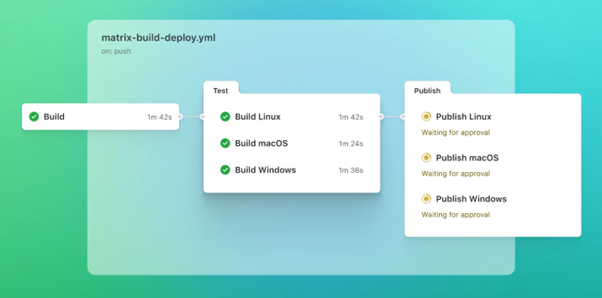
Fig 1: GitHub Actions CI/CD workflow pipeline
Start Learning In-Demand Tech Skills with Expert-Led Training
- Industry-Authorized Curriculum
- Expert-led Training
What Is GitHub Actions?
GitHub Actions is an automation tool that lets you define workflows directly in your GitHub repositories. These workflows run automatically when specific events occur, such as:
- Pushing code to a branch
- Creating a pull request
- Publishing a release
- Triggering manual jobs
Each workflow consists of jobs and steps that execute in a virtual environment. These steps can run scripts, install dependencies, test applications, or deploy code to cloud platforms.
By integrating automation into version control, GitHub Actions simplifies collaboration and speeds up development.
Why GitHub Actions Is Popular in DevOps
Several factors make GitHub Actions a preferred choice for modern DevOps teams.
- Native GitHub Integration
Since GitHub Actions is built directly into GitHub, there is no need for third-party tools or complex integrations. Workflow configuration lives in the same repository as your code, improving transparency and version control.
- Flexible Workflow Design
You can create workflows for multiple use cases, including:
- Automated testing
- Code quality checks.
- Container image builds
- Cloud deployments
- Security scanning
This flexibility supports both small projects and enterprise-scale systems.
- Large Marketplace Ecosystem
GitHub provides a marketplace with thousands of reusable actions. These pre-built components help teams quickly integrate tools like Docker, Azure, AWS, and Kubernetes into their pipelines.
- Cost-Effective Automation
For many open-source and small teams, GitHub Actions offers generous free usage. This makes it an attractive option compared to traditional CI/CD tools.
Key Components of GitHub Actions
Understanding the core components helps you design effective workflows.
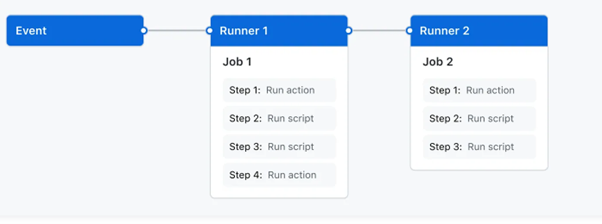
Fig 2: Core components of a GitHub Actions workflow.
- Workflow
A workflow is a YAML file stored in the .github/workflows directory. It defines when and how automation should run.
- Events
Events trigger workflows. Common examples include:
- push
- pull_request
- workflow_dispatch
- Jobs
Jobs represent groups of steps that run on the same runner. Multiple jobs can run in parallel to save time.
- Steps
Steps are individual tasks within a job. They can run shell commands or use predefined actions.
- Runners
Runners are servers that execute workflows. GitHub provides hosted runners, and you can also configure self-hosted runners for advanced use cases.
Sample GitHub Actions CI/CD Workflow
The following example shows a simple workflow for building and testing a Node.js application.
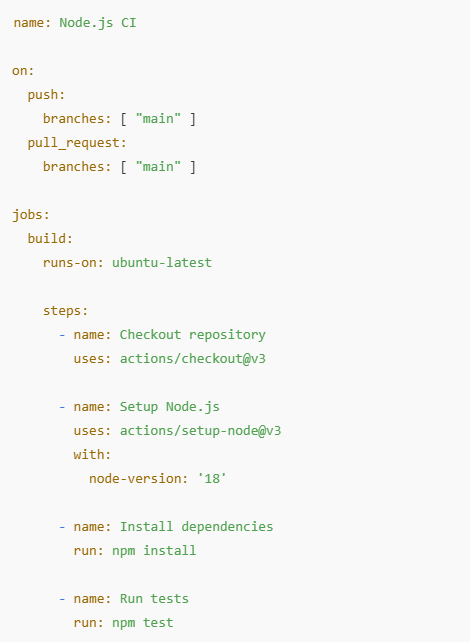
Fig 1: Sample GitHub Actions workflow for Node.js CI
This workflow automatically runs tests whenever code is pushed to the main branch, ensuring consistent quality.
GitHub Actions in CI/CD Pipelines
GitHub Actions is widely used to implement complete CI/CD workflows.
Continuous Integration (CI)
In CI pipelines, GitHub Actions helps teams:
- Run automated tests.
- Validate pull requests.
- Enforce coding standards.
- Detect issues early.
This reduces bugs and improves code reliability.
Continuous Deployment (CD)
In CD pipelines, workflows can deploy applications to environments such as:
- Azure App Service
- AWS EC2
- Kubernetes clusters
- Docker registries
By automating deployments, teams reduce human errors and speed up release cycles.
Best Practices for Using GitHub Actions
To get maximum value from GitHub Actions, consider the following practices.
- Keep Workflows Modular
Split complex workflows into smaller, reusable jobs and actions. This improves maintainability.
- Secure Sensitive Data
Store credentials and tokens using GitHub Secrets. Never hardcode passwords in workflow files.
- Optimize Execution Time
Use caching for dependencies and artifacts to reduce build duration.
- Monitor Workflow Performance
Review execution logs and failure reports regularly to improve pipeline stability.
- Use Versioned Actions
Always reference specific action versions to avoid unexpected breaking changes.
Common Use Cases of GitHub Actions
GitHub Actions supports multiple real-world scenarios, including:
- Automating code reviews and linting
- Building and publishing Docker images
- Running security scans
- Managing infrastructure with Terraform
- Automating documentation updates
These use cases demonstrate how GitHub Actions fits into modern cloud-native workflows.
Future of GitHub Actions in DevOps
As organizations increasingly adopt cloud-native and microservices architectures, automation platforms will continue to evolve.
GitHub Actions is expected to grow with:
- Better AI-assisted workflows
- Improved security features
- Enhanced observability
- Deeper cloud integrations
These advancements will further strengthen its role in DevOps ecosystems.
For professionals aiming to master DevOps automation, learning GitHub Actions is a strategic step toward building future-ready skills.
Scalable DevOps Automation
GitHub Actions has emerged as a powerful automation platform for building reliable and scalable CI/CD pipelines. Its native integration with GitHub, flexible workflow design, and growing ecosystem make it a valuable tool for modern development teams.
By adopting best practices and leveraging reusable actions, organizations can improve productivity, reduce errors, and accelerate software delivery.
Upskill Your Teams with Enterprise-Ready Tech Training Programs
- Team-wide Customizable Programs
- Measurable Business Outcomes
About CloudThat


WRITTEN BY Sirin Kausar Isak Ali
Sirin Ali is a seasoned corporate trainer and Subject Matter Expert with 11+ years of experience in cloud infrastructure, DevOps automation and Kubernetes. She has extensive real-time project experience in designing enterprise-grade CI/CD pipelines, automating containerized microservices deployments and implementing GitOps practices with advanced observability solutions. Skilled across diverse Kubernetes distributions, she brings hands-on expertise in transforming infrastructure and applications using industry best practices. Sirin has trained over 1500+ professionals worldwide and holds multiple certifications including CKA, Terraform Associate, Azure AI Engineer, GCP ACE, MCP, CCNA and MCT. Her practical, real-world approach simplifies complex DevOps concepts, empowering learners to confidently build production-ready solutions.


 PREV
PREV












Comments