

 Login
Login

 March 9, 2026
|
Voiced by Amazon Polly |
Modern software development is no longer just about writing code; it’s about context. Context of repositories, issues, pull requests, documentation, and CI/CD pipelines. As AI becomes a core part of the developer experience, the ability to provide accurate, real-time context to AI tools is critical. This is exactly where the GitHub MCP Server in VS Code delivers a breakthrough.
In this blog, we’ll explore what the GitHub MCP Server is, how it integrates with Visual Studio Code, and why it plays a crucial role in enabling intelligent, secure, and scalable AI-assisted development.
Start Learning In-Demand Tech Skills with Expert-Led Training
- Industry-Authorized Curriculum
- Expert-led Training
What Is the GitHub MCP Server?
MCP (Model Context Protocol) is an open protocol that enables AI models to interact with external tools and data sources in a structured and secure manner. The GitHub MCP Server acts as a mediator between AI assistants- such as GitHub Copilot Chat and GitHub’s ecosystem, including repositories, issues, pull requests, commits, and workflows.
Instead of relying on incomplete prompts or assumptions, MCP enables AI to operate using live, permission-aware GitHub context. This dramatically improves response accuracy and reduces hallucinations.
GitHub introduced MCP to standardize how AI tools consume contextual data, making AI outputs more reliable and enterprise-ready.
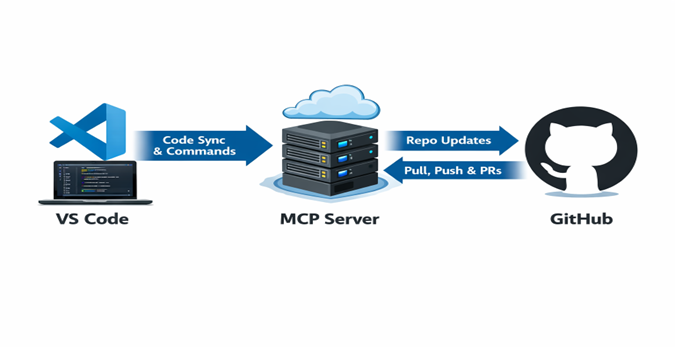
Fig 1: Screenshot of the high-level architecture of VS Code integration with GitHub using the MCP server.
Why MCP Matters in VS Code
Visual Studio Code is the primary development environment for millions of developers. Integrating the GitHub MCP Server into VS Code transforms it from a code editor into an AI-powered engineering workspace.
With MCP, developers benefit from:
- Context-aware AI explanations
- Intelligent pull request analysis
- Repository-specific guidance
- Secure access aligned with GitHub permissions
This evolution complements GitHub Copilot’s growing capabilities, especially as Copilot expands beyond code completion into planning, reviewing, and learning workflows.
How GitHub MCP Works Inside VS Code
At a high level, MCP enables structured communication between VS Code, AI assistants, and GitHub.
- A developer asks a question in VS Code.
- Copilot requests relevant context via MCP.
- MCP fetches data based on access permissions.
- AI responds using real repository and workflow data.
This ensures AI suggestions are grounded in reality rather than generic assumptions.
Key Capabilities of GitHub MCP Server
- Repository-Aware AI Conversations
AI can understand:
- Folder and file structures
- Commit history
- Active branches
- Architectural patterns
This is particularly helpful for onboarding developers or working with large legacy codebases.
- Pull Request and Issue Intelligence
With MCP, AI can:
- Summarize complex pull requests
- Explain failed checks
- Suggest fixes based on previous commits
- Link issues directly to code changes
This reduces context switching and accelerates code reviews.
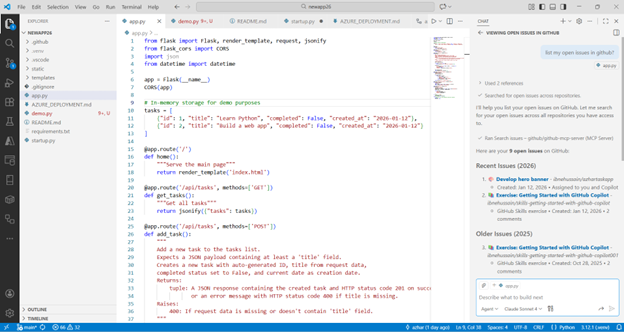
Fig 2: Screenshot of viewing and managing GitHub issues directly in VS Code using MCP integration.
- Secure, Permission-Based Context Access
Security is a core design principle of MCP:
- Honors GitHub repository permissions
- Uses authenticated, token-based access
- Prevents unauthorized data exposure
This makes MCP suitable for enterprise and regulated environments.
- CI/CD and DevOps Awareness
Developers can ask questions like:
- “Why did my GitHub Actions workflow fail?”
- “Which commit introduced this regression?”
AI responses are backed by real pipeline logs and execution data.
MCP, Copilot, and Collaborative Learning
GitHub MCP complements emerging collaboration models such as GitHub Copilot Spaces, where teams learn, experiment, and build together using AI-assisted workflows. If you’re interested in how Copilot is evolving beyond individual productivity into collaborative environments, the blog “Exploring GitHub Copilot Spaces: A New Way to Collaborate, Code, and Learn” provides excellent insight into this shift.
Together, Copilot Spaces and MCP create a foundation for team-based, context-rich AI development.
Real-World Skill Alignment and Certification Readiness
As GitHub Copilot and MCP become integral to modern development, understanding these tools is increasingly important for developers, DevOps engineers, and cloud professionals.
For learners aiming to build hands-on expertise, GH-300: GitHub Copilot Training closely aligns with real-world Copilot use, MCP-enabled workflows, and AI-driven development practices. These skills are particularly valuable when working with Azure-based DevOps pipelines and enterprise GitHub environments.
Challenges and Considerations
While MCP brings powerful capabilities, teams should consider:
- Governance and access control
- AI output validation
- Organizational security policies
Responsible adoption ensures MCP enhances productivity without compromising compliance.
The Future of AI Development
The GitHub MCP Server in VS Code represents a significant leap forward in AI-assisted development. By grounding AI interactions in a real GitHub context, MCP improves accuracy, security, and developer confidence.
As tools like GitHub Copilot evolve into collaborative, context-aware platforms, MCP becomes the backbone that enables trustworthy AI engineering. Whether you’re building cloud-native applications, managing CI/CD pipelines, or preparing for GitHub and Azure-focused roles, MCP is a capability worth mastering today.
Upskill Your Teams with Enterprise-Ready Tech Training Programs
- Team-wide Customizable Programs
- Measurable Business Outcomes
About CloudThat


WRITTEN BY MD Azhar Uddin
Azhar is a Microsoft Certified Trainer (MCT) and multicloud expert with a Master’s degree in computer applications. With a proven track record of training over 10,000 professionals worldwide, he specializes in cloud, DevOps, and system administration- emphasizing scalable, secure and cost-effective solutions. He brings deep expertise in Azure, AWS and Oracle Cloud, skillfully integrating complex multicloud environments and designing modern cloud-native architectures using microservices and containers. Recognized among the Top 100 MCTs globally acclaimed for delivering real-world, high-impact training in Microsoft Data & AI and cloud technologies.


 PREV
PREV



Comments