

 Login
Login


 December 15, 2025
|
Voiced by Amazon Polly |
The recent enhancement to AWS Resource Explorer now allows cloud teams to immediately discover and manage resources within a Region without any initial setup steps. This update delivers swift inventory visibility, supporting everyday troubleshooting and governance needs for AWS users. You can start your search in Unified Search in the AWS Management Console, the AWS Resource Explorer console, the AWS Command Line Interface (AWS CLI) or the SDK – and filter using tags, services, resource type, region and other metadata.
Start Learning In-Demand Tech Skills with Expert-Led Training
- Industry-Authorized Curriculum
- Expert-led Training
Benefits of Immediate Resource Discovery Matters
- Resource discovery: With the latest AWS Resource Explorer update, organizations gain instant access to search capabilities using tags, keywords and other metadata.
- Quick navigation: Navigate to your resources and act on them, enabling fast and informed decision-making.
- Time Saving: Quickly search resources in your current Region to find and act on resources without needing a custom search infrastructure.
- Resource Management: On opening the Resource Explorer console, automatic setup initiates in the background, providing you with details of the resource to view and organize directly from the Resource Explorer console.
- Cross-Region & Multi-Account Support: Resource Explorer enables one-click setup for cross-Region searches, providing a centralized view across global AWS assets. For multi-account organizations, leveraging AWS Organizations with Resource Explorer powers aggregated inventory insights and enhances governance.
Setting Up Resource Explorer
AWS Resource Explorer now provides immediate access to resource search and discovery capabilities in a Region. You can simply use a unified search experience without any initial actions, or you can use console-based discovery, in case you need to filter resources based on tags, keywords or other metadata. An AWS Resource Explorer is available immediately when you have the appropriate permissions. Users at minimum, with the permissions of AWSResourceExplorerReadOnlyAccess managed policy, can start searching for resources right away without any setup.
Unified Search Experience:
Quickly search resources in your current Region using basic permissions. The Unified Search tool displays partial results and prompts users to enable cross-region search when required. Type the name of the resource, and it will display the resource as shown in Figure 1, below.
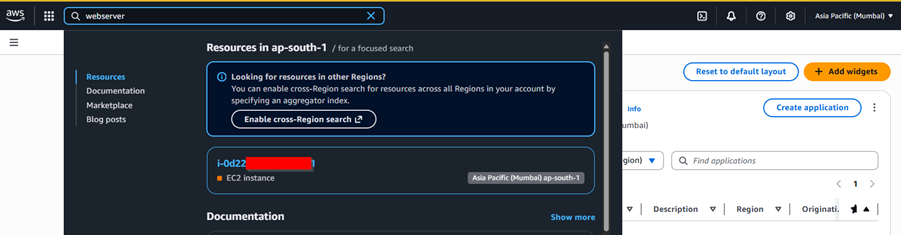
Figure 1: Unified Search Displaying Regional Resource Search, Recommends Enabling Cross-Region Search.
Console-Based Discovery:
On opening the Resource Explorer console, automatic setup initiates in the background. While the set-up completes, you can immediately search resources from the initial set of partial results using tags, keywords and other metadata. In the console of AWS Resource Explorer, you can filter the list of resources by region, resource type, service, tags, etc. Below in figure 2, a list of ec2 instances displayed in using filter of “resource_type = ec2:instance”
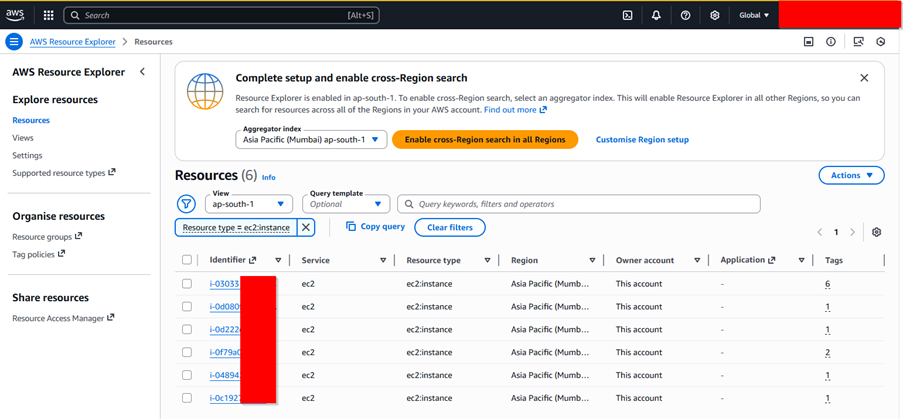
Figure 2: Resource Explorer Console Displaying Resource of Type EC2-Instance in AP-SOUTH-1.
Indexes and Views Explained
Resource Explorer utilizes two index types:
- Local Indexes: Contain data for a single Region, available for immediate, partial search results.
- Aggregator Indexes: Consolidate metadata across regions for centralized searching and reporting.
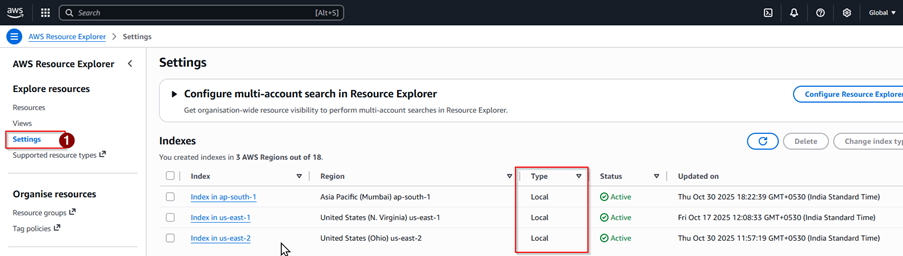
Figure 3: Local Index for Regions is Available, Enable Cross-Regions Search for Agreggator Index.
Views enable users to filter resource searches by tags, resource type or custom criteria, enhancing targeted asset management. Figure 4 below displays a view named “my-lambda”. The view my-lambda has a filter query applied as “service: lambda”.
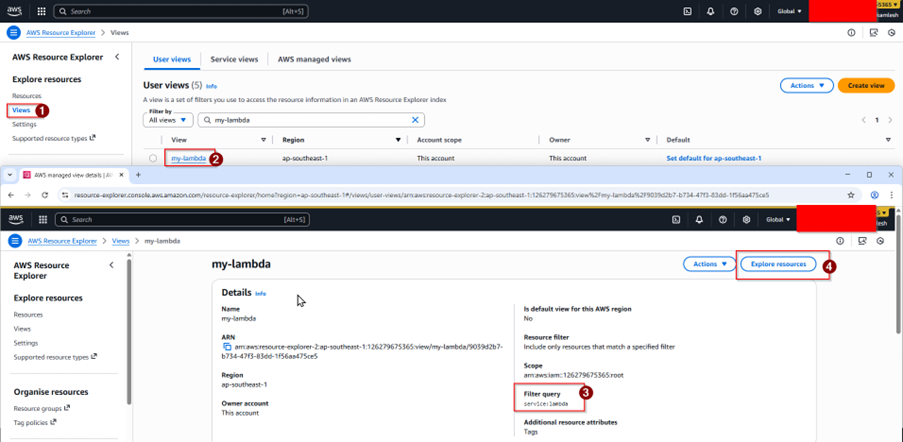
Figure 4: A view named ‘my-lambda’ with service ‘filter query.’
Once a view is created with the required filter, you can use that view to filter the list of resources in AWS Resource Explorer, as shown in Figure 5.
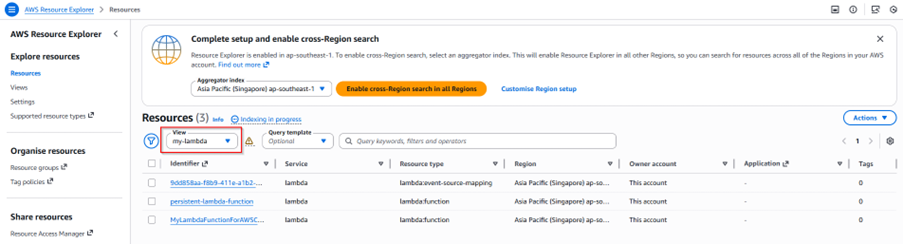
Figure 5: View Display Resources after applying filter Service: Lambda.
Faster AWS Inventory Visibility
The new AWS Resource Explorer update accelerates cloud operations by allowing users to uncover resources instantly, marking a significant improvement for cloud operations and offering faster troubleshooting and streamlined resource inventory management across regions. Teams now benefit from instant access to critical insights, enhanced visibility and more efficient governance without the traditional setup delays, with support for both single-region and cross-region use cases.
Upskill Your Teams with Enterprise-Ready Tech Training Programs
- Team-wide Customizable Programs
- Measurable Business Outcomes
About CloudThat
FAQs
1. What is AWS Resource Explorer?
ANS: – AWS Resource Explorer is a managed service that lets you quickly search and discover AWS resources across Regions and accounts using a simple search interface, either through the AWS Management Console, CLI, or SDKs.
2. Why should I use AWS Resource Explorer?
ANS: – It simplifies cloud resource management by eliminating the need to maintain manual inventories, providing fast and searchable access to resources with relevant metadata, saving time and improving operational efficiency.
3. What permissions are required to use AWS Resource Explorer?
ANS: – At a minimum, AWSResourceExplorerReadOnlyAccess is needed for partial, immediate search results. For full search capabilities and setup, AWSResourceExplorerFullAccess and permission to create Service-Linked Roles are required.
4. Can I filter my searches by tags or resource type?
ANS: – Yes, Resource Explorer supports filtering search results by resource metadata such as tags, resource type and other attributes for targeted discovery.


WRITTEN BY Kamlesh N
Kamlesh Nenwani is a Subject Matter Expert at CloudThat, specializing in AWS Architecting and DevOps. With 13 years of experience in training and consultancy, he has guided over 2500+ professionals and students in mastering diverse technologies. Renowned for his clarity in explaining complex topics and his commitment to continuous learning, Kamlesh delivers practical, interactive sessions grounded in deep technical expertise.


 PREV
PREV












Comments