

 Login
Login


 December 5, 2025
|
Voiced by Amazon Polly |
Introduction
In modern distributed systems, load balancing is what separates scalable, resilient applications from those that collapse under heavy traffic. While load balancing sounds simple, spreading requests across multiple servers, the complexity lies in how decisions are made. Should you route traffic based only on network data, or should you inspect the application payload?
This is where the difference between Layer 4 (L4) and Layer 7 (L7) load balancers matters. In this guide, we will focus on L4 load balancers, exemplified by AWS Network Load Balancer (NLB), which operate at the transport layer and are designed for speed, efficiency, and protocol flexibility.
Pioneers in Cloud Consulting & Migration Services
- Reduced infrastructural costs
- Accelerated application deployment
The OSI Model: Why It Matters?
The OSI model helps us understand what information a load balancer can “see.” L4 load balancers work at the Transport Layer (Layer 4).
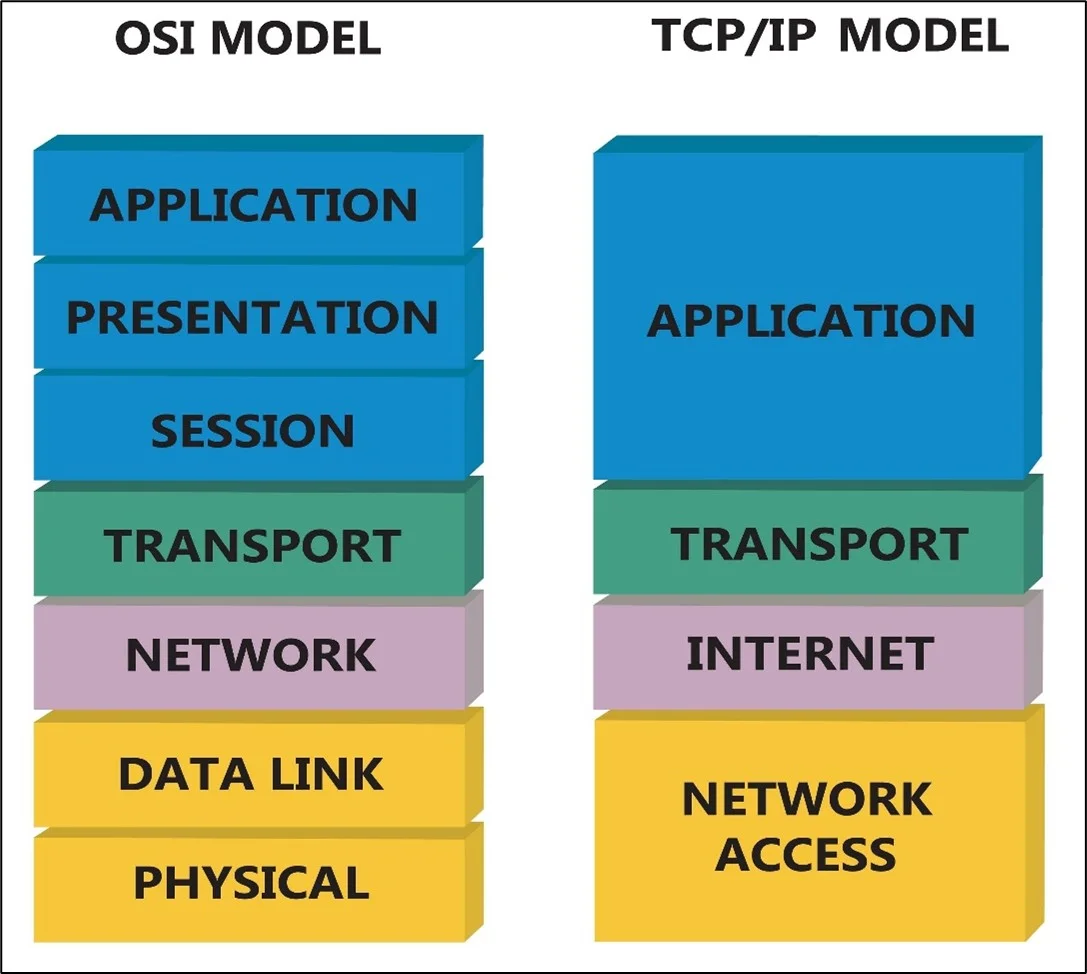
- Layer 3 – Network: IP addressing and routing across networks.
- Layer 4 – Transport: TCP/UDP communication with port numbers. L4 load balancers work here.
- Layers 5–7 – Session, Presentation, Application: Application-level details like cookies, headers, and encryption.
Key principle: An L4 load balancer uses the 5-tuple (source IP, source port, destination IP, destination port, protocol) for routing. It cannot inspect application data above Layer 4.
L4 vs. L7
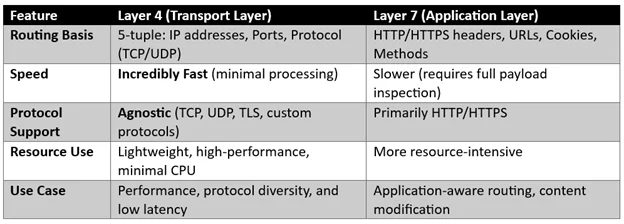
How L4 Load Balancers Work?
When a client connects, an L4 load balancer extracts the 5-tuple and applies a routing algorithm (round robin, least connections, hash-based, etc.).
- Extraction: The load balancer extracts the source IP address, destination IP address, and ports from the packet header.
- Decision: It uses this information and the chosen algorithm to select a single backend server.
- Connection Tracking: All subsequent packets for that TCP/UDP session are consistently routed to the same backend via connection state tracking.
- Health Checks: Simple TCP connect, or UDP pings, ensure traffic is only sent to live servers.
Strengths & Limitations of L4 Load Balancers
Strengths
- High Performance & Low Latency: Millions of connections/sec with decisions made in microseconds, ideal for high-volume traffic.
- Protocol Agnostic: Works for virtually any TCP/UDP traffic (HTTP, databases, gaming, custom protocols).
- Original Client IP Preservation (Transparency): Backend servers can often view the original client IP address without requiring an X-Forwarded-For header.
Limitations
- No Application Awareness: Cannot route based on application-specific details, such as URLs, cookies, or HTTP headers.
- Limited Health Checks: Only checks if the port is open (“up”), not if the application is returning errors (e.g., HTTP 500s).
- No WAF Integration: Because L4 load balancers do not terminate and inspect the application payload (like an L7 load balancer), they cannot integrate with a Web Application Firewall (WAF) to filter application-layer attacks.
AWS Network Load Balancer (NLB) Deep Dive
AWS Network Load Balancer (NLB) is the prime example of a modern L4 solution. It is designed to handle extremely high-throughput, low-latency traffic and is unique in its architecture.
NLB Key Characteristics
- Layer 4 Operation: NLB operates at the Layer 4 (L4) connection level. It does not inspect application traffic, making it incredibly fast.
- Performance: It can handle millions of requests per second with consistently low latency (measured in single-digit milliseconds).
- Static IP Addresses: NLB automatically provides a static IP address per Availability Zone (AZ) for the load balancer, which is critical for whitelisting and network control.
- Operating Mode: NLB is primarily a Pass-Through Mode (Direct Server Return) or IP-level proxy solution, forwarding the request directly to the target group.
NLB vs. AWS Application Load Balancer (ALB)
The choice between NLB and ALB is a classic L4 vs. L7 decision:
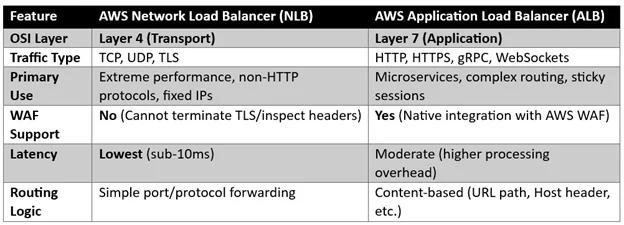
Summary: Use NLB for raw, high-speed, non-HTTP traffic or when a static IP is mandatory. Use ALB for web applications that require content-based routing, AWS WAF security, and native HTTP features.
Common Use Cases for L4 Load Balancers
L4 load balancers excel in scenarios where the overhead of L7 processing is unacceptable:
- Performance-Critical Applications: Gaming servers, real-time trading platforms, or time-sensitive data pipelines.
- Database Load Balancing: Distributing traffic for backends like MySQL, PostgreSQL, or NoSQL databases that communicate over non-HTTP TCP protocols.
- IoT & Streaming: Managing high-volume, low-latency sensor data or video/audio streams using custom TCP/UDP protocols.
- TLS Termination Offload (Advanced): While typically L7, some L4 balancers (such as NLB) can perform TLS termination at L4, preserving the performance benefit while providing secure connections.
Conclusion
Layer 4 load balancers, championed by solutions like the AWS Network Load Balancer, may not understand application-level details, but that’s their strength.
Drop a query if you have any questions regarding NLB and we will get back to you quickly.
Empowering organizations to become ‘data driven’ enterprises with our Cloud experts.
- Reduced infrastructure costs
- Timely data-driven decisions
About CloudThat
FAQs
1. What information does an L4 load balancer use to make decisions?
ANS: – It uses the 5-tuple: source IP address, source port, destination IP address, destination port, and protocol type (TCP/UDP).
2. Why can’t I use AWS WAF with a Layer 4 load balancer, such as AWS NLB?
ANS: – AWS WAF (Web Application Firewall) operates at the Application Layer (L7) and must inspect headers, cookies, and the content of the HTTP request body. Since an L4 load balancer does not terminate the connection or inspect the application payload, it cannot integrate with L7 security tools, such as AWS WAF.
3. Does an L4 Load Balancer change the client's IP address?
ANS: – It depends on the operating mode. In Pass-Through Mode (like NLB’s default), the original client IP is usually preserved and visible to the backend server. In traditional Proxy Mode, the load balancer’s IP would be the source IP for the backend connection.


WRITTEN BY Aakash Kriplani
Aakash works as a Research Associate at CloudThat, specializing in cloud computing with a strong focus on AWS services. He has hands-on experience designing, deploying, and managing cloud solutions, and a deep understanding of core AWS offerings. He is passionate about learning emerging technologies and continuously expanding his knowledge to stay ahead in the ever-evolving tech landscape ahead in the ever-evolving tech landscape.


 PREV
PREV












Comments