

 Login
Login


 September 3, 2026
|
Voiced by Amazon Polly |
Introduction
Many enterprises want a multi-tenant chat assistant that can answer questions based on their documents. Users may upload contracts, reports, or manuals and ask questions immediately or at a later time. Building the chat interface is simple, but ensuring that the system retrieves information only from the correct user’s or tenant’s documents is more challenging.
The system must securely separate each tenant’s data and use a verified identity to control access. This becomes more complex with agentic retrieval, where a single question may require multiple searches, and each search must adhere to the same access boundaries.
Amazon Bedrock Knowledge Base simplifies much of this work by handling document ingestion, embeddings, indexing, and retrieval. With direct ingestion, applications can also send documents directly to the knowledge base for processing.
This blog explains the architecture of a multi-tenant document chat application, including document upload and indexing, data isolation, question answering, and the practices needed to build a reliable system at scale.
Pioneers in Cloud Consulting & Migration Services
- Reduced infrastructural costs
- Accelerated application deployment
How does the Solution Work?
The application has two main flows: document upload and asking questions. The Knowledge Base handles document processing, retrieval, and answer generation, while the application manages authentication, uploads, chat, and user-level data isolation.
Architecture Diagram
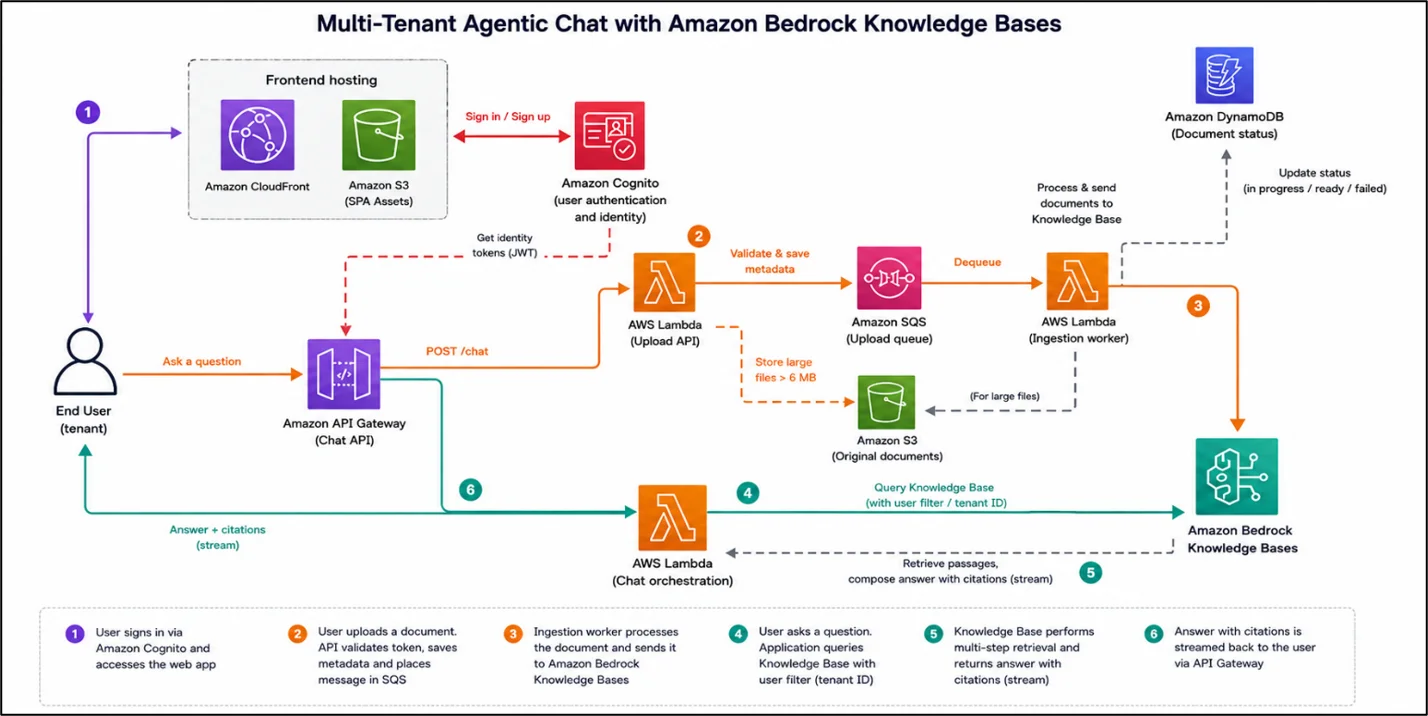
Here is the flow in simple terms:
- User signs in → uploads a document
- App verifies the login token → queues the file
- Worker tags file with user’s ID → sends to Knowledge Base
- Worker updates status: received → processing → ready
- User asks a question
- App queries Knowledge Base, filtered to that user’s ID only
- Knowledge Base retrieves passages → writes cited answer → streamed back to the user
The key building blocks behind this flow are:
- Amazon Bedrock Knowledge Base: reads, stores, and searches documents, including text, tables, and images
- Amazon API Gateway and AWS Lambda: handle upload, status, and chat requests
- Amazon Cognito: logs users in and provides a verified identity for isolation
- Amazon SQS: queues uploads so bursts of activity don’t overwhelm the system
- Amazon DynamoDB: tracks each document’s indexing status
- Amazon S3: stores larger files and hosts the web app
Uploading Documents
Since users upload documents in the application, files can be sent directly to the Knowledge Base via ingestion rather than a scheduled sync. This makes documents easier to manage and update using a unique document ID.
Smaller files can be uploaded directly, while larger files can first be stored in Amazon S3 and then referenced for indexing. The application can choose the appropriate method based on file size.
If a document is updated with the same document ID, it can be replaced without creating a duplicate, although the entire document must be reprocessed. Multiple documents can also be submitted together to handle larger upload volumes efficiently.
How Indexing Works
Uploading a document does not make it searchable immediately. The document goes through several stages, including acceptance, queuing, parsing, embedding, and finally indexing. Simple text content may become searchable sooner, while more complex content, such as images and tables in a PDF, can take longer to process fully.
The processing time can vary depending on the document type and system load. Plain text files may be ready within a few seconds, while PDFs can take longer to process. Under heavier workloads, documents may also spend additional time waiting for available processing capacity.
The application can track each document’s status in Amazon DynamoDB, using stages such as received, processing, and ready. A document should be marked as ready only when its content is searchable. Marking it too early could result in users receiving empty or incomplete answers.
Keeping Each User’s Data Separate
Data isolation is one of the most important requirements in a shared system. One user’s documents should never appear in another user’s search results or answers.
There are two common approaches. You can create a separate Knowledge Base for each tenant, or use a shared Knowledge Base and filter searches by the requesting user. For applications with many individual users, a shared Knowledge Base is often more practical because it avoids managing many separate indexes and creating a new Knowledge Base for every user. However, separate Knowledge Bases may be a better option for large customers that require dedicated isolation.
In a shared model, each document is associated with the uploading user’s ID. When the user asks a question, the application filters the search using that same ID. Importantly, this identity should come from the verified login token on the server, not directly from the client request.
As an additional security measure, the application can validate that the retrieved results belong to the requesting user. Requests without a valid identity should be rejected, helping ensure that users can access only the documents they are authorized to view.
Answering Questions
When a user asks a question, the application sends the request to the Knowledge Base along with a filter specific to that user. This ensures that the system searches only within the documents the user is authorized to access.
For complex questions, the Knowledge Base can break the request into multiple retrieval steps while applying the same access filter throughout the process. The final answer can then be streamed back to the chat interface with citations to the relevant source documents.
If more customization is needed, such as using a custom prompt or a different model, the application can first retrieve the relevant document passages and then generate the response separately. In all cases, the same user-level access controls should be applied to ensure proper data isolation.
Best Practices for a Reliable Application
- Use a queue for document uploads and indexing. A background worker can process documents asynchronously and batch multiple documents into a single request. Failed uploads can also be set aside for investigation rather than lost.
- Plan for indexing limits. Retrieval can usually handle regular application traffic, but indexing has its own limits. For large existing document collections, a scheduled sync may be more suitable than uploading everything at once.
- Handle failed requests with retries. When too many indexing requests are sent simultaneously, the application should retry the request rather than immediately treating it as a permanent failure.
- Monitor indexing time. If documents gradually take longer to process, it may indicate that the ingestion pipeline is approaching capacity.
- Store conversation history separately. The chat API can accept previous messages in the conversation, but the application should store the conversation history in its own database and send the relevant context with each request. This also helps keep each user’s conversation data separate.
Conclusion
Building a multi-tenant document chat application can involve significant infrastructure for document processing, search, retrieval, and data isolation. Amazon Bedrock Knowledge Bases simplify much of this by handling document ingestion, parsing, embeddings, retrieval, and ranking.
This allows your team to focus on building the application experience, including document uploads, chat, authentication, and ensuring that each user’s data remains properly isolated.
A sample implementation is also available as a repository that you can deploy in your AWS account and use as a starting point for building your own multi-tenant document chat application.
Drop a query if you have any questions regarding Amazon Bedrock Knowledge Bases, and we will get back to you quickly.
Empowering organizations to become ‘data driven’ enterprises with our Cloud experts.
- Reduced infrastructure costs
- Timely data-driven decisions
About CloudThat
FAQs
1. What is a multi-tenant document chat application?
ANS: – It is a chat application where multiple users or organizations can upload documents and ask questions about them while keeping each user’s data separate and secure.
2. How does the application keep user data separate?
ANS: – Each document is associated with a user’s verified identity, and every retrieval request is filtered to ensure users can access only their authorized documents.
3. How are documents added to the Knowledge Base?
ANS: – Documents can be uploaded using direct ingestion for application-driven uploads. Larger files can be stored in Amazon S3 and referenced for processing.


WRITTEN BY Aniket Bembale
Aniket Bembale is Senior Research Associate – Data & AIoT at CloudThat, focusing on Generative AI, Agentic AI solutions and Cloud Computing. He is involved in building scalable AI-driven applications and implementing modern data and AI technologies to solve real-world business challenges.


 PREV
PREV












Comments