

 Login
Login


 September 3, 2026
|
Voiced by Amazon Polly |
Overview
Building generative AI applications often requires authentication, permissions, and AWS identity configuration before developers can make their first model request. Amazon Bedrock API keys provide a simpler authentication option, making it easier to access supported foundation models with less initial setup.
This is particularly useful for prototyping, testing, internal applications, and lightweight integrations while still working within the AWS security ecosystem.
Pioneers in Cloud Consulting & Migration Services
- Reduced infrastructural costs
- Accelerated application deployment
Why Use API Keys?
IAM is important for controlling access to AWS resources, but configuring roles and permissions can add complexity during early development. API keys provide a straightforward way to authenticate Bedrock requests.
They can be useful for:
- Building GenAI prototypes quickly
- Testing different foundation models
- Connecting Bedrock with external applications
- Creating internal AI workflows
- Integrating with applications that support bearer-token authentication
This helps developers move faster from an idea to a working GenAI application.
Common Use Cases
- Rapid Prototyping
Startups and development teams can use API keys to experiment with Bedrock without spending too much time on authentication setup. Developers can test different models for use cases such as content generation, summarization, and question answering.
- Low-Code and No-Code Integration
Platforms that support HTTP APIs and bearer tokens can potentially connect with Bedrock more easily. This can be useful for internal dashboards, workflow automation, and lightweight AI applications.
- Internal AI Workflows
Development teams can use API keys while testing LLM-based applications and automated workflows. Short-lived credentials can be useful when temporary access is required.
- External Collaboration
For selected scenarios involving partners, researchers, or consultants, temporary credentials can provide controlled access without requiring broad AWS permissions.
API Key Options
Amazon Bedrock provides different options depending on the required access duration.
Long-Term Keys
Long-term keys can remain valid for an extended period based on their expiration settings.
They are generally useful for:
- Development
- Testing
- Prototyping
- Non-critical workloads
Since these credentials can remain active for longer periods, they should be stored securely.
Short-Term Keys
Short-term keys have a limited validity period and can inherit permissions from the associated IAM identity.
They are useful when temporary access is required and reducing credential lifetime is important.
For production workloads, organizations should select the authentication approach based on their security and governance requirements.
Key Benefits
- Simpler Authentication
API keys provide developers with a straightforward way to authenticate Bedrock requests without setting up a complete IAM workflow for every experiment.
- Flexible Credentials
Long-term and short-term options support different development and security requirements.
- Multiple Integration Options
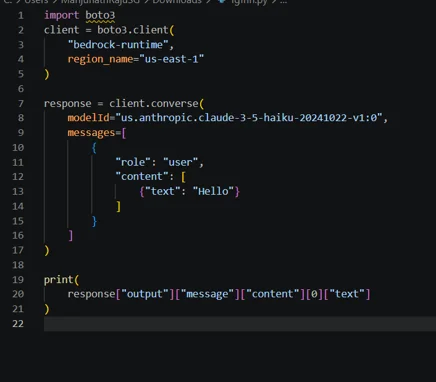
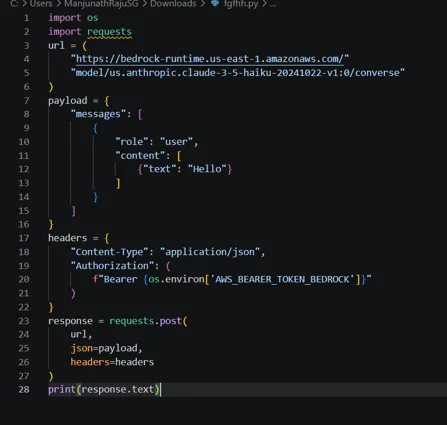
Amazon Bedrock can be accessed using tools such as Boto3, cURL, Python requests, and other HTTP clients that support bearer-token authentication.
- AWS Governance
API activity can be monitored via AWS CloudTrail, while sensitive credential values are protected from being logged.
API Keys in the Development Lifecycle
API keys can be useful at different stages of building a generative AI application. During the initial development phase, they allow developers to quickly test Amazon Bedrock models and understand how the application behaves. This can help teams compare models, experiment with prompts, and validate whether a particular AI capability meets their business requirements.
As the application progresses toward production, teams can review their authentication and security requirements and choose the most appropriate credential strategy. Short-lived credentials, AWS IAM permissions, monitoring, and secure credential storage can be introduced as the application becomes more critical.
This approach allows teams to start with a simple development experience while gradually adding stronger security and governance as the project grows. It also helps separate experimentation from production access, reducing unnecessary complexity during the early stages of development.
Making an Amazon Bedrock API Request
Step 1: Generate an API Key
From the Amazon Bedrock console:
- Open the API Keys section.
- Select the required key type.
- Configure the expiration and access settings.
- Generate the key.
- Store it securely.
Step 2: Set the API Key as an Environment Variable
export AWS_BEARER_TOKEN_BEDROCK={your-api-key}
Using an environment variable helps avoid storing credentials directly in application code.
Step 3: Call the Amazon Bedrock Model
Using Boto3
Using Python Requests
Security Best Practices
API keys should be treated as sensitive credentials.
- Do not commit API keys to Git repositories.
- Avoid hard-coding credentials in applications.
- Prefer short-lived credentials when appropriate.
- Limit access to systems that require the key.
- Monitor API activity using AWS logging and auditing services.
- Rotate or expire credentials according to security requirements.
API keys simplify authentication, but they do not replace the need for IAM, access control, and proper credential management.
Conclusion
Amazon Bedrock API keys provide developers with a simpler way to authenticate model requests and experiment with generative AI. They can reduce setup time for prototypes, internal tools, and integrations while still working within the broader AWS security ecosystem.
For teams exploring GenAI, API keys provide a practical path from experimentation to application development, with stronger security and governance added as the solution moves toward production.
Drop a query if you have any questions regarding Amazon Bedrock, and we will get back to you quickly.
Empowering organizations to become ‘data driven’ enterprises with our Cloud experts.
- Reduced infrastructure costs
- Timely data-driven decisions
About CloudThat
FAQs
1. What are Amazon Bedrock API keys used for?
ANS: – They provide an alternative method for authenticating requests to supported Amazon Bedrock APIs.
2. Which type of API key should I use?
ANS: – Long-term keys are convenient for development and testing, while short-term keys are preferable for temporary access.
3. Can I use Python or cURL with Bedrock API keys?
ANS: – Yes. Amazon Bedrock can be accessed using SDKs and HTTP clients that support the appropriate authentication method.


WRITTEN BY Manjunath Raju S G
Manjunath Raju S G works as a Research Associate at CloudThat. He is passionate about exploring advanced technologies and emerging cloud services, with a strong focus on data analytics, machine learning, and cloud computing. In his free time, Manjunath enjoys learning new languages to expand his skill set and stays updated with the latest tech trends and innovations.


 PREV
PREV












Comments