

 Login
Login


 May 22, 2026
|
Voiced by Amazon Polly |
Overview
Workplace productivity is increasingly constrained by fragmented information spread across communication tools, calendars, project management systems, CRMs, and document repositories. Amazon Quick introduces a unified AI-powered productivity layer that connects across these systems, understands organizational context, and executes actions on behalf of users. This article explores how Amazon Quick works, its core capabilities, integration architecture, pricing model, enterprise governance features, and how it compares with other AI productivity assistants in the market.
Pioneers in Cloud Consulting & Migration Services
- Reduced infrastructural costs
- Accelerated application deployment
Introduction
1,200 app switches per day. 23 seconds of reorientation each time. Nearly 8 hours per week are lost to context switching alone. Those numbers come from a 2024 Harvard Business Review workplace productivity study, and they explain why knowledge workers feel busy but unproductive.
The root cause: your information is fragmented across Slack, Jira, Google Drive, Outlook, and Salesforce. No single tool sees the full picture of your work. Amazon Quick, launched at the “What’s Next with AWS” event in May 2026, is built specifically to solve this, an AI assistant that connects to all your workplace apps, understands context across them, and takes action on your behalf.
What Amazon Quick Actually Is?
A knowledge worker switches between applications 1,200 times per day. That’s not a typo, it’s from a 2024 Harvard Business Review study on workplace productivity. Each switch costs 23 seconds of reorientation. Do the math: that’s nearly 8 hours per week lost to context switching alone.
Your information lives in Slack. Your tasks live in Jira. Your documents live in Google Drive. Your calendar lives in Outlook. Your data lives in Salesforce. No single tool sees the full picture of your work.
Amazon Quick does.
What Amazon Quick Actually Is?
Launched at the “What’s Next with AWS” event in May 2026, Amazon Quick is AWS’s AI assistant for work, not for developers (that’s Amazon Q Developer), not for business intelligence (that’s Amazon Q in Amazon QuickSight), but for everyday knowledge work across your entire tool ecosystem.
Quick connects to your workplace applications, understands their context, and takes action on your behalf. It’s available as a desktop app (Windows, Mac), a web interface, and integrations within existing tools.
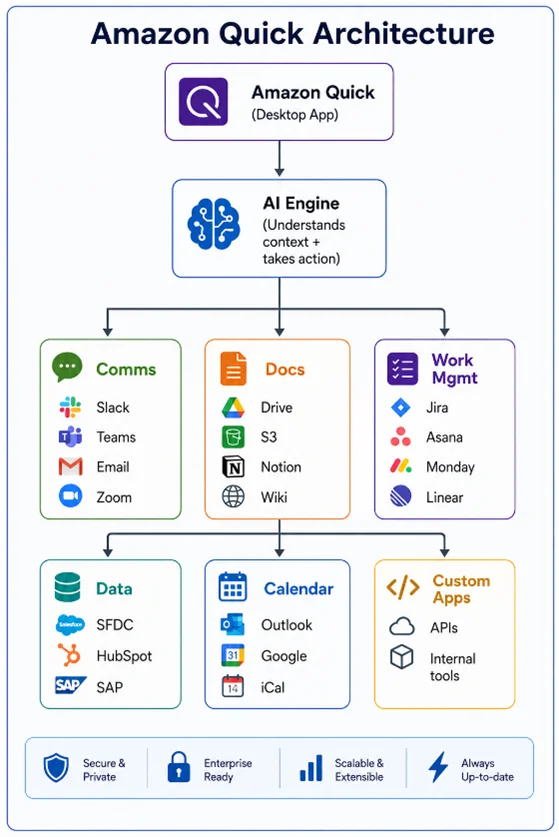
What Amazon Quick Can Do (With Real Examples)?
Cross-App Context
You ask: “What’s the status of the Henderson deal?”
Quick responds (pulling from Salesforce, Slack, and Google Drive):
“The Henderson deal is in Stage 4 (Negotiation). Last activity: Sarah shared a revised pricing proposal in the #henderson-deal Slack channel 2 days ago. The proposal document shows a 15% discount on the enterprise tier. Next step: follow-up call scheduled for Thursday at 2 PM.”
No single app could answer that question. Quick synthesized information from three sources in one response.
Action Execution
You ask: “Schedule a 30-minute prep meeting with Sarah and Mike before the Henderson call on Thursday.”
Quick does:
- Checks Sarah’s and Mike’s calendar availability
- Finds a 30-minute slot on Thursday morning
- Creates the calendar invite with context: “Prep for Henderson negotiation call”
- Attaches the pricing proposal from Drive
- Sends a Slack message to both: “Quick scheduled a prep meeting for Thursday 10 AM — Henderson deal prep”
Visual Asset Generation
New in the May 2026 release, Quick can generate visual assets directly in chat:
You ask: “Create a one-page summary slide of Q1 results using the data from our quarterly report in Drive.”
Quick generates: A formatted visual with key metrics, charts, and highlights pulled from your actual Q1 data. Not a template, a finished asset ready for your next meeting.
Pricing Plans

For teams, the Plus plan includes admin dashboards showing usage patterns, data governance controls (which apps Quick can access), and SSO integration.
Setting Up Quick for Your Team
Step 1: Install the Desktop App
Available for Windows and macOS. The desktop app runs persistently, learning your work patterns over time.
Step 2: Connect Your Apps
Quick uses OAuth-based connections. No passwords stored. Permissions are granular, you can give Quick read-only access to Salesforce but read-write to your calendar.
Step 3: Set Boundaries
Tell Quick what it can and can’t do autonomously:
- “Always ask before sending emails on my behalf”
- “You can schedule meetings without asking if they’re under 30 minutes”
- “Never access the #leadership-private Slack channel”
Step 4: Start Using It
Quick learns from your interactions. The more you use it, the better it understands your priorities, your communication style, and your workflow patterns.
Security and Data Governance
For enterprise adoption, the critical questions are:
Where does my data go?
Quick processes data within AWS’s infrastructure. Connected app data is accessed in real-time via APIs — it’s not bulk-copied or stored permanently. Conversation history is encrypted and retained per your organization’s data retention policy.
Who controls access?
IT administrators define which applications Quick can connect to at the organizational level. Individual users can further restrict themselves within those boundaries. Audit logs show every action Quick takes.
Is it compliant?
Quick inherits AWS’s compliance certifications (SOC 2, ISO 27001, HIPAA eligible). For regulated industries, data residency controls ensure processing stays within specified regions.
Quick vs. Other AI Assistants
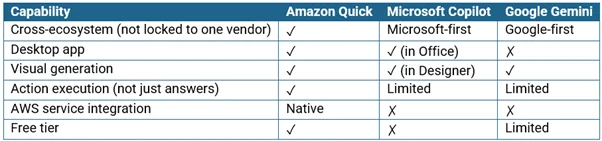
Quick’s differentiator: it’s vendor-neutral on the apps it connects to. It works with Google Workspace AND Microsoft 365. Slack AND Teams. Salesforce AND HubSpot. It doesn’t force you into one ecosystem.
The Productivity Compound Effect
Quick doesn’t save you hours on day one. It saves you minutes, 2 minutes here finding a document, 3 minutes there checking a status, 5 minutes scheduling a meeting. But those minutes compound. Users in the preview program reported saving 45-60 minutes per day after two weeks of use.
That’s not about working faster. It’s about eliminating the friction between knowing what you need to do and actually doing it.
Conclusion
Start with the free tier, connect your three most-used apps, and experience the compound productivity gains. For teams, the Plus plan’s admin controls and unlimited integrations make it enterprise-ready from day one.
Drop a query if you have any questions regarding Amazon Quick and we will get back to you quickly.
Empowering organizations to become ‘data driven’ enterprises with our Cloud experts.
- Reduced infrastructure costs
- Timely data-driven decisions
About CloudThat
FAQs
1. How is Amazon Quick different from Amazon Q?
ANS: – Amazon Q is a family of AI assistants for specific technical contexts, Q Developer for coding, Q in QuickSight for BI, and Q in Connect for customer service. Amazon Quick is for general knowledge work, it connects to your everyday business tools (email, calendar, project management, CRM) and helps with non-technical productivity tasks.
2. Can Quick access my company's internal tools and APIs?
ANS: – Yes. Quick supports custom app connections via APIs. If your internal tool has a REST API, you can configure Quick to read from and write to it. Enterprise plans include support for custom connector development.
3. What happens if Quick takes an action I didn't want?
ANS: – Every action has an undo window. Quick also learns from corrections, if you undo a scheduling action and reschedule manually, it adjusts its behavior for future similar requests. You can also set actions that always require confirmation before execution.
4. Is there a limit to how many apps I can connect?
ANS: – Free plan: 3 app connections. Plus plan: unlimited. Each connection is authenticated independently, and you can revoke access to any app at any time without affecting others.


WRITTEN BY Vignesh J
Vignesh Jagadeesan is the Head of Presales at CloudThat with 12+ years of experience driving digital transformation for Public Sector, SMB, and Enterprise customers across India and the USA. He specializes in Cloud Consulting, Data Management, MDM, Analytics, and enterprise modernization. Vignesh has led transformation engagements spanning cloud adoption, analytics, managed services, and enterprise solutioning across government, BFSI, healthcare, retail, manufacturing, and energy sectors, partnering with business stakeholders and cloud partners to deliver scalable, outcome-driven solutions.


 PREV
PREV











Comments